AI overviews now appear in 55% of Google search results, and while that has reduced overall search traffic, the users who do click through are 4x more valuable than traditional organic visitors because the AI answer has already walked them through the early research. Getting included and cited in those AI answers is now the most reliable way to preserve your search traffic and appear in front of a high-intent audience.
But Google hasn’t published a guide on how to win that kind of visibility. So, we combined insights from Google’s public docs, patents and third-party research to reverse-engineer how the system selects and cites content.
Part 1 covers what happens behind the scenes. And part 2 (this guide) turns those insights into strategies you can implement.
TL:DR
- Ground your content in your ICP’s language and workflows so it aligns with the intent signals Google uses during personalization.
- Cover the maximum fan-out queries around your core topics so your pages stay eligible for retrieval across hidden sub-queries.
- Structure every section with one idea per block, concrete details, and phrasing that can stand alone in pairwise ranking.
- Format your content in ways Google’s models can easily process – tables, steps, FAQs, recaps.
- Keep your pages fresh and crawlable with accurate schema, updated sitemaps, consistent naming, and clear entity signals across your site and external profiles.
- Measure your visibility through Peec.ai, branded queries, direct traffic, and evolving fan-out patterns so you can keep filling micro-intent gaps as they emerge.
FYI: Gemini, AI Mode, and AI Overviews Are All One System
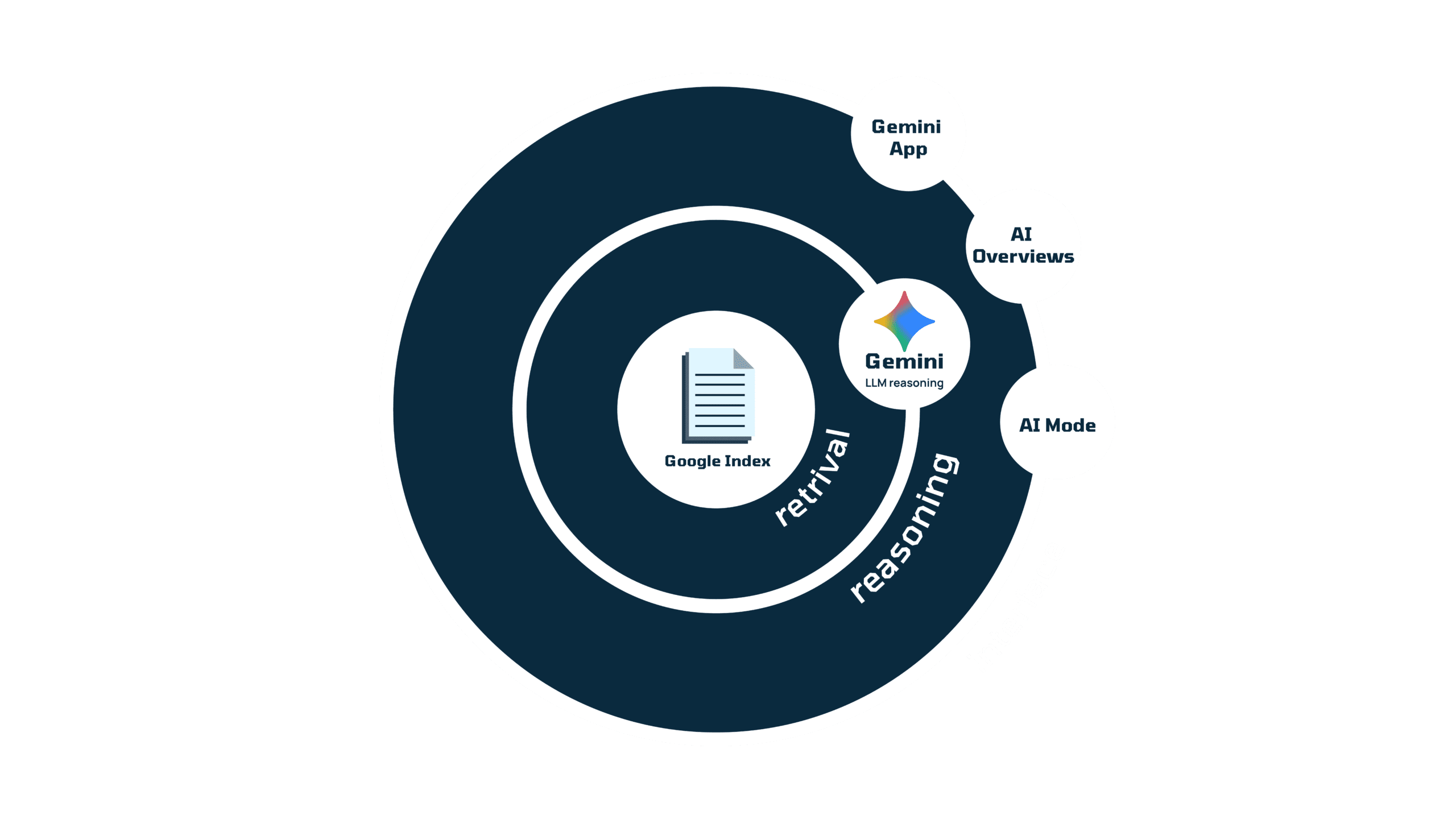
Gemini, Google’s AI Mode, and the AI Overviews shown in Search all run on the same underlying pipeline. They pull from the same index, use the same retrieval steps, and rely on the same reasoning model to decide what information to surface. The interfaces look different, but the system evaluating your content is the same across all three.
For SaaS teams, that means you don’t need three different optimization approaches. The same work — clear content, strong structure, consistent entities, and alignment with how Gemini interprets intent — increases your chances of being retrieved and cited everywhere Google’s AI shows up.
Now let’s get into the strategies.
1. Understand your ICPs and Write Content Tailored to their Intent
Google’s AI systems treat every searcher uniquely based on their “stateful context”: past queries, topics of interest, tools they use, and industries they work in. This is the first filter the system uses to judge if potential answers satisfy the intent and speaks to the positioning of the querier, not just what they’re searching for.
This is why understanding your ICPs deeply is so important. When you know their workflows, vocabulary, and decision patterns, you can tailor your content to match the context Google is using to personalize its results.
How to do it:
- Document your ICP’s real workflows. Write down the actual steps they take in their job, the tools they use together, and the friction points they face daily.
- Use the same vocabulary they use so your content maps to the signals Google associates with them.
- Shape your pages around their buying path, and show your product solving problems in your ICP’s field. Let each page reflect the awareness level behind their search –– exploration, comparison, justification, or implementation –– and make examples specific to your audience.
- Keep product messaging consistent everywhere. Use the same descriptions, entities, and claims on your website, help docs, marketplaces, and social channels so Google reads a unified story.
2. Map and Cover Fan-Out Queries
When someone enters a query, Google’s AI system expands it through query fan-out, which generates dozens of related variations to understand the user’s deeper intent. In this step, Google expands what answers it could look for based on a user’s stateful context.
These usually blend two dimensions at once: what someone is trying to evaluate (comparisons, integrations, constraints) and where they are in their journey (exploring, evaluating, narrowing down, verifying). To meet these expectations, Google looks at different types of content including product reviews, feature deep dives, comparisons, integrations, pricing filters, and compliance requirements
Your content is only retrieved if it aligns with one or more of these variations, because fan-out is what determines which pages get pulled into the custom corpus, not the original broad query the user entered (as per this Google Patent).
How to do it:
- Use Qforiato reveal the full range of fan-out variations behind your priority keywords.
- Sort the fan-out results by grouping related variations together, e.g., feature evaluations, deep-dive comparisons, integration questions, pricing filters, compliance needs, or industry-specific angles.
- Check your existing content against these content clusters to spot gaps. Your site could be missing integration walkthroughs, pricing explanations, evaluation-stage content, or compliance-framed angles.
- Optimize content for fan-out patterns. Add supporting sections, FAQs, short comparison blocks, pricing breakdowns, etc, so your content aligns with more of the expanded variants, and write headers using the wording used in fan-outs (“SOC 2 project workflow”, “pricing for small remote teams”).
3. Write Passages that Gemini Can Use and Cite in Its Answers
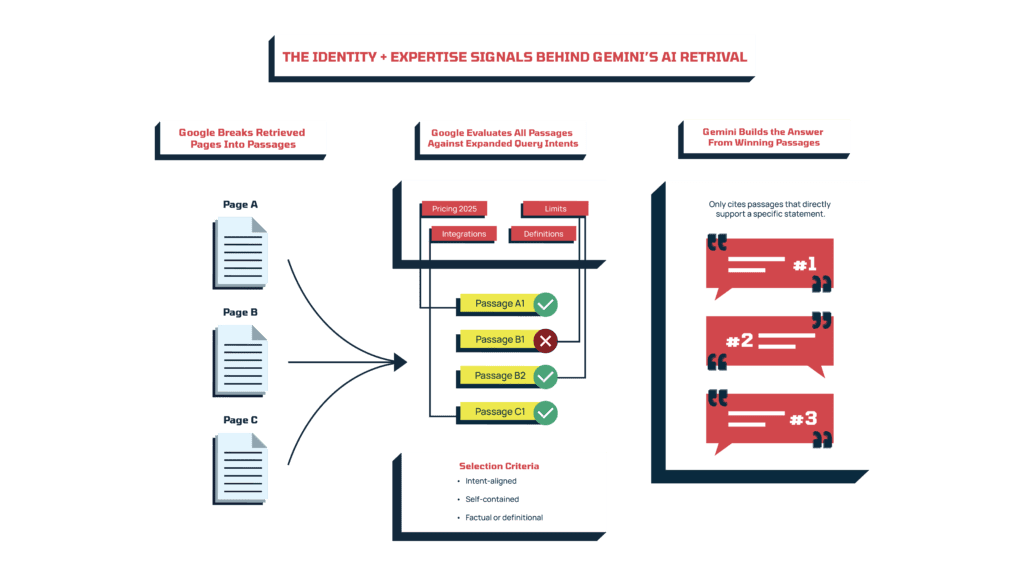
Within the custom corpus, Google evaluates all documents at a passage level by comparing each passage against other candidates to determine which one best satisfies the expanded query intent. Then the AI system uses winning passages to summarize the answer, but only cites those that directly support a statement in it.
So you need to structure each section to stand alone, answer clearly, and give Google a line it can confidently cite.
How to do it:
- Open each H2/H3 block with a clear, self-contained statement that the model can pull directly into an answer. (“Slack integration takes under 10 minutes to configure”.)
- Keep one idea per block so the model can evaluate it without needing surrounding context.
- Explain comparisons or trade-offs explicitly when relevant. Clear contrasts (e.g., better for small vs. large teams) help reasoning models evaluate usefulness in pairwise ranking.
- Use concrete details like facts, metrics, integration names, specific features, or compliance terms to strengthen a passage’s clarity.
Be seen by ai
If AI can’t see your content, neither can your audience. We help you get noticed and keep traffic flowing.
4. Use Clear Formats That Google’s AI Can Easily Process
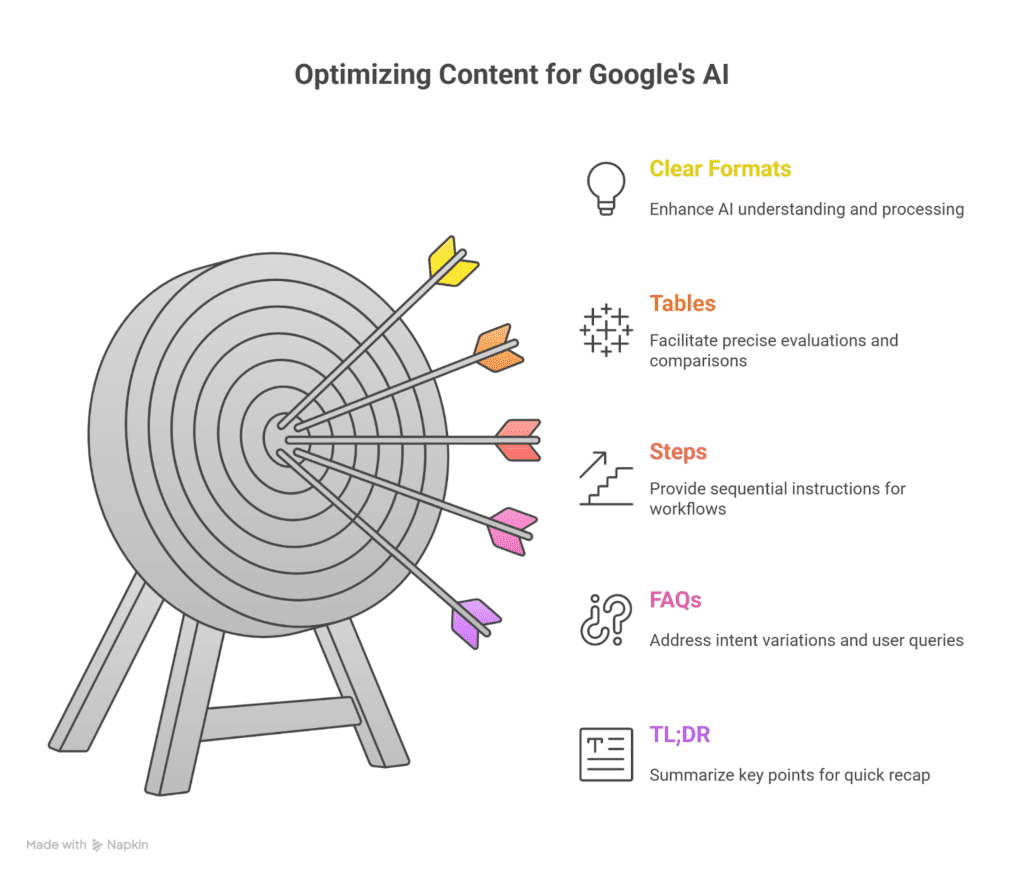
Google’s AI processes information by running it through different models that summarize, compare, extract, or validate what you’ve written. These models work best when the material is already organized into clean, predictable structures.
How to do it:
- Use tables for precise evaluations. They help comparison models pull features or plan differences without having to mine text manually.
- Use steps for workflows. Numbered instructions give extraction models an exact sequence they can reuse.
- Use FAQs to cover intent variations. They let you align with multiple fan-out angles in a controlled, high-clarity format.
- End with a TL;DR or short recap. Summarization models often use these as anchor points when building answer fragments.
5. Refresh and Publish Content Consistently to Stay Visible
In every step of retrieval and synthesis, newer or recently updated material is more likely to be pulled into the custom corpus and used in reasoning (as evident from this Google search algorithm leak last year).
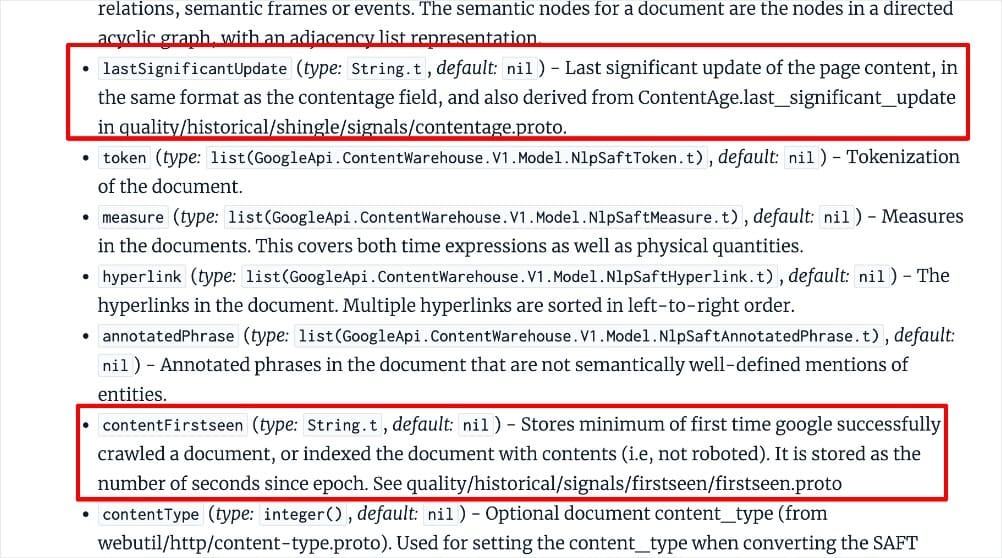
From the leaked Google Content Warehouse API: fields like [lastSignificantUpdate] and [contentFirstSeen] show that Google tracks both when a page was first indexed and when it was last meaningfully updated — reinforcing how strongly the system values freshness. Source: AIOSEO
This makes ongoing updates just as important as publishing net-new content. Even small revisions can tell Google your page is current and still actively maintained.
How to do it:
- Refresh important pages on a predictable schedule, especially anything involving features, pricing, setup steps, regulatory details, or integration changes.
- Update existing content to cover new fan-out patterns when Qforia surfaces emerging angles (new comparisons, use-cases).
- Update timestamps, titles and metadata when making meaningful edits so Google knows you have made changes. For example, after you’ve improved your existing feature explanations, updated screenshots, or added new FAQs.
6. Set Up Schema and Technical Foundations That Support AI Retrieval
For your content to appear in Gemini or AI Mode, Google first needs to be able to crawl it, understand it, and place it correctly in the index. That depends on clean technical foundations like structured data, accurate sitemaps, and unobstructed access through robots.txt.
How to do it:
- Apply JSON-LD schemaacross key templates. Use Article, FAQ, HowTo, Organization, and SoftwareApplication schema to make the structure of each page explicit and machine-readable.
- Maintain an accurate XML sitemap with <lastmod>. This helps Google recrawl updated pages quickly so fresh content can enter the retrieval pipeline sooner.
- Allow crawling in robots.txt so crawlers can reach and process your pages.
- Keep meaningful content in crawlable HTML. Avoid hiding key information behind JS/CSS scripts, tabs, or interactive components that Google may not reliably render.
- Monitor Core Web Vitals, especially INP. Since INP replaced FID in 2024, Google expects good responsiveness as a minimum quality signal for pages eligible for AI surfaces.
7. Make Your Identity and Expertise Easy for Google to Understand
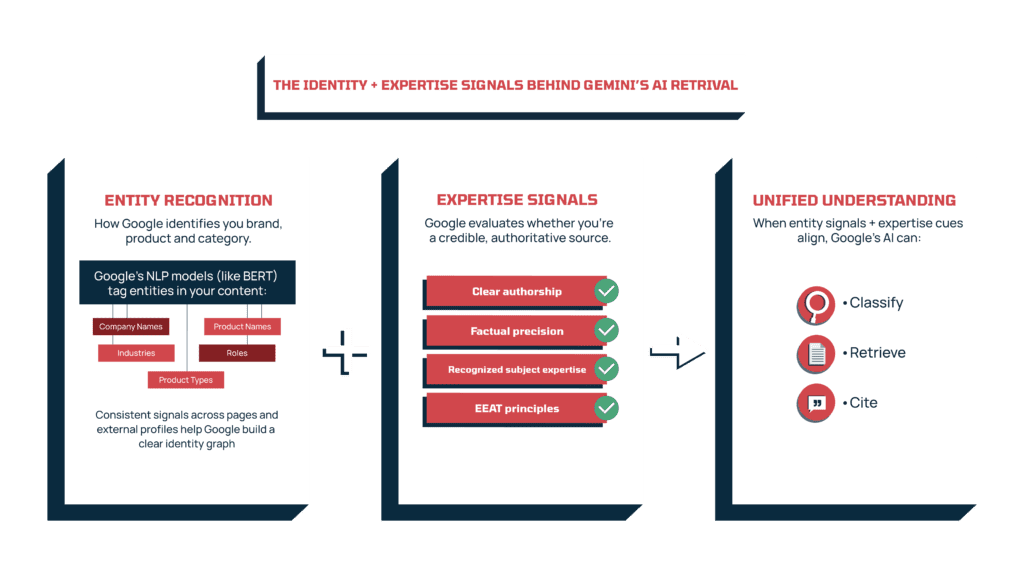
For Google’s AI to retrieve, evaluate, and cite your content, it first has to understand who you are and whether you’re a reliable source. Two parts of the system work together here:
- Entity recognition: how Google classifies your brand, product, and categories
- Expertise signals: how Google gauges whether you’re a credible source
Natural language processing models like BERT tag entities in your text – company names, product types, industries, roles – to build a picture of your identity. If those signals are inconsistent across your site and external profiles, Google struggles to match you to the right topics.
At the same time, Google’s EEAT principles influence which passages its AI system trusts. Clear authorship, factual precision, and recognized subject expertise help the system validate your content during reasoning and citation.
When your entity signals and expertise cues line up, your content becomes easier for Google’s AI to classify, retrieve, and cite.
How to do it:
- Standardize your naming everywhere. Use the same company name, product names, and category terms across your site, docs, integrations, G2, Crunchbase, and marketing assets.
- Reinforce your identity in schema. Add Organization and SoftwareApplication schema with sameAs fields linking to your authoritative profiles (LinkedIn, Crunchbase, G2, GitHub, etc.).
- Use author bylines with validated expertise, for example, use your Head of Data as the author of your analytics content.
- Run Named Entity Recognitionchecks on key pages. Use a tool like TextRazor API to see what entities Google is detecting in your content and optimize or expand where signals are thin or unclear.
- Strengthen external entity signals. Invest in digital PR for mentions in relevant industry publications or partner blogs. These contextual citations reinforce how Google categorizes you.
- Use specific, verifiable statements. Clear claims (“integrates with HubSpot and Notion,” “used by 2,500 sales teams globally,” “ISO 27001 certified”) help both entity-tagging and credibility scoring.
8. Measure and Iterate on Micro-Intents
Your visibility in Google’s AI answers shifts as fan-out patterns change, user context evolves, and Google experiments with new behaviors. On top of that, AI-driven traffic is still hard to measure because Google Search Console doesn’t reliably attribute it. So the only practical way to understand how you’re performing is to watch a mix of signals that, together, show whether your brand is appearing, how often, and with what sentiment.
How to do it:
- Track prompt-level visibility with Peec.ai. It shows whether you appear at all, where you’re cited, which sources feed the answer, how you rank against those sources, and whether sentiment is positive or neutral.
- Use regex filters to separate AI-driven visits inside Search Console. GSC groups most AI clicks into a broad “AI referral” bucket — and when referrer data is missing, those visits show up as direct. While regex won’t catch everything, it will give you a clearer picture of which pages are getting AI visibility.
- Watch branded queries and direct traffic as proxy metrics: When your branded searches climb and direct traffic rises alongside stable content efforts, it’s usually a sign you’re being shown in AI answers.
- Update your content based on what these signals tell you. For example, if Peec.ai shows you losing ground on key prompts:
- Strengthen sentiment through UGC, customer reviews, or Digital PR.
- Refresh outdated or thin pages with clearer explanations, new insights, or improved examples.
- Expand pages that competitors are outranking with missing comparisons, workflows, or specifics.
Final Thoughts: Your Best Path to Getting Mentioned in Gemini and Google AI Mode
These strategies give you the highest likelihood of being included and credited across Gemini, AI Mode, and AI Overviews. They’re all grounded in Google’s documentation, algorithm leaks, and third-party analyses of how Gemini interprets, retrieves, and cites information -– so nothing’s guesswork here.
Across everything we uncovered, a few truths stand out:
- Strong SEO is still the foundation. If Google can’t crawl, index, or interpret your content cleanly, it never enters the pipeline Gemini and AI Mode draw from.
- The index is the source of truth. AI Overviews, AI Mode, and Gemini are three interfaces reading from one system — the same data, the same signals, the same retrieval logic.
- The ranking logic is unified. Whether a user sees an AI Overview, opens AI Mode, or gets an answer inside Gemini, the evaluation process behind the scenes stays the same.
For a full “why” behind these strategies, read Part 1: How Gemini and Google AI Mode Ranks Your Content. It gives you the context that makes these tactics more logical to apply.
Be seen by ai
If AI can’t see your content, neither can your audience. We help you get noticed and keep traffic flowing.