
Getting mentioned in Claude can be easier than it is in most other LLMs. Because, unlike ChatGPT, Perplexity, or Gemini, Claude pulls its live information from a very different ecosystem, which creates a more open playing field for newer or smaller SaaS brands.
But this index is only one part of the story.
Through system-prompt research and hands-on testing, we’ve also seen consistent patterns in how Claude rewrites queries, when it decides to search, and what types of pages it selects and cites. These patterns are stable enough that you can optimize for them.
For SaaS companies, optimizing for LLMs, this guide translates our learnings into clear, practical strategies you can use to increase your chances of being pulled into Claude’s answers.
TL:DR;
- Be in Brave’s index: Claude only pulls live data from Brave, so make sure your key pages are crawlable, discoverable through Web Discovery, and submitted via Brave’s feedback form if missing.
- Match Claude’s query rewrites: Use clear, structured headings and break content into skimmable blocks that align with the sub-queries Claude generates.
- Publish content that answers high-intent, specific questions Claude can’t answer from pretraining, like pricing, limits, integrations, workflows, or compliance details.
- Keep high-value pages visibly fresh and offer details Claude cannot paraphrase, such as performance snapshots, step-by-step workflows, and region-specific constraints. Claude cannot infer this data, so these elements increase citation likelihood.
How to Get Claude to Include You In Its Answers
1. Ensure Your Site Is Indexed in Brave
Claude pulls all of its live information from Brave Search, an independent search engine that builds its own index and doesn’t rely on Google or Bing. Because Claude depends entirely on Brave, you can only appear in its answers if Brave has already indexed your website.
But Brave doesn’t offer a traditional “submit URL” tool. So, to get into its index, your site must enter through one of three paths:
- Brave users visiting your pages with the Web Discovery Project enabled,
- Submitting missing URLs through the feedback form on Brave Search, or
- Allowing Brave’s crawler to access your site (it won’t crawl anything blocked for Googlebot).
This foundation needs to be in place before any other strategy will work.

How to make sure Brave can find and index your site
- Check that your pages are crawlable. Review your robots.txt and llms.txt so important pages (docs, pricing, integrations, feature guides, changelogs) aren’t accidentally excluded.
- Use the Web Discovery Project (Brave’s main indexing route). When Brave users with Web Discovery enabled visit your site, Brave receives anonymous signals that help it discover and index those URLs.
- New sites typically register after about 20 visits from different IPs with Web Discovery enabled.
- You can replicate this internally by having teammates install Brave, enable WDP, switch IPs or devices, and visit your core URLs so Brave can detect and index them. Share core URLs in dev, privacy, and OSS communities where Brave usage is high.
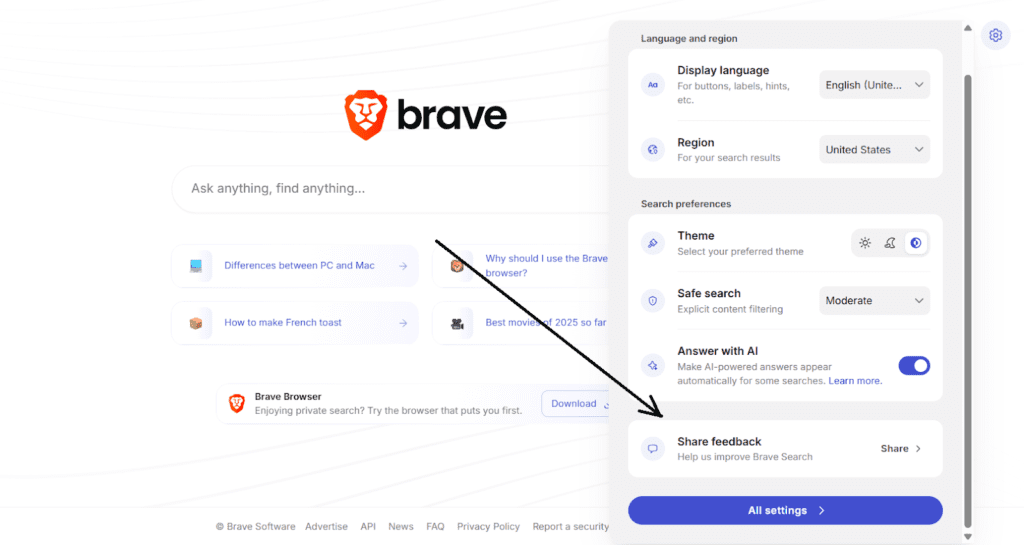
- Submit missing URLs manually. If key pages don’t appear when you search for them on Brave, use the “Feedback” link to suggest those URLs. Brave uses this input to add new pages to its index.
2. Structure Content for Query Rewrites
Claude breaks user queries into cleaner, more targeted versions so it can search the web in smaller, more precise steps. You’ll sometimes see this in the interface when it tells you what it’s about to search for, but most of the rewriting happens internally.
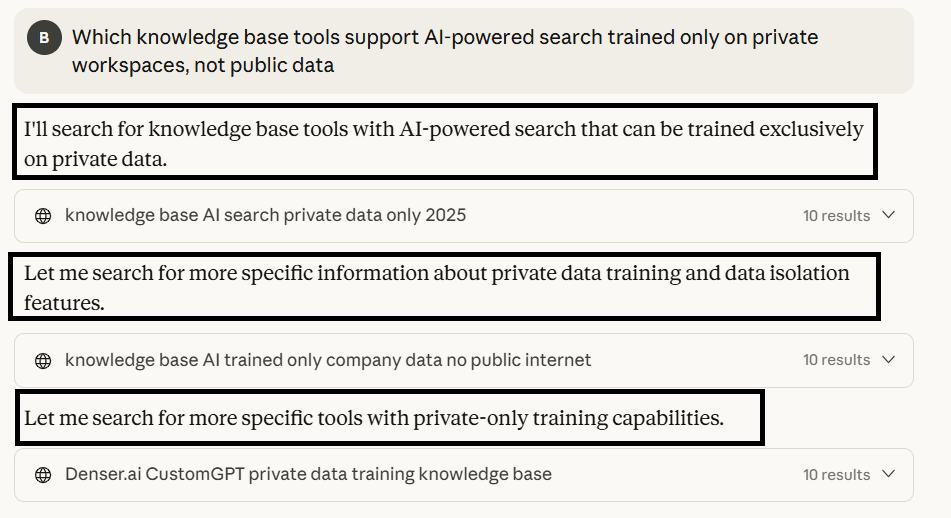
Claude reformulates the original query into narrower sub-searches, each targeting a specific piece of the intent so it can fetch deeper, more precise information.
When a query has multiple constraints – price, region, features, integrations, year – Claude rewrites each part and runs several searches. That means it’s not just looking for “good content”; it’s looking for pages whose headings and sections mirror these rewritten fragments. So if your content isn’t structured to show that it addresses the query’s constraints clearly, Claude may not be able to find and retrieve information from it.
How to structure content so Claude can match and pull from it:
- Use clear, predictable H1s/H2s that map to rewrite patterns. Claude often reformulates into phrases like: “pricing 2025,” “storage limits,” “video library features,” “[Tool] vs [Tool] comparison. Make these headings explicit so Claude can align its sub-searches with your content.
- Break pages into extractable blocks. Use tables, matrices, bullets, step-by-step sections, and short FAQ sections.
- Publish focused comparison/alternative pages with clear trade-offs. Show where your product fits, where it differs, and where another tool may be better. Be sure to use details like price, storage and other data that Claude will need to search for to reference accurately. Claude matches these to sub-intents.
- Create dedicated feature pages. Examples include, “Video Library Support,” “SSO Settings,” “API Rate Limits.” These give Claude a direct landing point for rewritten queries.
3. Focus on High-Intent Queries That Claude Can’t Answer Internally
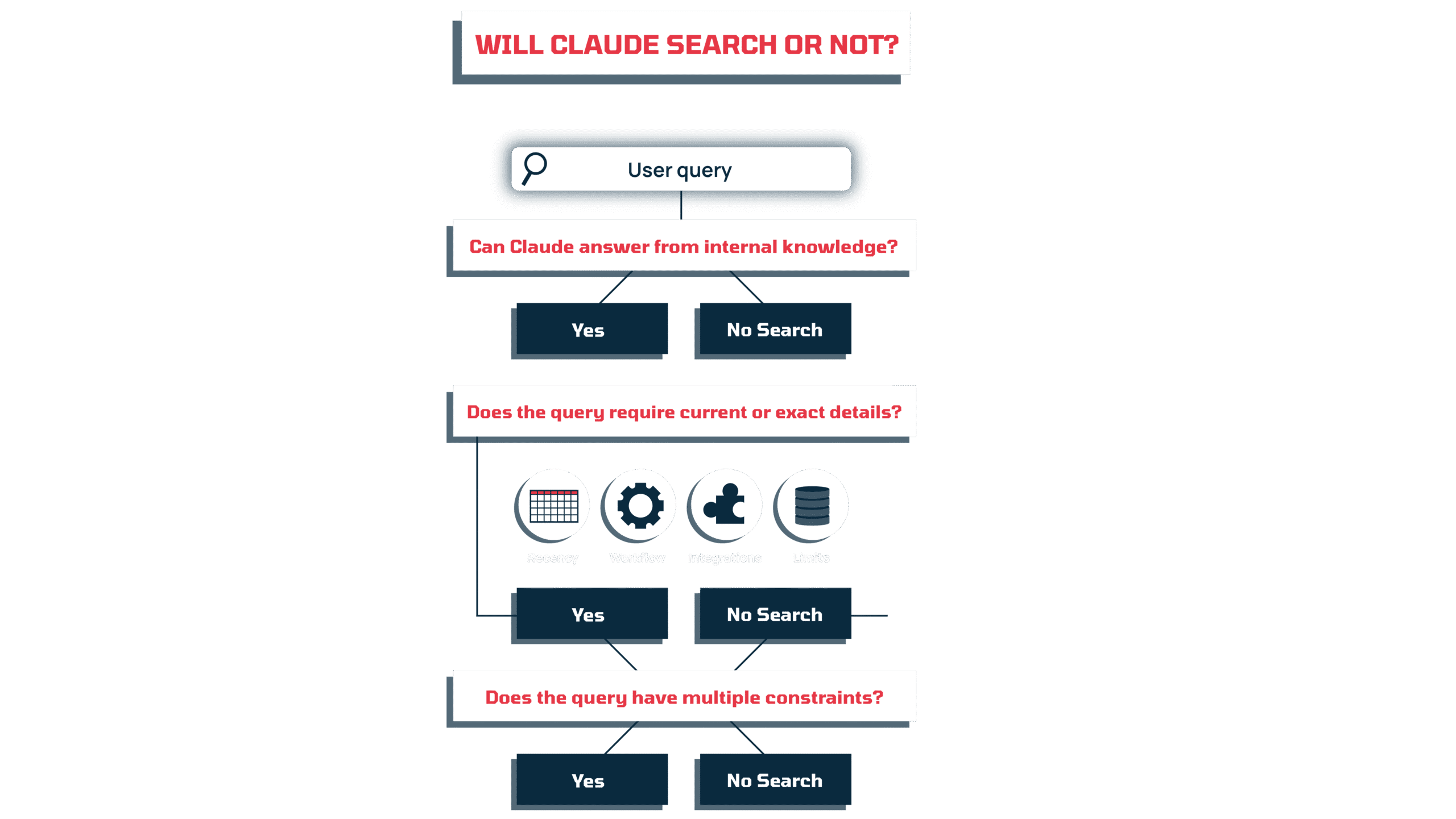
Claude only goes to the web when its internal knowledge isn’t enough. That means it ignores broad, evergreen topics (“what is SaaS,” “benefits of X”) and saves its search calls for queries that require current, specific, or product-level detail –- exactly the kind of information a SaaS company updates frequently.
Both single_search and research mode activate when Claude needs something it cannot infer from pretraining, like:
- up-to-date pricing
- integration requirements and compatibility
- feature limits, thresholds, or compliance updates
- workflow steps or how-to instructions tied to a specific product
- year-specific changes, releases, or announcements (e.g. 2026 funding memo)
That means your goal is to publish content that makes these details explicit and easy for Claude to pull, and that answers questions people are searching for.
To understand what questions to focus on, first use your internal resources. Start with customer + support conversations. Look for recurring “How do I…?”, “Does your product support…?”, or “What’s the limit on…?” questions.
Then, pull constraint-based questions from sales.: “Can we do X under Y budget?”, “Does this work for teams of Z size?”, “Can we automate this without using another tool?”
As you compile ideas internally, also monitor competitor shifts and category changes. When competitors increase pricing, change limits, introduce new constraints, or add/remove integrations, users may start to search for updated tool comparisons (eg, HR SaaS for 2026) or look for alternatives if their current software suddenly increases the price (eg, “Cheaper alternative to X).
Once you have an idea of the queries you need to address, write content that answers it directly:
- Include the exact information a user would need to complete the task or decision. Spell out limits, dependencies, steps, edge cases, and conditions. This is the type of detail Claude cannot infer from its model.
- Use precise descriptions. Say “Allows up to 50GB per workspace with role-based access for guests” instead of “Flexible storage with advanced permissions.”
- Write pages that answer one specific scenario, e.g., “Set Up Slack Notifications for Multi-Workspace Accounts (2025)”. Scenario-based content generally maps cleanly to Claude’s rewritten sub-queries.
Is Claude Seeing your content yet?
Your content deserves attention. Let’s make sure Claude actually sees it and your SaaS brand gets the recognition it deserves.
4. Refresh High-Value Pages Quarterly
Claude leans hard on recency when choosing what to surface.
In testing, we saw it rewrite queries, even simple ones, with a built-in year marker (“2025”), and the Brave results it returns almost always come from pages that make their freshness obvious in titles or headings.
This happens whether the querier signals recency (“most up-to-date,” “2025”) or not.
Once Claude decides a search is required, it still reformulates the query with a time marker and pulls pages that clearly match that signal. SaaS content that doesn’t present itself as current gets pushed down. The main exception we saw to this was…
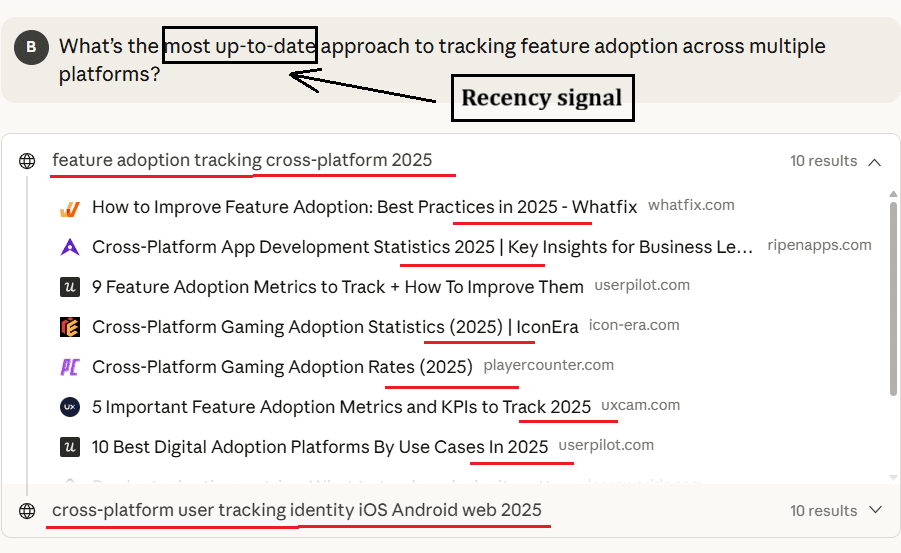
Claude sees “most up-to-date” as a recency cue and rewrites the query with “2025”. The results it returns are all clearly timestamped, showing how strongly Claude prefers fresh pages when the user signals time sensitivity.
On the other hand,
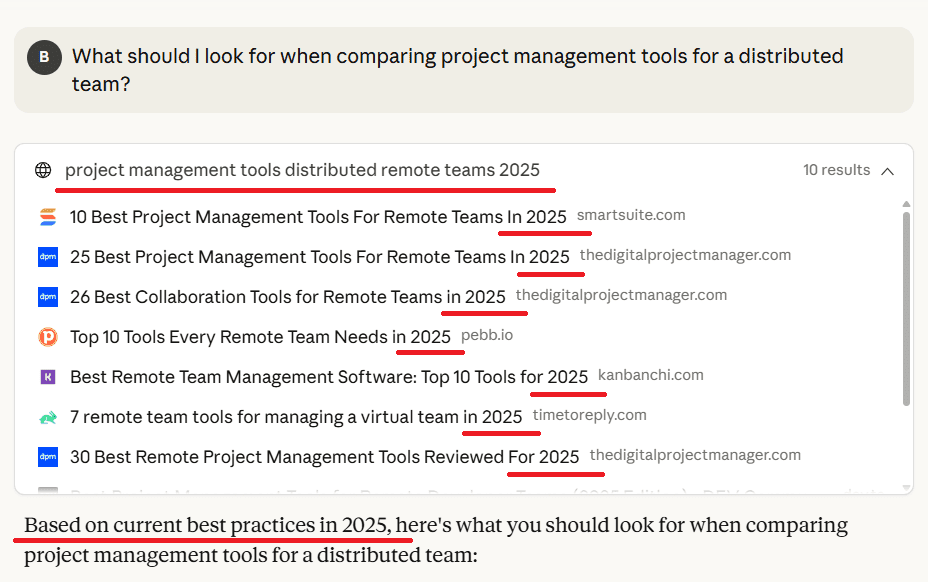
Even without a date in the query, Claude still adds “2025” during rewriting once it decides a web search is needed. The returned results are again year-stamped, confirming that recency is a built-in retrieval preference – not just a user-driven one.
The exception: Claude almost always prefers fresh content, but if a query is so specific that the best-matched pages on Brave aren’t very recent, it will still pull them. In those instances, relevance outweighs recency (and right now, we can’t see exactly how Claude scores relevance).
But overall, the goal is to ensure your pages are current, so they consistently enter Claude’s candidate pool.
How to signal recency to Claude:
- Make meaningful updates to existing content. Add new limits, revised steps, updated screenshots, or clarified use cases.
- Update your titles and H2s when the year changes. Claude’s query rewrites often include the year; your headings should match the pattern.
- Include freshness markers and maintain technical signals. Add visible on-page timestamps (“Updated January 2025”), and keep your Last-Modified header, sitemap <lastmod> values, and structured data timestamps updated so crawlers and LLMs can detect that the page is fresh.
- Remove outdated claims quickly. Old pricing, deprecated features, and retired integrations reduce both query alignment and recency value.
5. Offer Content Claude Can’t Paraphrase
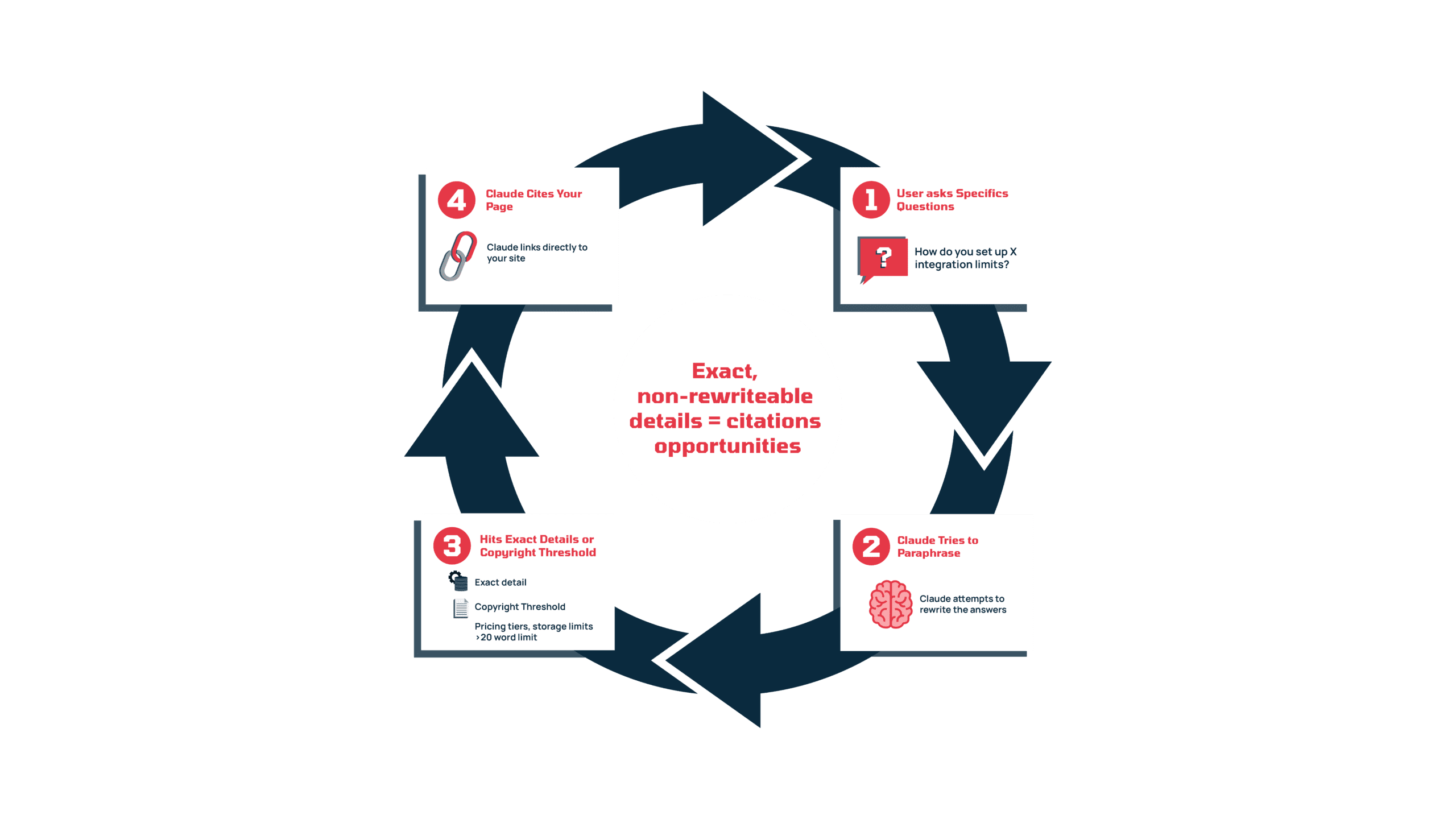
Claude only cites when it can’t rely on its model or safely paraphrase a detail. Complex queries make this show up more often because they require exact values, limits, or steps that Claude can’t recreate on its own. When your content contains these specifics, Claude has no choice but to pull from it and link.
Two conditions tend to trigger citations:
- The detail cannot be paraphrased without losing accuracy – pricing tiers, storage limits, permission rules, configuration steps, integration workflows, compliance constraints, or original numbers.
- The explanation cannot be rewritten inside copyright limits – if summarising would exceed the ~20-word boundary, Claude cites instead.
So give Claude details that it can’t rewrite, and make sure those details genuinely help users once they land on your page, so those who click through the citation find what they need on your site and genuinely consider your product.
How to create content Claude can’t paraphrase:
- Add exact, non-negotiable details. Pricing matrices, usage limits, API prerequisites, permission rules, version notes, audit logging capabilities, etc.
- Publish workflow and integration guides. Step-by-step instructions for real use cases (e.g., “Sync [your SaaS to ClickUp Tasks (2025)”).
- Build lightweight, non-paraphrasable assets. ROI calculators, capacity calculators, onboarding checklists, comparison tables, automation templates, and troubleshooting flowcharts.
- Create data-led content. Original benchmarks, industry snapshots, churn insights, performance studies, or usage data from your product – Claude cannot infer these numbers.
- Produce niche or region-specific pages. Compliance notes, localisation differences, and constraints that don’t exist in general SaaS documentation.
Final Thoughts: How to Get Mentioned In Claude
Everything we covered in this guide shows that Claude consistently looks for fresh, specific, well-structured information that it can’t infer from its training data. When your content meets those expectations, you put yourself in the path of the queries where Claude has to search and has to cite.
If you want the deeper logic behind this – how Claude rewrites queries, how its search modes work, and what actually creates citation potential – Part 1: How Claude Ranks Your Content is worth reading. Together, both parts give you the full picture: why Claude pulls certain pages, and how to structure your content so yours becomes one of them.
Is Claude Seeing your content yet?
Your content deserves attention. Let’s make sure Claude actually sees it and your SaaS brand gets the recognition it deserves.