Claude works differently from all other LLMs: its search system doesn’t rely on Bing or Google; it evaluates information with its own logic, and it cites sources only when the content genuinely fills a gap in its knowledge.
We know this because we spent time breaking down how Claude rewrites and interprets queries, how it decides when to search, and how it chooses which pages deserve a link. This guide walks you through what we found happening in the backend, so you can understand how a brand’s content gets surfaced in Claude’s answers
In Part 2, we will turn these learnings into practical strategies you can use to reach Claude’s fast-growing user baseof developers, engineers, analysts, researchers, and writers across the U.S. who use Claude to solve real problems in their workflows, not for casual browsing.
TL:DR
- Claude pulls fresh information from Brave Search, so to appear in Claude, your site must be indexed in Brave and accessible to its crawler.
- Claude only searches when its internal knowledge is incomplete; these moments create all citation opportunities.
- Complex or time-sensitive queries (pricing, integrations, constraints, new features) offer the highest visibility potential for SaaS.
- Claude selects pages based on query alignment, knowledge gaps, and recency – not domain strength or brand size.
- It cites when details can’t be paraphrased safely, especially updated pricing, feature limits, integrations, benchmarks, or original data.
Where Does Claude Get Its Info?
Claude relies on two sources when answering questions:
- It’s pre-2024 training data, and
- Live results from Brave Search when it needs current or more specific information. Brave is an independent search engine that doesn’t lean on large publishers or high-DA sites, unlike traditional search engines.
Because Claude pulls directly from Brave, your content must be present in Brave’s index before it can ever appear in a Claude citation.
Brave builds its index in two ways. The first is through the Web Discovery Project, where Brave users who opt in share anonymous signals about the pages they visit, helping Brave identify and learn about new URLs.
The second is through Brave’s crawler. It doesn’t use a distinct user agent, but Brave notes that if a page is not crawlable by Googlebot, their crawler will not crawl it either. If a site’s URL is still missing, users can also submit it through the feedback option on Brave Search.
Brave’s reduced bias on domain authority means smaller or newer SaaS products can surface more easily, as long as their site is technically accessible. So keep your important pages crawlable, and review your robots.txt/ llm.txt files to ensure you have not accidentally hidden key documentation and product information from AI crawlers.
How Claude’s Search Models Works
The Claude system prompt leak from May 2025 shows that Claude follows a strict decision process before it runs any web search.
In short, Clause only turns to the web when it identifies a gap in its own pretraining, especially when the query involves recent information, specific details, or multi-step reasoning.
The modes Claude uses to determine whether it searches the web at all, how many times it searches, and whether a citation can appear are:
1. Never_search
- Claude uses this mode for facts that are stable and widely known.
- It answers entirely from its internal training data and does not look at the web.
- This mode produces no citations because no external search is triggered.
2. Do_not_search_but_offer
- Claude can answer the question from its model, but recognizes that newer data might exist.
- It gives the main answer first, then offers to search if the user wants an update.
- Even in this mode, Claude still avoids web search by default, so citations do not appear in the primary response.
3. Single_search
- Claude uses this mode when it detects a simple factual gap that requires one quick check.
- It performs one search call, pulls a current source from Brave, and answers.
- This is the first mode where inline citations can appear.
4. Research
- Claude uses this mode for complex, multi-part queries that require more than one search.
- These are usually comparisons, product evaluations, or tasks that need multiple sources.
- Claude runs multiple tool calls (often between 2–20), gathers information, and builds a structured response that may include several citations.One top-centered node labeled User Query.
Want to get mentioned in Claude?
Of course you do! Our clients get their content in Claude LLMs like ChatGPT and Gemini. If you’re serious about promoting your business in LLMs we’d love to help.
How Claude Handles Queries
Claude’s four search modes activate depending on the type of query it receives.
1. Fully Known Queries
These are queries where Claude is confident it already knows the answer, and the answer hasn’t changed since its training data.
Examples:
- “What is a content calendar?”
- “Benefits of project management software.”
- “What is Kanban?”
These map to the never_search and do_not_search_but_offer modes. Claude answers from its model and does not call Brave.
2. Recency-Dependent Queries
Some simple queries include a recency signal that pushes Claude to check current information. If a query contains phrases like “2026,” “latest,” “updated,” “this year,” or “newest,” Claude knows its training data may be stale and triggers single_search.
Examples:
- “Best content automation tools in 2026.”
- “Latest CRM tools for small businesses.”
- “Notion pricing 2026.”
These queries are not complex in structure, but they ask for information that changes frequently. That alone forces Claude to search.
3. Specific-Detail Queries
In these queries, Claude understands what the question is asking but lacks the exact details. It needs to confirm product-level capabilities, integration requirements, compliance constraints, or workflow steps. These almost always push Claude into single_search.
Examples:
- “Does ClickUp support SSO for guest users?”
- “Which knowledge base tools allow AI search restricted to private workspaces?”
- “How does [Your SaaS] connect to BigQuery?”
These answers depend on product documentation, support pages, or recent updates – information Claude cannot rely on from training.
4. Multi-Step or Constraint-Heavy Queries
These are the queries that require Claude to pull information from multiple sources and verify different constraints. They activate research mode, which involves several search calls.
Examples:
- “Best workspace tools under $15/user for European teams with video library support.”
- “How to sync Jira issue statuses with ClickUp dashboards in 2025 without using Zapier”
- “Notion vs Coda vs [Your SaaS] 2025 pricing and features.”
- “GDPR-compliant file sharing tools with time-limited links and audit logs.”
For these queries, Claude may:
- identify relevant tools,
- check multiple pricing pages,
- verify specific capability requirements,
- and search again once it determines which products warrant deeper inspection.
This step-by-step behavior is visible in real examples, as we can see from how Claude rewrites queries to pull answers.
| Query Type | What Claude Detects | Search Mode Triggered | When This Happens |
| Fully Known Queriese.g., “What is a content calendar?”, “What is Kanban?” | The answer is stable and already known | No search (model-only response) | Definitions or concepts that haven’t changed since training |
| Recency-Dependent Queriese.g., “Best content automation tools in 2026”, “Notion pricing 2026” | A time or freshness signal that may invalidate training data | Single search | Simple questions where the information changes frequently |
| Specific-Detail Queriese.g., “Does ClickUp support SSO for guest users?”, “How does [Your SaaS] connect to BigQuery?” | Missing or uncertain product-level details | Single search | Feature checks, integrations, permissions, or setup questions |
| Multi-Step / Constraint-Heavy Queriese.g., “Best tools under $15/user for EU teams”, “Notion vs Coda vs [Your SaaS] 2025” | Multiple constraints that require validation across sources | Research mode (multiple searches) | Comparisons, compliance checks, pricing filters, or workflow logic |
How Claude Rewrites Queries
Claude’s search workflow rarely uses the raw user query. Even when you don’t see multiple rewrites in the interface, BrightEdge’s research confirms that Claude reformulates queries behind the scenes to isolate intent, introduce constraints, and map the question to web content more effectively.
You can also see this behavior in how Claude narrates its process in the interface — phrases like “I’ll search for…” and “Let me search more specifically…” signal that it has already reinterpreted the query and is preparing a more structured sub-search.
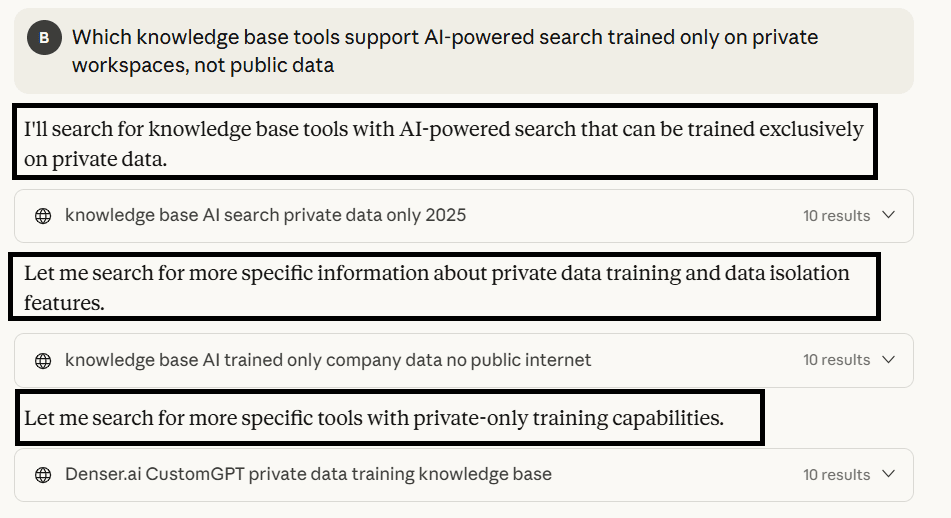
Claude is rewriting one query into several, more focused sub-queries. It starts broad, then runs increasingly specific searches to isolate the exact requirement before pulling results from Brave.
From our experiments, we’ve found that this process generally follows three stages:
1. First Pass: Run a broad, general search
Claude starts with a simplified version of the query to gather a landscape of relevant pages. This first pass is designed to answer:
- What are the main entities involved?
- What tools or concepts consistently appear?
- Which pages seem to map to the user’s intent?
For example, when we prompted with “best team workspace tools under $15 per user per month for small teams in Europe that support video libraries”, it first reformulated the query into: “team workspace tools video library management under $15 2025.”
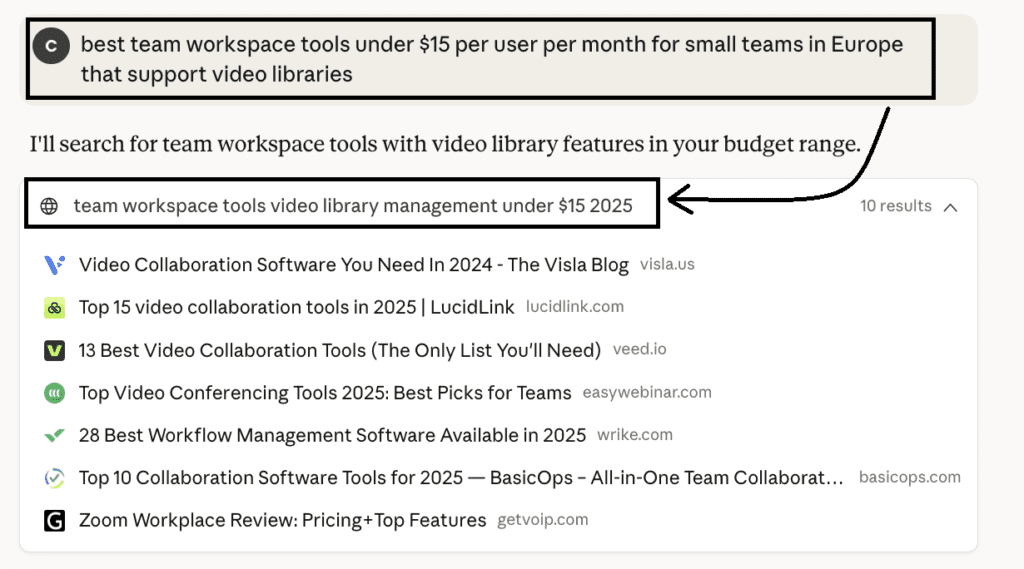
This returns general “best tools” lists, product reviews, and category pages, which are enough for Claude to begin identifying candidates.
Similarly, Claude simplified an informational intent query, “How to sync Jira issue statuses with ClickUp dashboards in 2025 without using Zapier,” into “Jira ClickUp integration sync 2025” in the first pass.
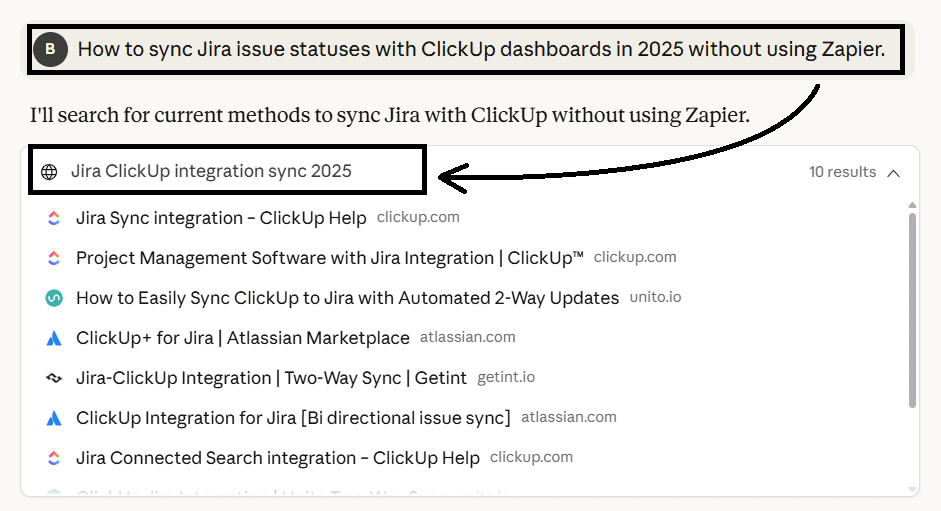
This returned integration guides, ecosystem pages, marketplace listings, and troubleshooting posts, which build Claude’s understanding of the main concepts and the ecosystem around them.
2. Identify Candidates: Infer likely solutions from the broad results
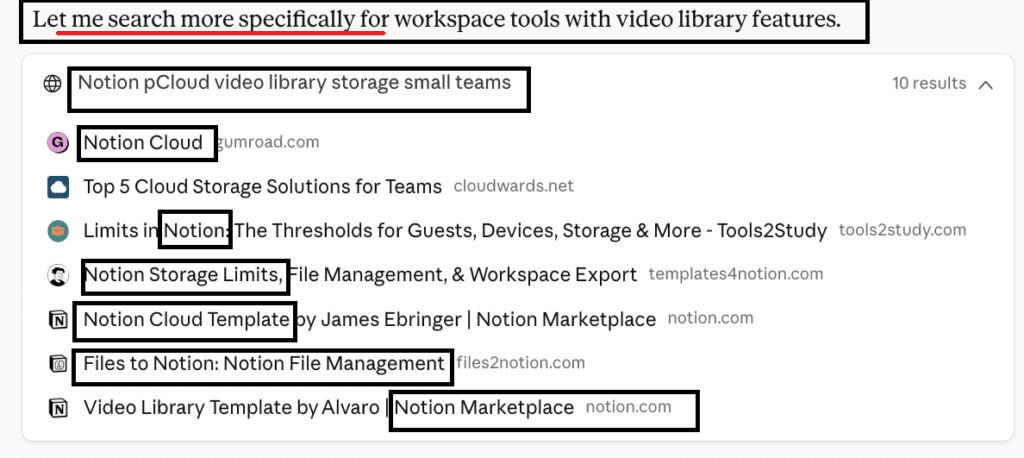
Once Claude spots recurring patterns or entities, it starts narrowing its search. This is when it begins running more specific rewritten versions of the query, based on the intent.
For commercial queries: Once a product becomes a viable match (e.g. Notion), Claude begins running searches and fetching URLs specifically tied to that product’s capabilities, limits, and documentation. So the returned results show pages that address Notion’s storage limits, file handling, documentation, and community templates:
For informational queries: The second phase search targets specifics like integration docs, automation guides, feature explanation pages, community Q&A, API-level notes, etc.
In our example, it looks at pages that handle troubleshooting, sync setups, automation and workflows. This helps Claude understand how this integration works and which pages explain the missing details to synthesize its final answer.
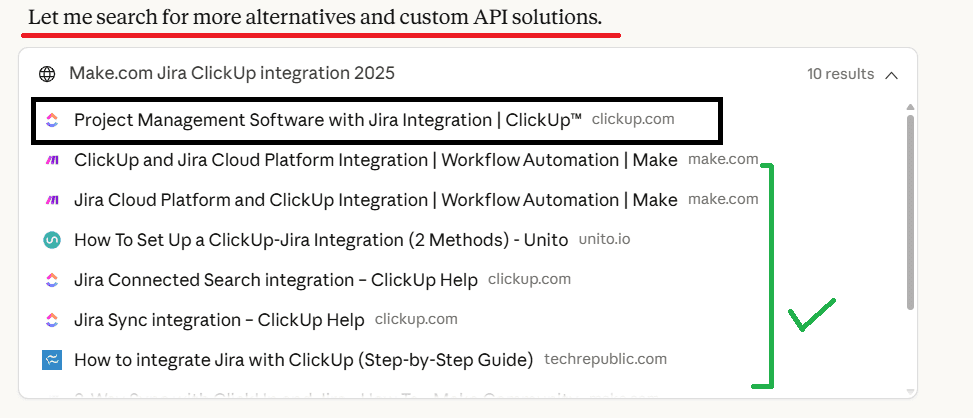
This tells us that Claude can only surface your SaaS if your content mirrors the way it rewrites and breaks down the queries.
How Claude Ranks and Cites Content
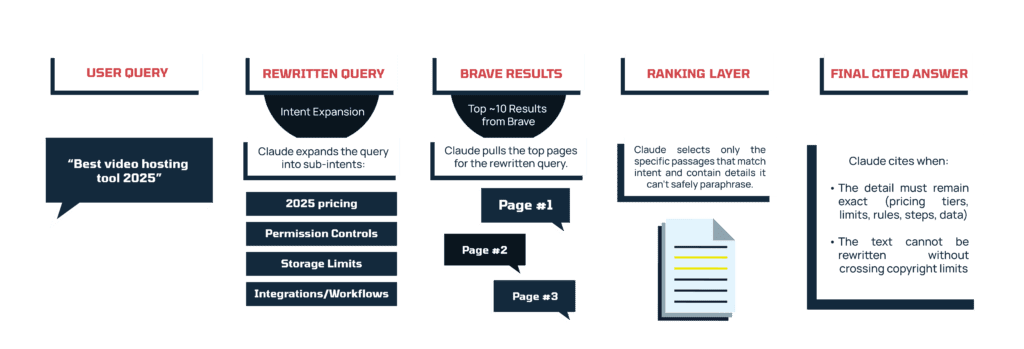
Claude begins by pulling the top ~10 results from Brave for its rewritten version of the user’s query. From there, it evaluates each page on three core signals:
1. Query alignment: whether the page matches the sub-intents Claude generated during rewriting. Clear headings such as “Video library support,” “Pricing 2025,” “Guest permissions,” “Storage limits” make this alignment easier.
2. Knowledge gap: whether the page contains information Claude cannot rely on its model for. This includes pricing, features, and integration updates, compliance notes, workflow details, or original metrics.
3. Recency: whether the content is clearly up to date. When a query includes a time signal (“2025,” “latest,” “this year,” “new release”), Claude prioritizes pages that make their freshness explicit and filters out pages with outdated pricing or obsolete feature descriptions.
Once Claude identifies pages that satisfy these conditions, it decides whether to cite them. It paraphrases whenever it can, but two situations trigger citations:
- When the information can’t be paraphrased without losing accuracy – for example, exact pricing tiers, storage limits, permission rules, step-by-step integration instructions, or original data points. These details must be preserved as-is, so Claude links to the source.
- When the explanation cannot be rewritten within copyright limits – Claude avoids reproducing more than ~20 consecutive words from any page, so if the required explanation is too specific to restate cleanly, it cites instead.
And complex queries are where citations most often happen, because Claude needs specific details it can’t recreate from its model. So your content has to supply the kind of information that satisfies the two citation triggers above. Structuring your pages around these specifics gives Claude something it can cite when a complex query sends it to the web.
To make your content citation-ready, include elements such as:
- updated pricing tables, feature matrices, or version notes
- technical limits, thresholds, or compliance specifics
- workflow or integration guides tied to a narrow use case
- calculators, planners, or interactive tools
- region-specific information or niche user scenarios
- original benchmarks, studies, or case study numbers
Final Thoughts
These insights give you a clear foundation for understanding how Claude discovers, interprets, and evaluates information. Once you see how it rewrites queries, identifies what it doesn’t know, and chooses which pages to cite, you can start building content that fits naturally into the way Claude works.
Part 2 walks you through the steps you need to take to turn this understanding into a repeatable content-creation process and position your pages as strong citation candidates.
Want to get mentioned in Claude?
Of course you do! Our clients get their content in Claude LLMs like ChatGPT and Gemini. If you’re serious about promoting your business in LLMs we’d love to help.