
In Part 1 of this guide – What is Query Fan-Out & How to Extract Fan-outs for your Brand’s Targeted Prompts, we explained what query fan-out is, how it changes the way AI systems retrieve information, and how to extract fan-outs for the prompts that matter to your business.
In this part, we focus on how to use that data. Once you have extracted and prioritized relevant fan-outs, the next step is to structure and expand your content so it clearly satisfies the underlying intent behind each prompt. When those layers are addressed explicitly, your pages become far easier for AI systems to retrieve, evaluate, and cite when generating answers.
TL:DR
- Query Fan-Out is a process by which AI systems break a prompt into multiple backend queries, retrieve sources for each, and synthesize the final answer from those pieces.
- Optimize for intent layers, not just keywords, so content headings and sections clearly address fan-out logic.
- Write sections that stand alone as answers, clearly explaining their respective topic so AI systems and readers can understand them quickly.
- Use formats that AI can easily extract, like tables, comparison blocks, lists, and FAQs.
- Regularly update your evergreen content and signal recency with updated comparisons, revised tables, and current-year references.
- Publish comparison and alternatives pages and maintain strong profiles on review platforms like G2, Capterra, and GetApp.
Recap: What’s Query Fan-Out and Why It Matters for AI Search
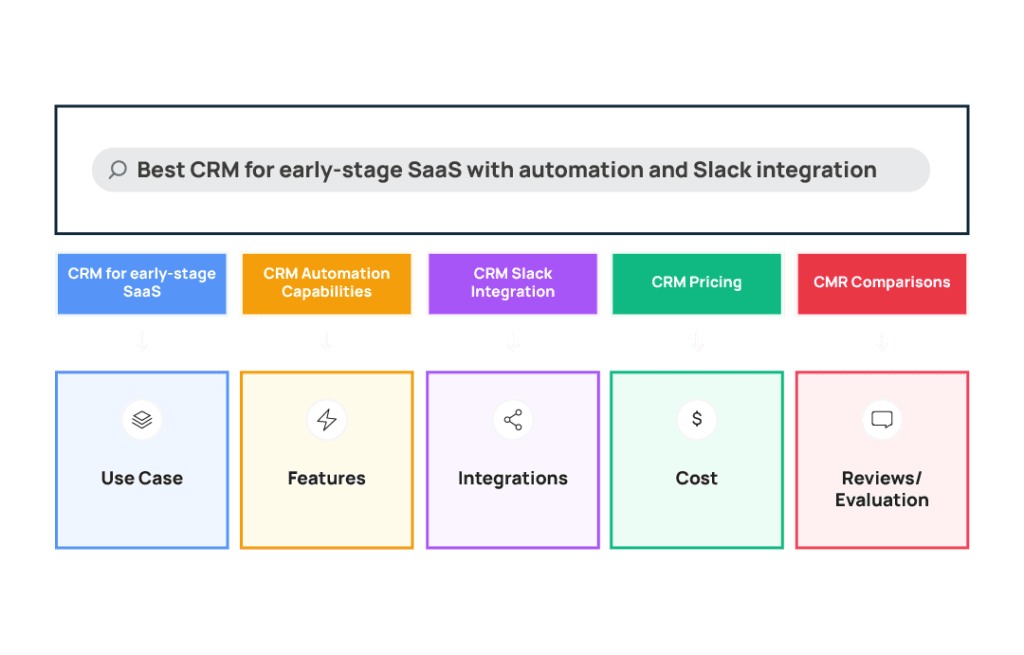
Query fan out is when a user asks an AI system something like “Best CRM for early-stage SaaS with automation and Slack integration,” and the system breaks that prompt into multiple underlying queries. In this case, those could include:
- CRM for early-stage SaaS
- CRM automation capabilities
- CRM Slack integration
- CRM pricing tiers
- CRM comparisons
Then, the LLM retrieves pages for each of those topics and synthesizes the information it retrieves into a final answer.
This means visibility in AI answers depends on whether your content clearly addresses those decision layers – use case, features, integrations, pricing, comparisons – not just a single keyword or prompt.
How to Optimize Your Content to Appear in AI Answers Using Query Fan-Out
Once you’ve extracted fan-outs for your priority prompts, the next step is adapting your content to address those fan-outs.
The goal here is not to “add more keywords” or create a ton of overlapping content that addresses every possible fan-out variation.
Instead, you need to strengthen and align your existing content with the fan-outs first, and only expand it where there are meaningful gaps in how you address sub-queries.
The steps below focus on how to update existing pages and create new content so that your site more clearly covers the decision layers AI systems retrieve when generating answers. Doing this increases the likelihood that your content is surfaced, cited, or used as a source in AI-generated responses.
Step 1: Structure Your Pages Around Intent Layers
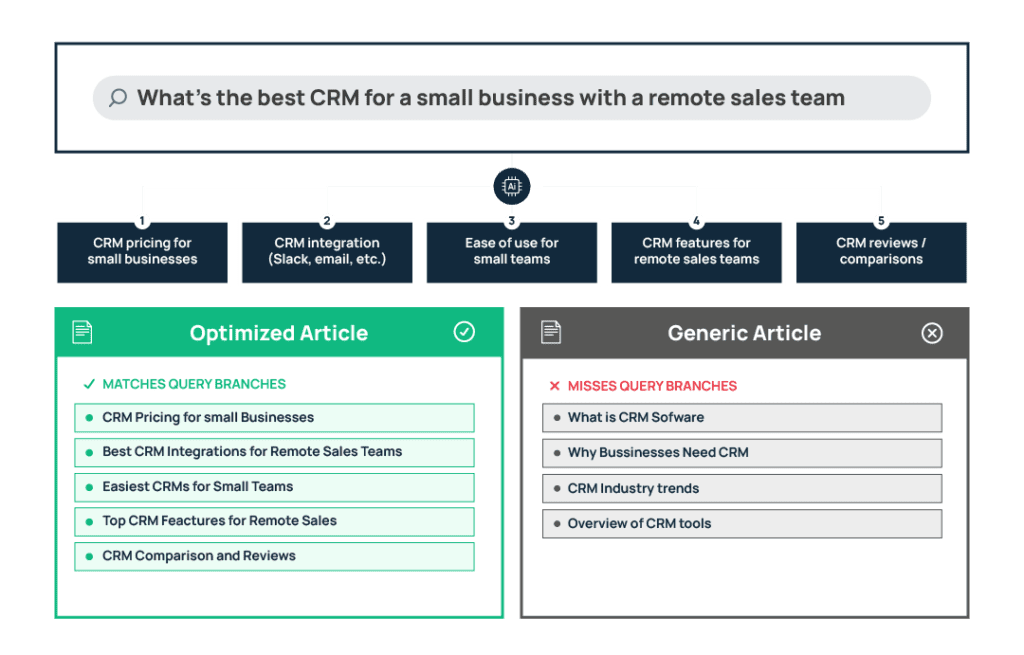
Use clear H2 and H3 headings that describe the specific information each section of the page provides. This structure helps readers quickly navigate to the information they need. It also helps AI systems understand which parts of the page address specific questions or decision points, making it easier for them to retrieve relevant sections when generating answers.
For example, if you have a page targeting a query “CRM for Startups,” the headings should clearly address the factors a startup team evaluates, such as pricing, scalability, integrations, automation, and ease of setup. This means that an LLM will be more likely to show someone your page who’s using the prompt ‘best CRM for early-stage SaaS with automation and Slack integration’.
Your content could be structured around the decision layers behind the prompt, like this:
H2: CRM for Early-Stage SaaS Teams
H2: Pricing Under $50: What You Actually Get
H2: Slack Integration: Capabilities and Limitations
H2: Automation Features for Small Teams
H2: Comparison With Alternative Startup CRMs
Use H3 Headings to Break Down Key Sections
Within each major section, use H3 headings to organize the specific details users may be looking for. These subheadings make it clearer what information is contained in each part of the page and allow both readers and AI systems to quickly identify the most relevant passage.
For example, the Automation Features section might look like this:
H2: Automation Features for Small Teams
H3: Nurture Prospects with Customized Email Drips
H3: Smart Scheduling for Every Sales Rep
H3: Run Automated Reports with Custom Metrics
In this structure, each heading and subheading corresponds to a factor someone may evaluate when choosing a CRM, making it easier for AI systems to match sections of the page to different fan-out queries.
Step 2: Make Each Section Clear, Complete, and Self-Contained
With the right headings in place, the next step is to ensure that the content within each section clearly explains the topic it represents without making readers hunt for context elsewhere.
This clarity benefits both AI systems and your target audience.
When the information in a section is complete and easy to understand, it becomes easier for AI models to retrieve and cite it. But more importantly, it helps the reader who actually lands on the page quickly understand what your product does, how it works, and whether it fits their needs. It keeps people engaged and makes it easier for them to take the next step.
Tips for clarity:
- Start sections with the core takeaway.
- Explain features and integrations by walking through what the user actually does and what outcome they can expect.
- Avoid vague marketing language and support claims like “easy integration” with a concrete explanation.
- Ensure each section supports the main topic and overall purpose of the page.
Strategy 3: Use Formats That AI Can Easily Extract
According to recent fan-out research, structured formats such as tables, comparison blocks, lists, and clearly defined FAQ sections are far more likely to appear in AI-generated answers than loosely written narrative paragraphs.
Tables are particularly effective because they package an entire decision dimension into a single structured unit, allowing the model to quickly identify the relevant information without having to interpret multiple paragraphs.
Tips for formatting
- Use comparison tables when explaining differences between tools, plans, or features.
- Add structured FAQ sections to commercial pages to address common constraints users include in their searches, such as pricing limits, integration requirements, or feature availability.
- Clearly list supported integrations, pricing tiers, or feature breakdowns where relevant.
Step 4: Maintain Freshness Signals (very important)
When a user prompt signals the need for current information (explicitly or not, AI systems often include current-year modifiers in their backend searches to ensure the sources reflect the latest state of the category.
This tends to happen when the prompt involves recommendations, comparisons, or other situations where the model needs to validate with up-to-date information from the web. This means content that clearly signals it is current is far more likely to remain in the set of sources the model considers during retrieval.
Tips for maintaining content freshness:
- Periodically refresh comparison pages to reflect new competitors, feature updates, and pricing changes.
- Update integration, feature, and pricing pages when capabilities evolve.
- Include current-year references where the context calls for it (for example, “Best CRM for SaaS in 2026”).
- Signal updates clearly through timestamps, revised tables, or refreshed comparison sections.
Step 5: Show Up in Review and Comparison Sources
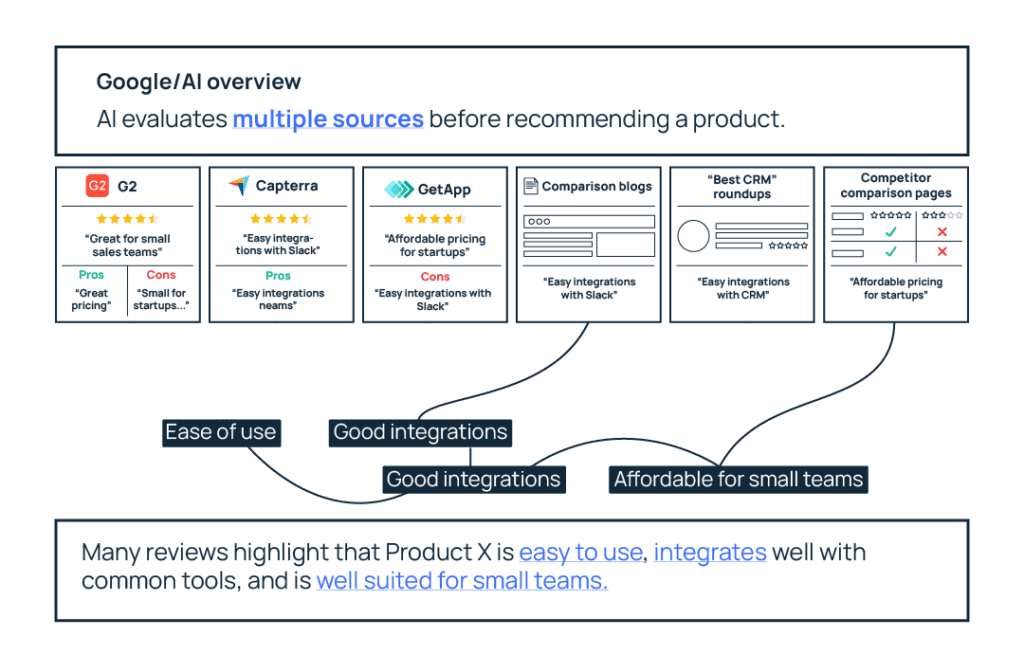
Nective Digital’s research shows that AI systems frequently retrieve review and comparison content, especially when prompts include qualifiers like best, vs, alternatives, or reviews. These queries indicate that the user is not just learning about a category but actively comparing options.
So to address those evaluation layers, AI systems often pull from sources that already organize information around comparisons – both on your site and across third-party platforms.
Tips for reviewing content on your site
- Publish competitor comparison ([your product] vs [competitor 1] vs [competitor 2]) pages that clearly state the pros/cons, use-case differentiation, and decision guidance
- Create alternatives pages (Best [competitor product] alternatives) that position your product fairly within the landscape.
- Write evaluation-oriented guides that help buyers understand how to assess different tools.
And beyond your own site:
- Maintain active profiles on review platforms such as G2, Capterra, and GetApp.
- Encourage (maybe even incentivize) customers to leave detailed, authentic reviews that explain use cases and strengths.
- Keep those profiles updated so they accurately reflect pricing, integrations, and key features.
Final Thoughts on Optimizing Content For Query Fan-out
With query fan-out, the 60 prompts that are most relevant to your company can expand into 600 backend retrieval checks. Luckily, you don’t need 600 pieces of content to optimize to appear in AI searches.
Instead, you need to understand the intent behind these fan-out queries so you can address the questions in those sub-prompts. That means you can structure your existing pages so they clearly address the underlying dimensions fan-outs reveal, and expand your content only where meaningful gaps exist.
Of course, none of this is possible without first understanding the fan-outs behind your priority prompts. If you haven’t done that yet, start with Part 1 of this guide, where we walk through how to extract and analyze them.
If you’d like to see what this approach looks like applied to your own SaaS content, reach out to us. We’d be happy to help identify your priority prompts, analyze their fan-outs, and shape a content strategy around them.