
For your SaaS product to appear in AI summaries and AI-powered search results, you need to understand how these systems retrieve and evaluate information. Query fan-out is a big part of this process, and if you don’t know how fan-outs work, it becomes much harder to craft content that LLMs cite, meaning your brand’s visibility suffers.
This guide explains what query fan-out is, how it works in systems like Gemini and ChatGPT, and how to extract fan-outs for your priority prompts so you can influence AI surfacing and citation.
TL:DR
- AI systems break one prompt into multiple backend queries across criteria like pricing, integrations, comparisons, reviews, and use-case fit before generating a response.
- Most fan-out queries have zero measurable search volume, so traditional keyword data alone won’t reflect real AI retrieval behavior.
- To optimize for query fan-out, start with priority prompts, not head terms. Define 20–50 realistic, multi-factor prompts using search demand + ICP framing + real buyer conversations.
- Extract real fan-outs using tools to see actual retrieval branches.
- Map fan-outs against your site. Check whether each underlying query is clearly and explicitly addressed.
- Prioritize commercially relevant gaps. Focus first on evaluation, pricing, integrations, comparisons, and use-case fit.
- Search volume still matters, but it’s no longer enough. A topic can look complete in SEO tools while still missing key retrieval layers in AI-driven environments
What Is Query Fan-Out?
You open your favorite LLM and type:
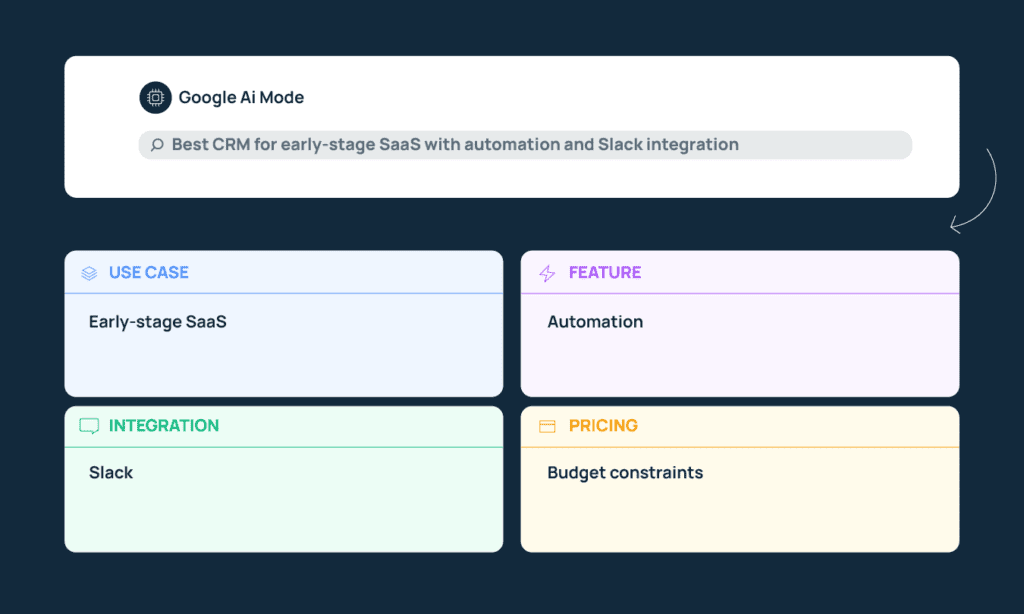
“Best CRM for early-stage SaaS with automation and Slack integration.”
Within a few moments, you get a structured and comprehensive answer. It references specific tools, mentions pricing considerations, compares features, and even highlights integrations. This is not the result of a single web search.
Instead, the AI performs a query fan-out: it breaks your prompt into multiple underlying search queries and runs each separately.
Your single prompt may be decomposed into queries like:
- CRM for early-stage SaaS
- CRM automation capabilities
- CRM Slack integration
- CRM pricing tiers
- CRM comparisons or alternatives
Each of those represents a distinct angle or constraint embedded in your original question. The system retrieves sources that best satisfy each of those angles and then synthesizes a response across them.
This process is not visible to you as the user, and you see only one answer, but behind that answer, the LLM is segmenting the intent of your prompt into separate decision dimensions.
What Does This Mean for SaaS Marketing?
Query fan-out research tells marketers that prompts are getting longer and more complex, and that according to Seer Interactive, 95% of fan-outs generated by Gemini have no search volume.
That means if you have been optimizing the old-SEO way, you will be missing content topics and structure that LLMs want. For your product to be mentioned and cited as a solution in relevant prompts, your content needs to clearly and explicitly address multiple criteria at once.
That is, you need to write specific, contextual content to appear in LLMs for a multi-layered prompt like “Best CRM for early-stage SaaS with automation and Slack integration.”
Does that mean producing ten versions of the same article? Not really, but it does mean your coverage has to cover topics you may not have targeted before, and your process for identifying new topics (or refreshing old ones) needs to include fan-out research.
How to Identify and Extract Fan-Outs Around Priority Prompts
1. Generate Relevant Prompts
Start by brainstorming prompts a real buyer might type onto ChatGPT, Google AI, or another LLM to research tools in your category.
To come up with multi-factor-layered prompts like these for your own product:
- Look at search data to understand which broad topics have traction in your space.
- Narrow that topic through the lens of your ICP. Ask yourself: who is this for? An early-stage founder? A RevOps lead? A 50-person SaaS team? The same topic will turn into very different prompts depending on who is searching.
- Use insight from your marketing persona work, sales team and support tickets to understand what factors influence decisions and what questions surface most often.
- Layer in those decision factors that influence whether someone chooses your product – pricing thresholds, required integrations, feature depth, use-case fit, competitors, etc.
Once you’ve gathered all this data, stitch this information into prompts. aim at ~15 words long and don’t be afraid to go longer – unlike short Google strings, AI searchers are increasingly prompting with more than 25 words. For example, “Best CRM for early-stage SaaS with automation and Slack integration” or “CRM under $50 per month for small SaaS teams with reporting features”.
You can do this manually, or with AI by using a template like this:
You are an [ICP — describe role, company size, industry, stage, budget context].
You are [core topic — describe what this person is trying to evaluate, replace, compare, or improve within your product category].
Here are important decision factors for you:
– Pricing concerns: [budget limits, contract preferences, pricing structure sensitivities]
– Required integrations: [tools this persona already uses or insists on connecting]
– Key features: [specific capabilities they care about most]
– Common objections or friction points: [recurring concerns, risks, or deal blockers]
– Competitor comparisons (optional but recommended): [tools frequently compared against yours]
Based on this information, generate [X number] realistic, full-sentence prompts this buyer would type into ChatGPT or Google AI when actively evaluating or comparing {your product category}.
Remember, you don’t need to target every brainstormed or suggested prompt. Narrow down your initial list to the queries that most closely align with your target buyer and product positioning.
2. Extract Real Fan-Out Queries With a Fan-Out Tool
You’ve generated and identified the prompts that you want your brand to appear for in AI conversations.
Now you need to see how those prompts are being broken down behind the scenes so you can optimize for the underlying fan-outs that LLMs like Gemini and ChatGPT generate when grounding against the web.
Note that these tools aren’t interchangeable. As per recent research, Gemini (which powers Google’s AI Overviews and AI Mode) generates way more fan-outs per prompt – up to 28 in some instances, while ChatGPT typically generates fewer, around 2 to 4. So you will have to approach each LLM separately.
Here’s how to pull fan-outs from the back-ends of these LLMs:
For Gemini/Google’s AI Mode:
Dan Petrovic built a Query Fan-Out tool that uses Google’s own grounding system via the Gemini API. Under the hood, it pulls the webSearchQueries field – which contains the exact backend queries Google executes when generating AI responses.
Instead of writing your own API scripts, this tool surfaces that data directly from the “AI Mode Prompt” you put into the tool’s interface. To use it, simply add your prompt and hit “Extract Fan Out Queries”.
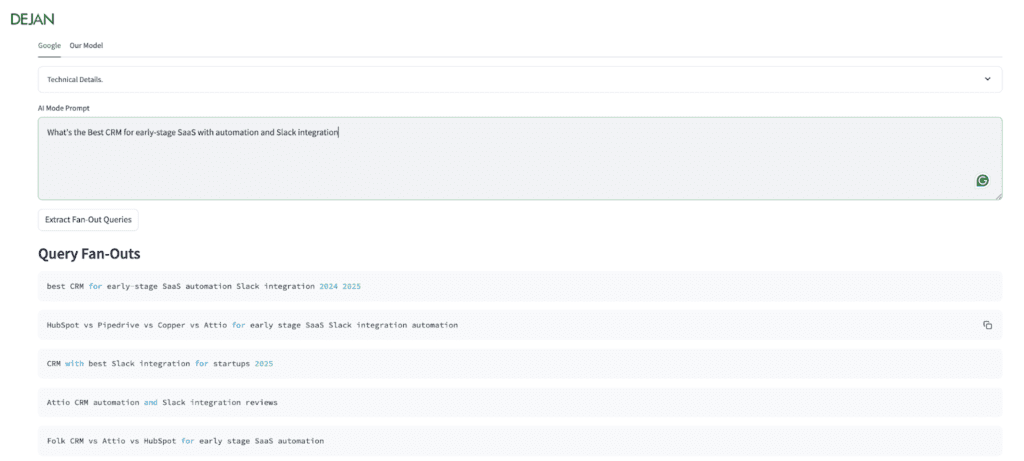
You can see that when the prompt “What’s the best CRM for early-stage SaaS with automation and Slack integration” is entered, it returns multiple distinct retrieval branches – including comparison queries, Slack-focused variants, review-focused angles, and year-modified searches.
These are the actual queries Gemini runs when grounding.
For ChatGPT:
Fan-out data in ChatGPT is retrievable, but doing it manually requires developer tools, so we again suggest using a tool. Something like ChatGPT Search Capture, which surfaces ChatGPT’s retrieval-level data directly, is a good option. It shows the queries executed behind the scenes, the URLs cited, brand mentions, and other retrieval signals.
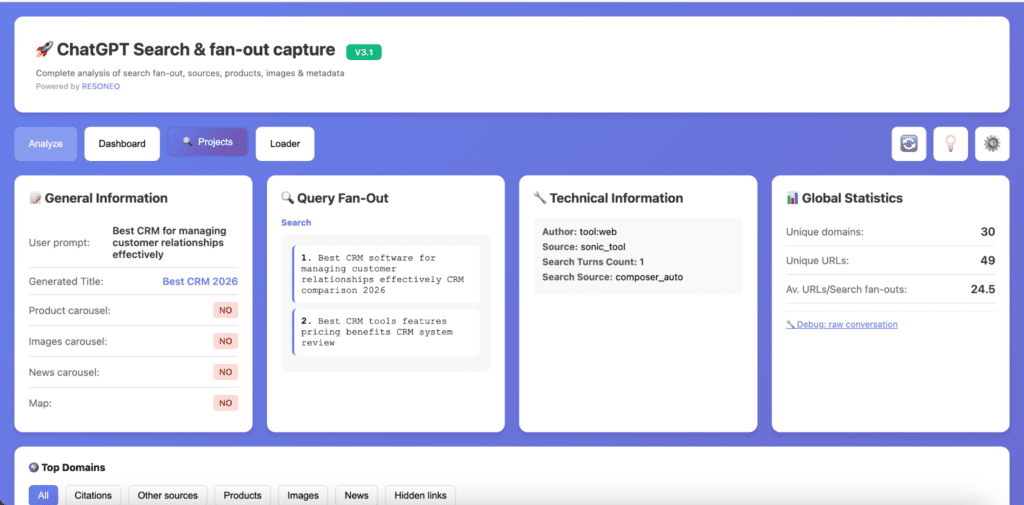
Here’s how to do it:
- Install the ChatGPT Search Capture extension.
- Run one of your priority prompts in ChatGPT with browsing enabled.
- Use the extension to:
- List the query fan-outs executed
- Extract all cited URLs
- Identify brand mentions
- Export the results into TSV or Excel format.
- Review which retrieval branches appeared and which sources were cited.
For other LLMs
As of early 2026, there aren’t widely available tools that surface this data as easily for other LLMs like Claude as the Gemini or ChatGPT solutions discussed above. To expose and access similar retrieval or query fan-out data for them, you’d have to inspect API responses or write custom scripts. So if you want to analyze fan-outs in those systems, expect to involve a developer.
3. Map Extracted Fan-Out Queries Against Existing Site Content
Once you’ve extracted the fan-out queries, the next step is to check whether your site actually answers them.
Go through each fan-out and think: if this exact query were run in isolation, do you have a page that clearly addresses it? It’s not enough that the topic is loosely mentioned somewhere. The coverage needs to be explicit and structured enough that an AI system can confidently retrieve it as a relevant source.
You can do this manually, but tools like Domain Coverage Analyzer make the process much faster. You upload your list of fan-out queries, and the tool scans your site to classify coverage into categories such as:
- No Coverage
- Clear Gap
- Related Gap
- Aligned
- Perfect Coverage
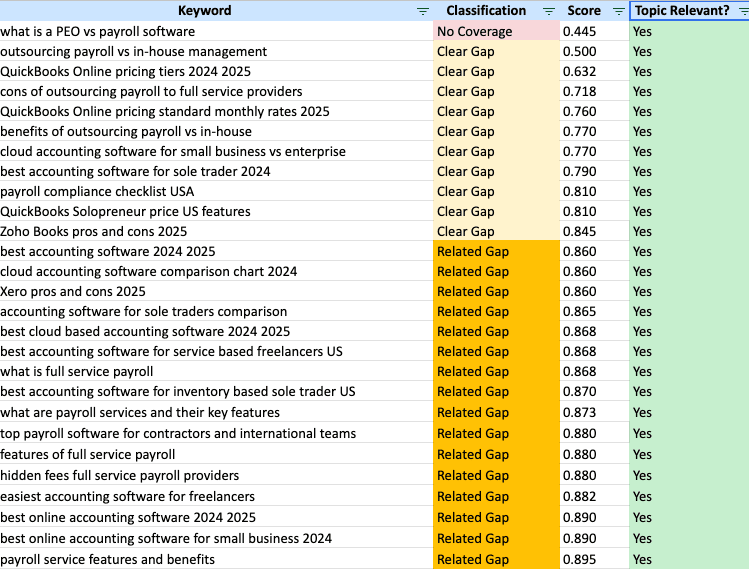
Source: Nectiv Digital
What this mapping exercise usually reveals is not a total lack of content. More often, you’ll see partial coverage scattered across pages – where you touch on a topic but don’t clearly structure it around the specific constraint the fan-out represents.
4. Prioritize Fan-Outs Based on Commercial Relevance
Once you’ve mapped coverage gaps, prioritize the fan-outs that are most likely to influence someone’s purchasing decision. That would mean prompts related to product evaluation, pricing decisions, integration requirements, competitive comparisons, and use-case fit.
From there, make a list of priority pages to create or refresh – which we discuss in part two.
Final Thoughts on Query Fan-Out
Query fan-out changes how we approach topical coverage.
For a long time, decisions around clusters were largely driven by search volume, keyword difficulty, and visible demand signals. If the numbers looked strong, the topic was considered worth pursuing.
But when a single prompt can expand into nine, fifteen, or even twenty backend retrieval queries, those traditional metrics are no longer enough to determine whether a topic is fully covered, and can’t guarantee you will surface in AI-driven environments.
If you’re struggling to surface in LLM responses despite publishing content, the problem is often fan-out coverage gaps. We help SaaS teams uncover and close those gaps – book a call with us if you’d like help with that.