
As an SEO agency with a GEO specialization, we have built a practical tool stack that reflects what is genuinely useful right now. Rather than jumping on new tools and processes, we have prioritized exploiting the overlap between GEO and SEO where possible, aiming for a realistic setup that works hard for your content program.
Here is what we use to track meaningful signals .
Since GEO measurement is still evolving, and we are learning alongside the industry, we will continue updating this list as better tools emerge.
TL:DR;
- Use traditional SEO tools such as Ahrefs / SEMrush to validate real search demand, identify commercial modifiers, and benchmark competitor coverage.
- Use a query fan-out tool like Qforia to understand how core queries expand into layered AI prompts so you can structure content accordingly.
- Invest in consistent distribution with Publer to reinforce brand signals across platforms AI systems ingest.
- Use AI processing insight tools like ChunkViz & TextRazor to structure content for chunking, entity recognition, and retrieval.
- Track visibility with Peec.ai to monitor AI mentions, sentiment, and competitive presence across prompt sets.
- Layer in GSC + GA4 to validate whether AI visibility leads to branded demand, stronger engagement, and conversions.
- Use Hotjar and Survicate to refine pages and capture direct feedback from AI-influenced visitors.
- Consider Athena HQ if you want to centralize monitoring, benchmarking, and attribution in one scalable system.
For Research & Discovery
Much of the basics of SEO research are useful for GEO, but adding a query fan-out tool will help you nail additional queries that only show up in AI.
Ahrefs / SEMrush
Ahrefs and SEMrush are keyword research platforms that use seed topics to generate related keywords, question-based queries, search volume data, keyword difficulty scores, SERP features, and competitor rankings. They also allow filtering by modifiers such as “vs,” “pricing,” “reviews,” and “alternatives,” and provide insight into which domains rank for those terms.
This helps you validate real demand around your core ideas, which is the first step in building a GEO content strategy.
How to use these in your GEO program:
- Research demand for search terms before you start looking at how those same topics surface inside AI interfaces.
- Identify the comparison and buying-related variations (like hubstaff “pricing”, or hubstaff “reviews”, or hubstaff “vs” clockify) people already search for, so you can address those angles directly in your content.
- Collect related questions that closely resemble how users phrase prompts in LLMs.
- Review which competitors currently rank for those topics to understand where they already dominate visibility and where there may be gaps you can realistically win.
Pricing: Ahrefs from ~$129/month; SEMrush from ~$165/month
Qforia
Source: IPullRank
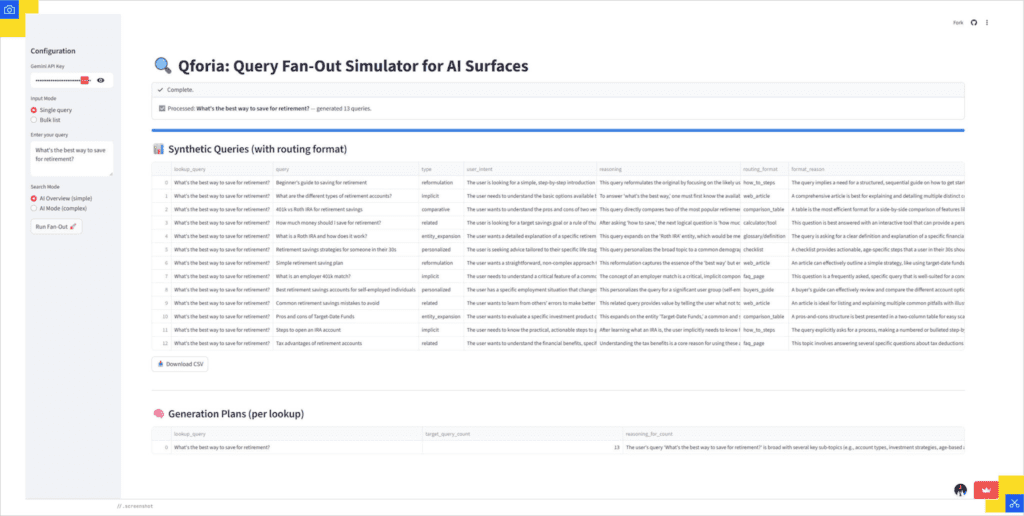
Once you’ve validated demand at the keyword level, Qforia helps you understand how a single query expands inside AI systems through query fan-out – a process by which AI systems and modern AI-powered search engines take one user query and expand it into multiple related sub-queries.
Qforia simulates that process using Gemini and gives you the closest working view of how LLMs may be decomposing your query at the backend.
How to use these in your GEO program:
- Enter your core query and review the expanded sub-queries to see what related angles AI systems are likely exploring in parallel.
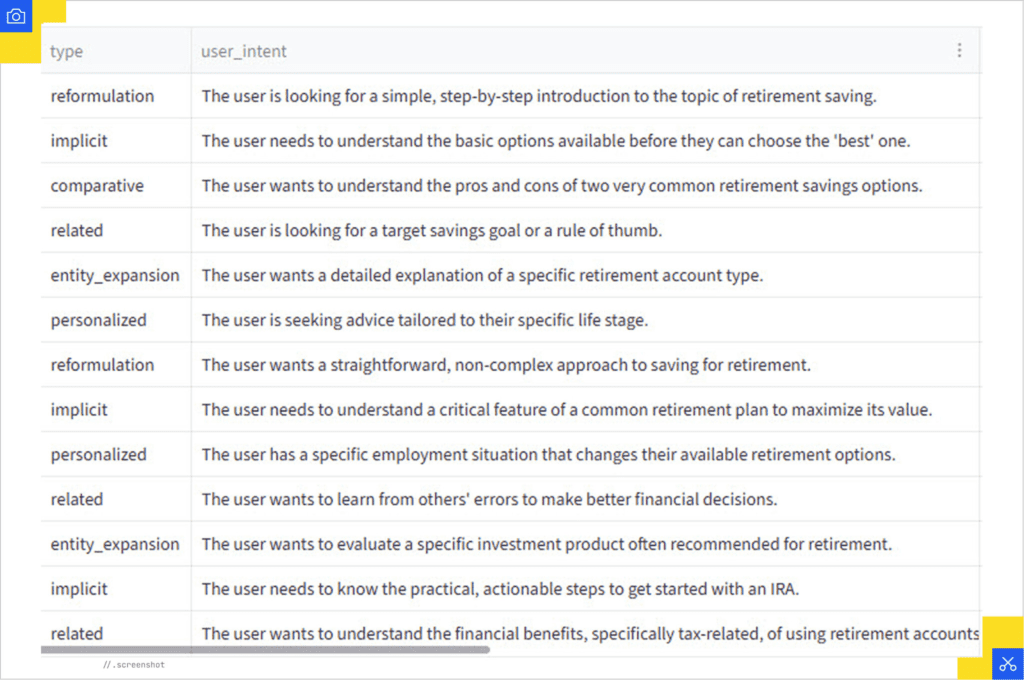
- Add the implicit or follow-up questions surfaced in the output to your content outline, even if users don’t explicitly type them into search.
- Group the generated queries by type (e.g., comparison, personalized scenario, definition) and structure sections of your page to address each intent layer clearly.
- Follow the suggested content formats (tables for comparisons, checklists for steps, FAQs for definitions) to match how AI systems expect the answer to be structured.
Source: IPullRank
Pricing: Free (Paid Gemini API key required).
For Content Distribution
Distribution is more core to GEO than SEO, because mentions of your brand signal validity to LLMs. To learn more about why content distribution matters, read: How to Distribute Your SaaS Blog Posts
Publer

Publer is a multi-channel social media scheduling tool that allows you to create, schedule, and manage posts across platforms like LinkedIn, X, Facebook, Instagram, TikTok, Pinterest, and Google Business Profiles, from one dashboard. It supports actions like: bulk scheduling, post recycling, content libraries, team collaboration, analytics tracking, hashtag suggestions, and automated scheduling at optimal posting times. It also allows link shortening, UTM tracking, and basic performance reporting.
If your company already uses Buffer or Hootsuite for your content or SEO program, this will be redundant. But if you are building your stack from scratch, compared to these tools, Publer offers similar scheduling functionality at a lower cost with a simpler interface.
How to use this in your GEO program:
- Schedule consistent posts across LinkedIn, X, and other relevant platforms to maintain ongoing brand visibility rather than relying on occasional bursts.
- Repurpose core content into multiple formats and distribute it across channels where AI systems may pull corroborating signals.
- Encourage discussion and third-party engagement around your brand to increase the number of contextual mentions outside your website.
- Maintain a steady publishing cadence so your brand generates continuous external signals instead of long inactive gaps.
Pricing: Free tier; paid from ~$4/month
For Insight into AI Content Processing
The tools in this section help you get a close idea of how your content is being structured and interpreted at an AI’s processing layer, so you can create content that LLMs are more likely to cite.
ChunkViz
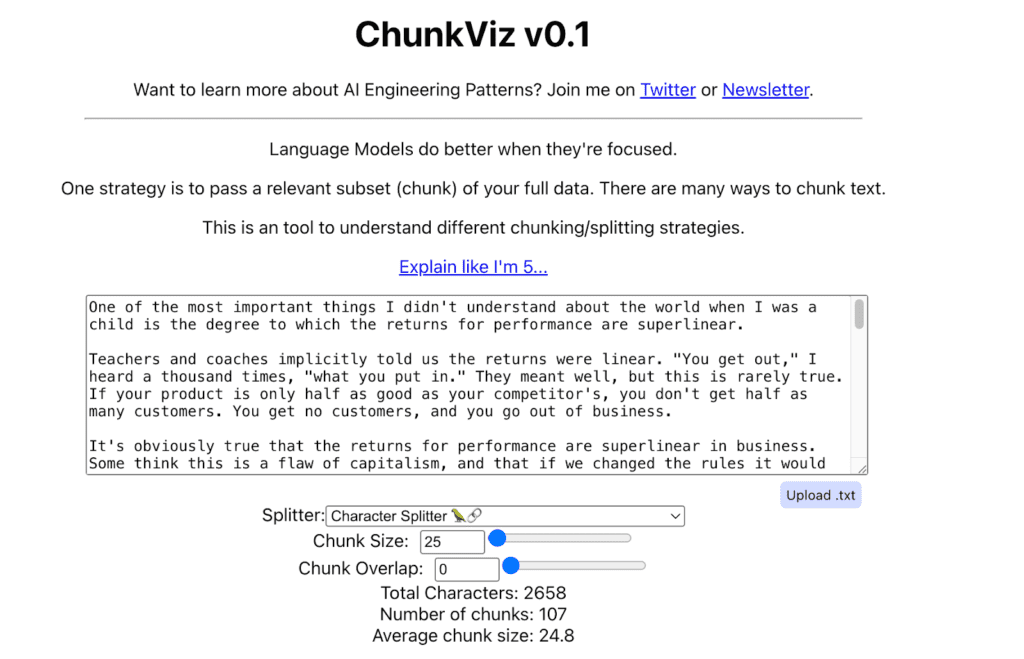
ChunkViz is a simple visualization tool that shows how LLMs break your content into chunks. You paste in a piece of text, select a token size, and it simulates how that content might be segmented when processed by a language model. Since LLMs read and retrieve information in chunks rather than entire pages, how your content is divided can influence what gets pulled into an answer.
How to use this in your GEO program:
- Paste key pages (pricing, integrations, feature breakdowns) into the tool and check whether critical information sits cleanly within a single chunk.
- Identify sections where important context gets split across chunks and tighten or reorganize them to improve retrieval clarity.
- Group related sections together using the right headings, so information stays cohesive instead of being fragmented across segments.
- Compare the content that shows up in AI answers with your chunk view to understand why certain paragraphs appear while adjacent ones are ignored.
Pricing: Free (open-source app).
TextRazor API
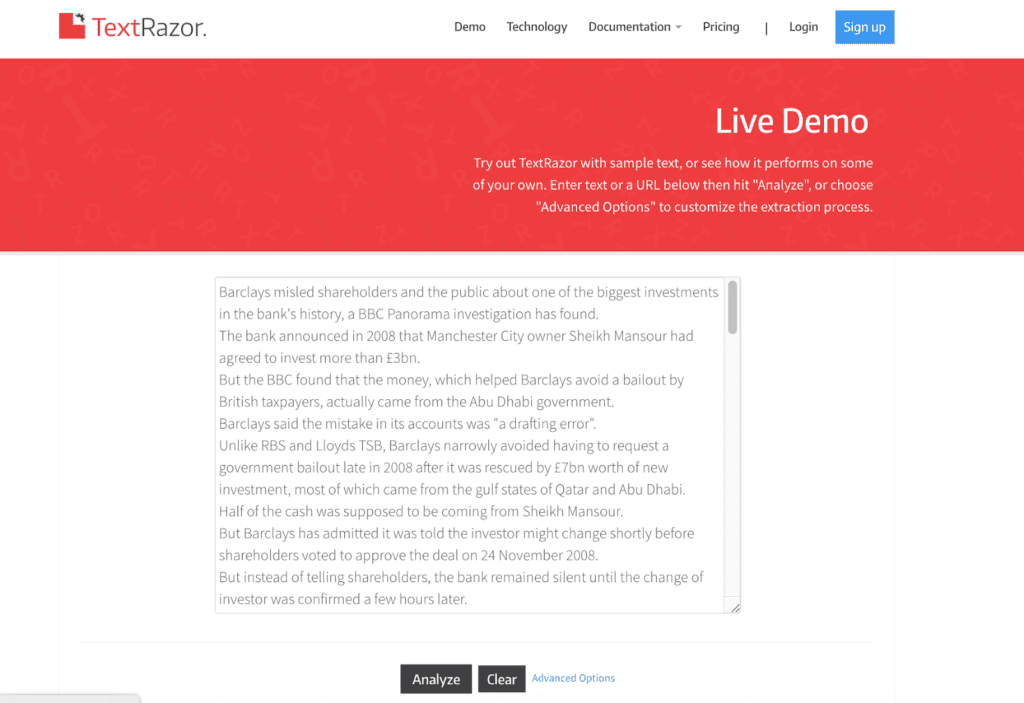
TextRazor is a natural language processing API that performs named entity recognition (NER) and relationship extraction. When you pass text through it, the API identifies entities such as companies, products, people, locations, topics, and the relationships between them. It also links recognized entities to structured knowledge bases like Wikipedia or Wikidata, where possible.
In simple terms, it shows you what a machine “sees” when it parses your content.
How to use this in your GEO program:
- Run key pages through the API and review which entities are clearly recognized versus which are missing or ambiguous.
- Confirm that your product name, integrations, competitors, and core industry terms are identified as distinct entities.
- Check whether relationships between entities (e.g., product → integration → use case) are explicitly structured rather than implied.
- Add missing entities or clarify vague references so AI systems can anchor your content more confidently.
- Validate that pages targeting specific topics are actually structured around the entities those topics require.
Pricing: Free tier available; paid plans start at ~$200/month
For Monitoring & Measurement
Right now, GEO attribution is tricky, and we don’t yet have a definitive tool that can clearly differentiate whether a lift came from GEO.
So for measurement, we recommend not only modifying classic SEO tools, but also taking on a disciplined way of reading different metrics side by side to identify patterns that point to GEO wins.
How to use this in your GEO program:
- Track branded query growth to see whether more people are searching your company name after you increase visibility in AI answers.
- Review new comparison, integration, and use-case queries appearing in impressions to see whether your brand is entering deeper research conversations.
- Check which pages (FAQs, pricing, comparison content) are gaining impressions and reinforce those formats if they align with AI-driven discovery.
- Use filters to separate branded and non-branded queries so you can distinguish awareness lift from baseline SEO performance.
Pricing: Free
Google Analytics 4 (GA4)
GA4 tracks what users do once they land on your site — sessions, landing pages, engagement, and conversions.
Visitors from AI searches often arrive more informed, which can translate into deeper scroll depth, more product-page views, and stronger demo activity even if your overall organic traffic has dipped lately. Look for these patterns alongside your GEO efforts to show their effects.
PS: By default, GA4 buckets most AI traffic into referral or direct. For clearer visibility on which LLMs exactly are sending you traffic, you can create custom channel groupings and regex filters. Here’s a detailed guide we created on how to do that.
How it supports GEO:
- Check whether increases in branded searches (seen in GSC) are followed by more sessions and engagement in GA4.
- Compare engagement metrics for branded or direct traffic to see if those visitors scroll further, visit pricing pages, or convert more often.
- Create custom channel groupings to isolate traffic from specific chatbots and compare which sources (ChatGPT vs Perplexity vs Claude)drive higher-quality visits.
Pricing: Free
Peec.ai
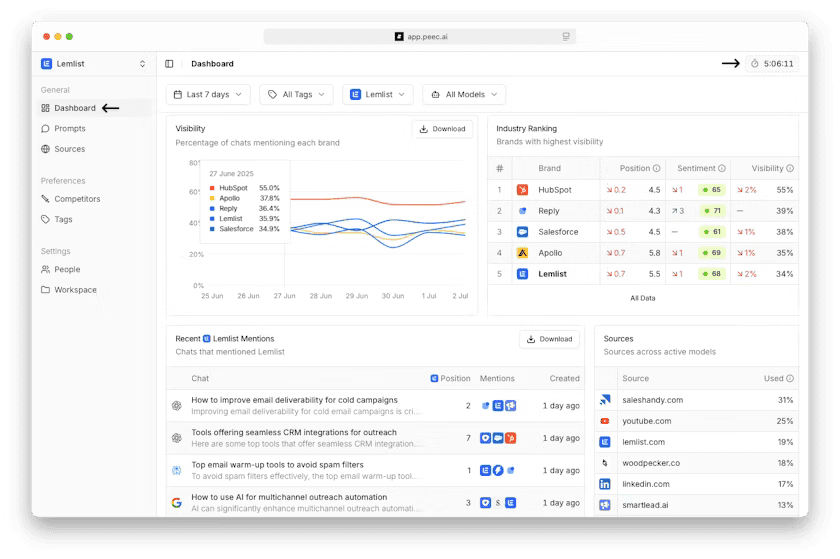
Peec.ai is a monitoring platform built specifically for GEO. You define a set of prompts relevant to your category, and it tracks how your brand appears across AI systems like ChatGPT, Perplexity, and others. It records whether you’re mentioned, how frequently, in what context, and alongside which competitors. It also analyzes sentiment and shows the sources that appear to be feeding those AI responses.
Unlike GSC or GA4, this sits at the visibility layer and tells you how AI systems are framing your brand before users even click.
How to use this in your GEO program:
- Track which prompts already mention your brand and which ones consistently feature competitors instead.
- Review the sources feeding AI answers and strengthen your presence on those domains if they influence your category.
- Identify prompts where competitors are cited and build or expand content to compete directly on those topics.
- Monitor sentiment and positioning to ensure your brand is described accurately and consistently.
- Make updates to key pages and watch whether mention frequency or placement improves over time.
Pricing: Starts at $105/month.
Optional: Athena HQ
Source: AEO Tools
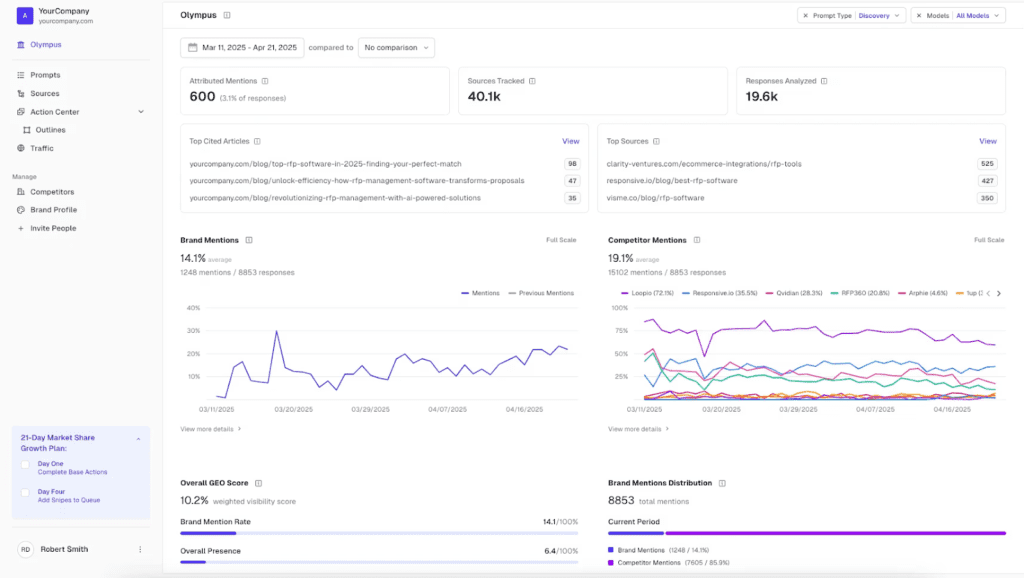
Athena is not required to run GEO effectively. Everything it does can be achieved by combining tools like Peec, GSC, GA4, and your own reporting workflows. The difference is that Athena centralizes those layers instead of you stitching them together manually.
It’s an advanced GEO analytics platform that monitors brand presence across 8+ LLMs, including ChatGPT, Perplexity, Gemini, Claude, and Grok, and provides all insights in one dashboard. It also includes features like the Action Center for content gap analysis and automated recommendations, the Athena Citation Engine (ACE) for modeling citation likelihood, and integrations with GA4 for tying performance data together.
For teams willing to spend the extra ~$100 per month to unify reporting and reduce operational overhead, it can simplify monitoring and prioritization.
How to use this in your GEO program:
- View AI mentions, competitor visibility, and on-site performance in one dashboard instead of checking separate tools.
- Compare citation trends with traffic and conversion data to see whether visibility shifts align with business results.
- Review content gap reports and prioritize updates based on where competitors are cited and you are not.
- Use citation likelihood modeling to decide which pages to refine first..
Pricing: From ~$95/month (credit-based usage model)
For Feedback & Iteration
Once users land on your site, you need to understand how they actually interact with the content that AI systems are surfacing. That’s where behavioral tools come in.
Hotjar
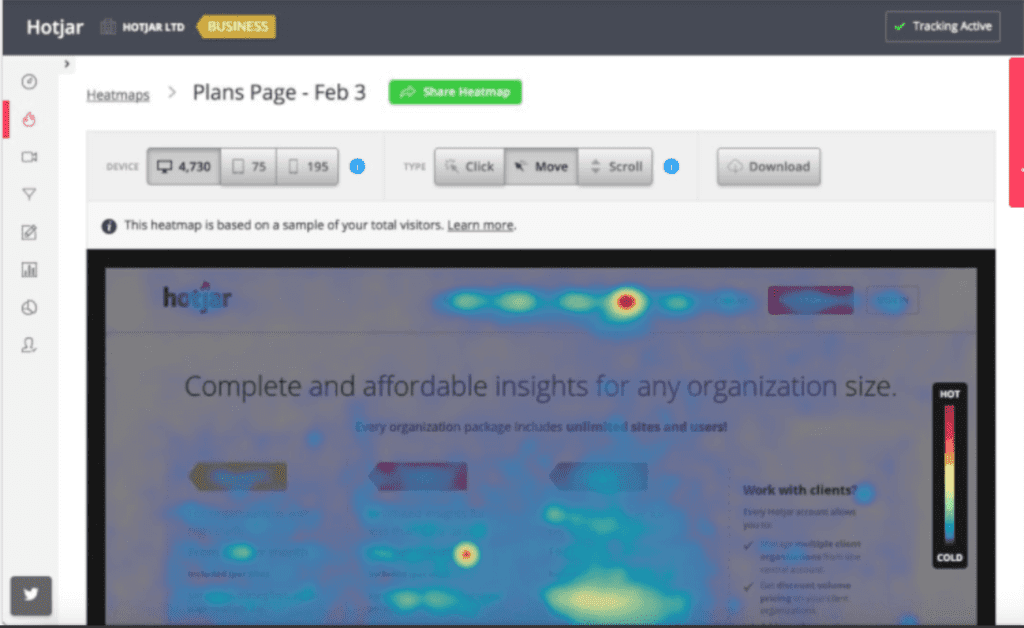
Hotjar is a behavioral analytics platform best known for heatmaps, session recordings, and scroll tracking. It helps you see how real users interact with your pages beyond what GA4 event data alone can show.
How to use this in your GEO program:
- Watch session recordings for visitors landing on key pages (pricing, comparisons, FAQs) and note where they hesitate, exit, or abandon actions.
- Review scroll maps to see how far visitors read and whether they reach the sections AI systems are likely surfacing.
- Compare behavior between branded/direct traffic and other sources to identify differences in intent and engagement.
- Adjust page structure, copy, or calls to action based on where users lose momentum.
Pricing: Free tier available; plus from $39/month
Survicate

Survicate is an on-site survey and feedback tool that lets you collect responses directly from visitors while they’re on your site.
Considering how messy GEO attribution is, sometimes the most reliable way to understand discovery is to ask. A simple “How did you hear about us?” poll can clarify whether users found you through ChatGPT, Perplexity, Google search, or elsewhere.
How to use this in your GEO program:
- Add a short discovery question to key pages to identify whether visitors found you through ChatGPT, Perplexity, Google search, or elsewhere.
- Segment responses to compare on-site behavior between AI-discovered visitors and other traffic sources.
- Collect the exact language customers use to describe their problems and your product, then incorporate that phrasing into FAQs, structured content, and entity coverage.
- Use recurring feedback themes to adjust positioning or clarify sections that may be misunderstood.
Pricing: Free tier available; paid plans start from ~$120/month.
Final Thoughts
Right now, measuring GEO means working with a mix of proven SEO tools, a few AI-specific additions, and getting crafty in how you configure and read your data. You’re looking at mentions, branded searches, site behavior, and competitor presence together to see if your visibility is actually growing – as there’s no single metric to define GEO wins.
If you’re unsure whether your current setup is capturing GEO impact properly, we’re happy to take a look – Book a free discovery call with us today!