Google assembles every AI answer with a very specific system.
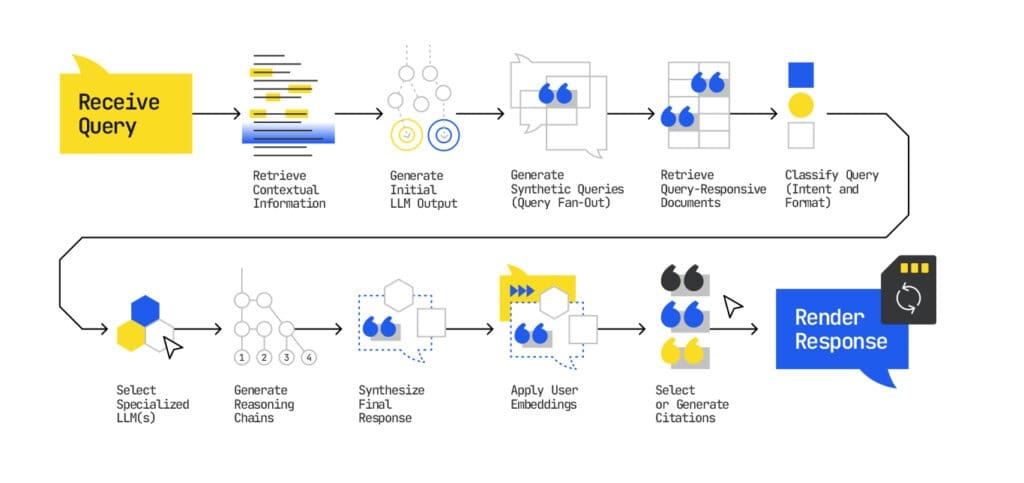
A user types in a question, and then Google’s technology formulates a response by going through the same series of steps every time.
In that process, only a few sources make the cut, and even fewer get cited.
This guide breaks down how Google’s AI retrieves, evaluates, and cites content inside Gemini and AI Mode, so you can shape your messaging, be favored by Google’s algorithms, and start to see results from GEO.
TL:DR;
- Gemini, AI Mode and AI Overviews all run on Google’s index and AI reasoning pipeline. This means that you can optimize for all three simultaneously once you understand how the foundational technology works.
- First, Google builds a behavioral profile of a querier to deliver personalized results. It then processes a query by looking for related queries, and building a ‘custom corpus’: a set of passages that directly relate to the ask.
- Next, Google decides which passages better answer the query, and uses specialized models to summarize, compare, and extract from the custom corpus.
- Finally, it decides what to paraphrase and what to cite, and gives a searcher a custom, contextual answer.
Next: In Part 2, we show how to turn this new understanding of Google’s AI into concrete steps you can take to increase your chance of appearing in its AI answers.
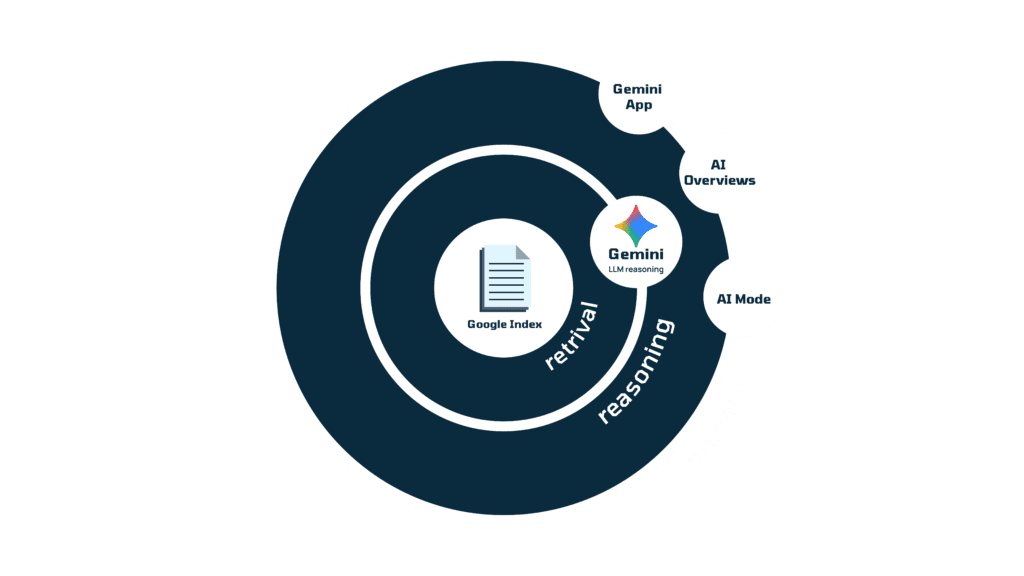
Gemini, AI Mode, and AI Overviews All Work as One System
Google Search is the centre of everything.
Gemini, AI mode, and AI overviews share the same data sources, the same retrieval pipeline, and the same ranking logic based on clarity, depth, and authority. The only differences are in how the answer is displayed, not how it’s chosen.
Google’s index is the data source that powers every new AI experience Google releases.
Gemini, Google’s large language model, sits on top of that index. It interprets the same information, but builds reasoning chains and generates personalized answers.
AI Mode and AI Overviews are just different ways that Google’s AI output shows up to users.
That’s why this guide treats them together.
Because when you understand Gemini’s reasoning process or how AI Mode decides which passages to cite, you know how Google’s entire AI ecosystem evaluates and presents information.
That means you can optimize for all three systems using the same techniques — more on this in Pt. 2.
How Gemini & Google AI Mode Ranks Your Content
Source: IPullRank
Stage 1: Understanding User Context and Personalization
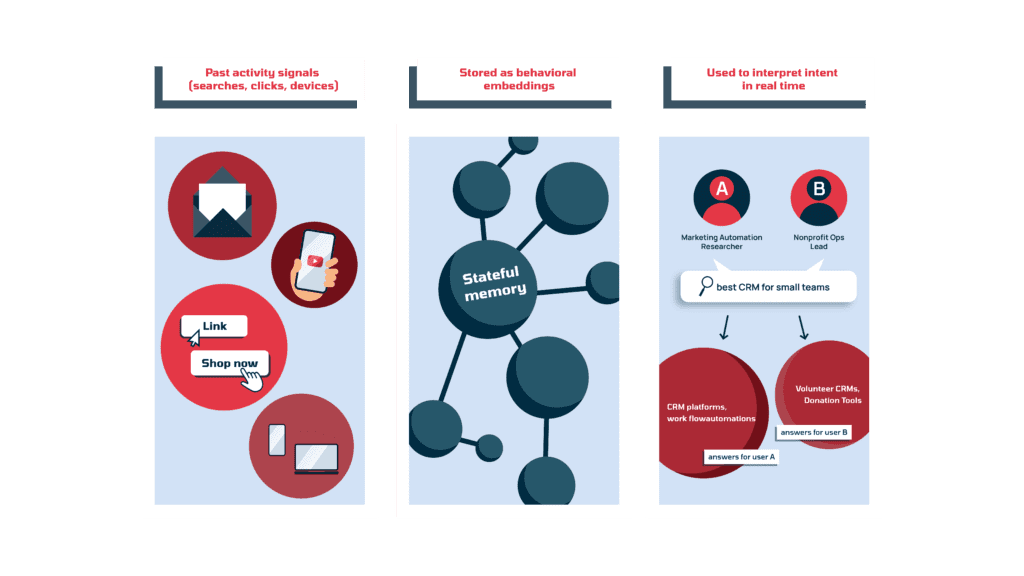
Before Gemini fetches a single page, it builds a live picture of the searcher –– who they are, what they’ve been exploring, and how that shapes what they mean by their query. This will determine what Google decides to show a user throughout the rest of its AI processing.
To do that, Google transforms a user’s activity into vector embeddings. These are numerical representations of behavior built from past queries, clicks, locations, and devices. These embeddings are stored as part of the system’s stateful context, which acts like a running memory of each person’s interactions with Google.
That means Gemini can reference its stored context to interpret a user’s intent over time.
For example, someone who’s been researching marketing automation and CRM integrations will activate different vector associations than a nonprofit team lead searching the same words. And when the model later performs query fan-out (discussed in the next stage), those embeddings guide the direction of expansion and the type of content retrieved.
Takeaway for SaaS teams: To gain visibility in Google’s AI results, you have to deeply understand your ICPs – their interests, workflows, pain points, buying behaviors, and even word choice. Then, you need to ensure your content consistently reflects yourICP’s buyer journey and speaks directly to their intent and positioning. Matching your ICP’s context shortens your vector distance, which should increase the likelihood of being in the AI’s final answer
Stage 2: Expanding the Query Through Fan-Out
Once Google has created a contextual picture of the querier (based on their demographics, past search behaviors, locations and devices), it looks at what the person typed and decides which retrieval path to take.
If the user has given Google a specific URL to look at, the system switches into browsing mode, simply visits that page, and reads it directly.
400But when the user enters a broad query such as “best CRM for small teams,” Gemini activates what Google calls query fan-out. And instead of treating the phrase as one request, it creates dozens of related variations, including synonyms, comparisons, pricing filters, integrations, or industry constraints. “Best CRM for small teams” could branch into:
- “Trello vs Asana for finance teams”
- “project management software with SOC 2 compliance”
- “affordable SaaS collaboration tools for remote teams”
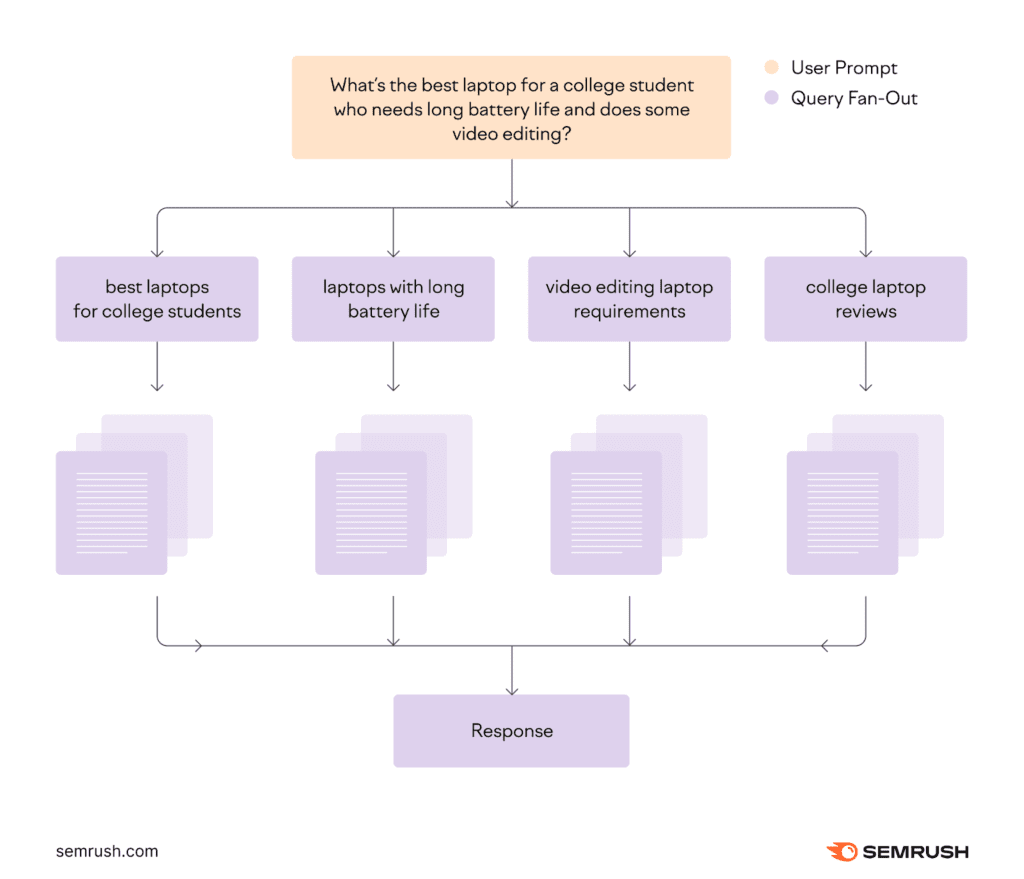
Source: Semrush
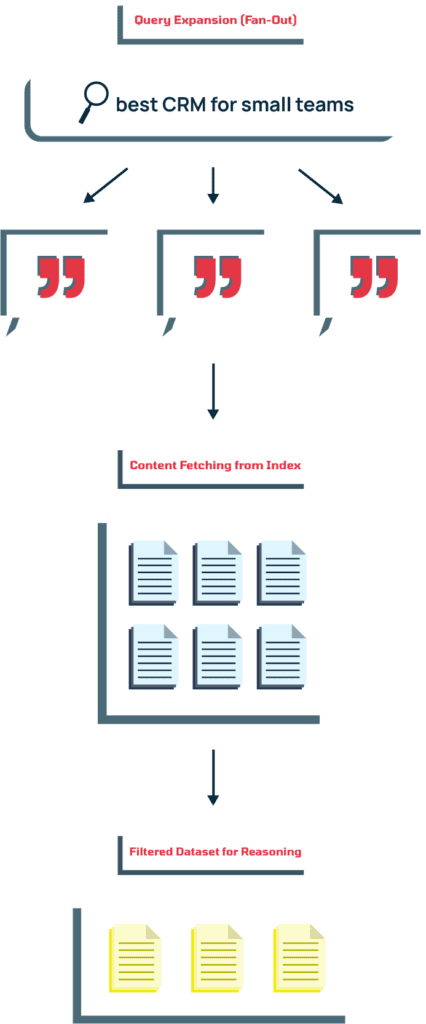
These query variations will then be passed through Google’s content_fetcher function. Where browsing gets information from single pages, content_fetcher begins large-scale retrieval
Takeaway for SaaS teams: Instead of writing one page per target keyword, write more comprehensive content that answers user questions more fully. Describe your features, industries, and integrations in clear, entity-rich language, and use real-world details of your product and results, so Gemini’s content_fetcher is more likely to recognize your relevance across its fan-out landscape.
Stage 3: Building the Custom Corpus
After Gemini expands the query through fan-out, it needs to gather the actual material it will process. Each of those sub-queries sends results through the content_fetcher pipeline, pulling text from relevant pages. This is how Google starts constructing what it calls a custom corpus (in this patent), which is essentially a mini index, built just for that specific question.
Then, the system creates the vector embeddings (numerical representation of meaning) of every query, passage, and document, and measures how closely these embeddings align with the combined intent behind the user’s query and its expanded variations.
As a result of this evaluation, passages with the highest similarity scores stay in the index, and weaker matches are filtered out.
This is now the custom corpus, a concentrated dataset with a few dozen passages drawn from the most semantically aligned sources that Google uses for all later reasoning.
Stand out with Google and Gemini
Don’t let your content go unnoticed. We’re here to show you how to get AI to notice your work.
Stage 4: Ranking Passages Through Pairwise Comparison
With the custom corpus assembled, Google shifts from collecting candidates to deciding which exact passages answer the query best.
Here are the back-end mechanics explained in simple terms:
- Queries, sub-queries, documents, and passages are represented as vector embeddings to form the custom corpus.
- The system slices documents into units (paragraphs, steps, bullets) to compare.
- Pairwise LLM rankingcompares units in twos and chooses the one that matches a user’s intent; repeated comparisons yield a ranked set of passages.
This advances beyond static scoring (TF-IDF/BM25). Classic term-weighting might still be playing a role somewhere deep with the initial candidate discovery (hybrid retrieval), but inclusion in generative answers increasingly depends on the LLM’s pairwise reasoning over meaning, completeness, and usefulness at the passage level.
Takeaway for SaaS teams:
- Relevance is relative. A paragraph can be well-written and accurate, but Gemini is viewing every passage through the lens of the user’s intent (determined from history, embeddings, and behavior). So even if your unit explains a topic clearly, it can lose out to another passage that matches that user’s exact context or needs more closely.
- Chunked content survives. The passages that make it through this stage are the ones that can stand alone as complete, readable answers. Each unit should be concise and conclusive, as the model favors passages that deliver usable information immediately, without needing extra context from the rest of the page.
Atomic vs chunked content? We know there is a lot of debatebut we prefer ‘chunked’ over “atomic” to refer to a style of writing that splits topics into concise, relevant and contained sub-sections. While it’s not clear exactly how or where every AI splits content, chunking is an easy way to think about writing a piece that both – humans andmachines can easily read and use.
Stage 5: Processing Selected Passages Through Specialized Models
With passage selection complete, the system goes into “answer assembly” mode.
Several specialized models take over, each handling a different part of the reasoning process that transforms those individual winner passages into a single, coherent answer.
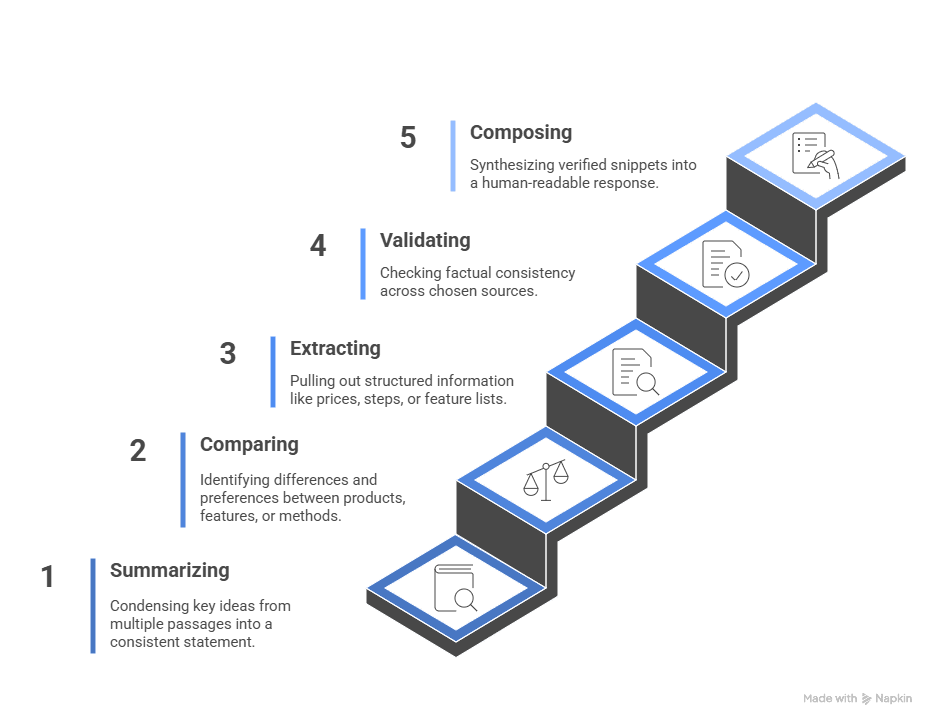
Based on one of Google’s patents, the process looks something like this:
- Summarizing: one model condenses the key ideas from multiple passages so that overlapping points become one consistent statement.
- Comparing: another model focuses on how two products, features, or methods differ and when each is preferable.
- Extracting: a third model pulls out structured information such as prices, steps, or feature lists.
- Validating: a verification layer checks factual consistency across those chosen sources.
- Composing: finally, a synthesis model pieces together the verified snippets into the human-readable response that appears in Gemini or AI Mode.
By the end of this process, what began as scattered, high-scoring passages becomes a single response, almost ready to appear in Gemini or AI Mode.
Stage 6: Selecting and Assigning Citations
After a draft answer is formed, Gemini determines which parts should link back to their original sources – the citation selection stage.
Important to note here: the model evaluates which specific sentences directly support each claim in the generated response. It does not cite every passage that contributes to an answer.
How does it determine what gets cited? If a sentence Gemini produces corresponds clearly with a piece of text in your content, that line may be attributed to your page. Other information, even if it influenced the answer, may be paraphrased without mention.
Takeaway for SaaS teams: Being included in the custom corpus, winning pairwise battles, and being used in the reasoning process doesn’t guarantee visible credit. Sentences or passages must be specific enough to quote for the best likelihood of attribution.
Stage 7: Assembling the Final Response
Gemini takes the passages that survived every previous stage, blends those short, quoted fragments with paraphrased text, and adds connective language to make it flow naturally. Then it arranges the information into whatever format best fits the query, sometimes that’s a paragraph, a list, or a table, and gives the querier an answer.
Final Thoughts
Gemini and Google’s AI systems are reasoning in real time to answer queries with the most relevant information. Intent awareness and clarity are what get you inside the system, and everything else builds on that.
Now that you understand how Google and Gemini’s AI systems work, and you’ve started to see how that will influence your content choices, it’s time to turn this knowledge into action.
Pt 2 of this guide will teach you strategies for building content that Gemini and Google’s AI Mode recognize, retrieve, and cite. Read on.
Stand out with Google and Gemini
Don’t let your content go unnoticed. We’re here to show you how to get AI to notice your work.