TL;DR:
- LLM-referred users visit your site pre-informed, so their behavior and content needs are different from those of cold search visitors.
- LLMs surface pages differently than Google, so your top-performing LLM pages often won’t match your SEO-performing pages.
- If you don’t track LLM traffic separately, it gets mixed with search and social, making your performance data unreliable.
- Separating this traffic shows which prompts, snippets, and content elements actually drive trials and sign-ups.
AI-powered tools like ChatGPT, Perplexity, and other LLMs are sending a new kind of visitor to your SaaS website. These users often arrive knowing the details of your product, pricing, or features. That means what they need from your content, and therefore their behavior, is different from visitors who arrive via traditional search traffic.
In order to ensure these visitors convert, you need to understand what path they are taking to get to your site and how they make their way through your marketing funnel. That means tracking.
Here’s the problem: you can’t track this traffic the same way you track SEO or paid ads. To understand whether AI-driven visits actually turn into free trials, sign-ups, or revenue, you need to set up dedicated tracking for LLMs –– think custom UTMs, multi-touch attribution, and intent-based segmentation. Without this, you’ll miss the real impact LLMs are having on your growth.
Key Conversion Metrics to Track
When you’re driving AI traffic to your SaaS site, it’s not enough to just look at visits. You need metrics that tell you what’s working, what your audience responds to, and ultimately, what drives revenue. Here’s what to focus on:
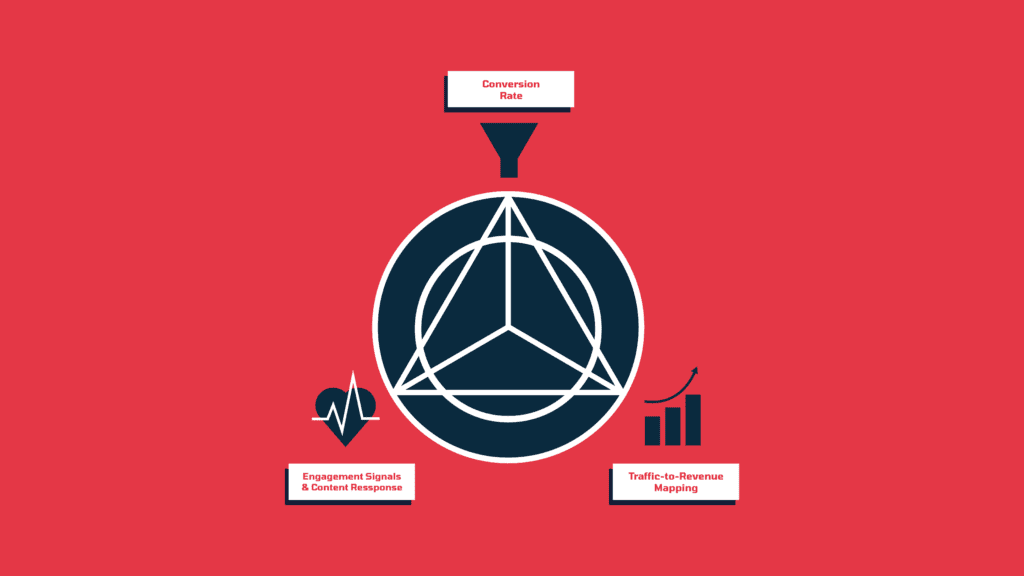
Conversion Rate (CR)
Conversion rate measures the percentage of visitors who take your key actions: signing up for a trial, activating an account, or upgrading to paid. This metric matters because it tells you whether LLM traffic is contributing to growth for your SaaS company, not just bringing in casual visitors.
Engagement Signals & Content Response
Looking at engagement and content response tells you how visitors interact with your site. Time on page, scroll depth, clicks on demos or pricing pages, and other behaviors are all examples of things you can track for this purpose. These insights help you understand which messaging, format, or tone resonates with AI-referred visitors, giving you a clearer picture of your ideal customer profile.
Traffic-to-Revenue Mapping
Traffic-to-revenue mapping links specific AI-driven pages or campaigns directly to business outcomes like new sign-ups, paid subscriptions, or upgrades. It does this by tracking which pages or campaigns each visitor interacts with before converting, then connecting those interactions to actual subscription or purchase data in your analytics or CRM. This metric matters because it ties your marketing efforts to the bottom line, showing which LLM touchpoints generate measurable SaaS growth.
Once you know which metrics matter most, the next step is setting up the right systems to measure them. Here’s how to do it.
Techniques to Measure and Analyze LLM traffic and conversions
These techniques help you dig into the behavioral patterns behind LLM-referred traffic so you can see what influences conversions across the entire journey, not just the final click.
Multi-Touch Attribution
Relying only on last-click attribution can dramatically understate the impact LLM traffic has on your growth. To avoid this, marketers use multi-touch attribution: a method for tracking how visitors interact with two or more pages, campaigns, or content pieces on your SaaS site before converting. It shows the full value visitors bring across the funnel by revealing which paths (the combination of pages, campaigns, and content pieces they interact with) contribute to sign-ups, trials, or paid conversions.
How to Set It Up:
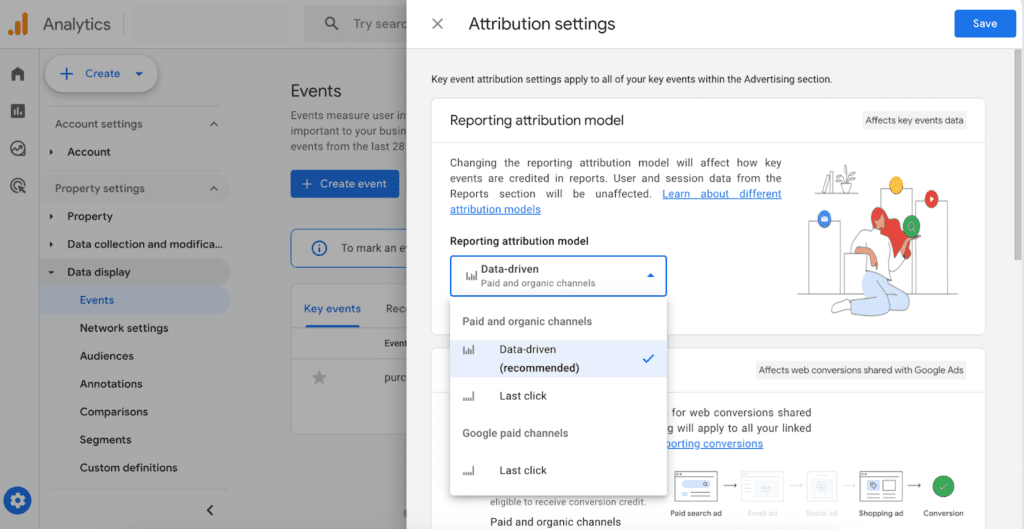
- Use GA4’s attribution models like data-driven or create custom multi-touch setups. Doing this helps you see which combinations of content and campaigns are most effective, so you can focus your efforts on what drives conversions and growth.
- AddLLM-specific UTMs so each AI platform is tracked separately. To do this, add a utm_source parameter to the URL you want to track. Then, use that full URL whenever you share your page in AI prompts, tools, or outputs. When the LLM preserves the link, GA4 will capture the traffic and it will appear in your Acquisition reports. Just note that some platforms rewrite or strip UTMs, so this won’t cover 100% of AI traffic.
- utm_source=chatgpt
- utm_source=perplexity
- utm_source=claude
- utm_source=gemini
- Segment traffic byuser intent You can do this in your analytics tool (like GA4) by creating segments or filters based on landing page tags, URL patterns, or content categories. For example: pages under /blog/ might indicate informational intent, while /pricing or /signup could indicate transactional intent. Apply these segments when analyzing traffic or running reports, so you can see how different types of visitors behave and convert.
- Informational → /blog/how-to-do-x
- Transactional → /pricing, /product/feature-guide, /signup
Tracking LLM Conversions
If LLMs are sending you traffic, you should know if it’s converting. This post shows how to track what actually matters. Want help setting it up? Let’s talk.
A/B Testing for LLM Content
A/B testing for LLM content means comparing your regular site content vs variations of your pages optimized for AI traffic to see which drives more conversions from AI-referred visitors. You want to do this because AI users have a different journey getting to your site and may behave differently from other visitors, such as those coming from search or paid ads. To get meaningful insights, segment your A/B test by traffic source so you can specifically track how LLM-referred visitors respond to each variation. This shows which content resonates best with people coming from LLMs, helping you create and refine pages that are more likely to convert visitors into trials, sign-ups, or paying customers.
How to Set It Up:
- Create two page variants (A and B), make small changes in structure, tone, or formatting (like moving a CTA, rewriting a headline, or changing the layout)so you can test which version performs better..
- Run the test, use GA4 experiments, Optimizely, or split URLs with UTMs. Make sure each page variant is properly tracked so you can compare results accurately.
- Filter results by AI-referred traffic, in GA4 or your analytics tool create a segment for visitors who arrived via LLM-specific UTMs (like utm_source=chatgpt). This lets you see how ChatGPT, Perplexity, Gemini, and Claude visitors respond to each variant specifically.
Conversion Path Analysis
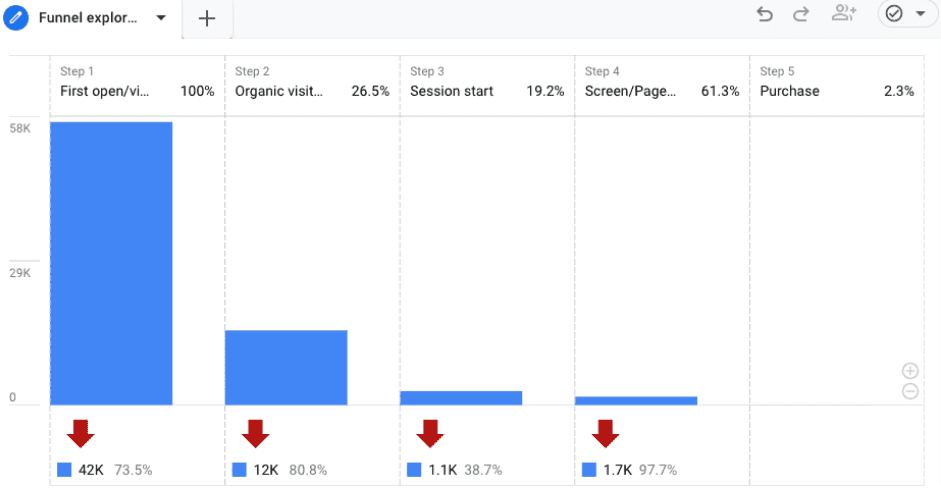
Conversion path analysis maps the journey of visitors on your SaaS site, from the first AI-surfaced page they land on to the point they convert. You want to use it because it reveals how LLM traffic navigates your site differently from traditional search traffic, showing where visitors drop off, get confused, or lose interest. Understanding these paths helps you optimize CTAs, messaging, and page flows to increase conversions from AI-referred traffic.
How to Set It Up:
- Use GA4’s funnel exploration or path analysis to visualize user journeys and identify drop-off points.
Source: MeasureSchool
- Segment traffic by source so you can isolate AI-referred visitors from traditional search or paid traffic.
- CompareLLM traffic vs. traditional search traffic behavior to spot differences in engagement and navigation. Look at patterns like:
- Which pages AI visitors land on first
- How long they stay on each page
- Where they drop off or exit
- Which CTAs or links they click most
- Interpret what these differences mean, determine which pages or flows are confusing, underperforming, or not aligned with AI-referred visitor intent.
- Identify opportunities for optimization, decide which content, CTAs, or page flows need adjustment based on the observed behavior.
- Implement changes and monitor results, update content, CTAs, or onboarding flows and track whether AI-referred conversions improve.
Quick Tips for Tracking and Analyzing LLM Conversions
When tracking AI-driven traffic to your SaaS site, you may face a few common challenges:
- Attribution complexity. LLM visitors often interact with multiple pages or campaigns before converting, so relying only on last-click tracking can understate their impact. Tip: Use consistent UTM tagging for AI touchpoints wherever possible. While you may not capture every interaction, this helps you better understand which pages and campaigns are contributing to conversions and gives a clearer picture of AI traffic’s role in the funnel.
- Data silos. If your LLM tools, analytics, and CRM don’t communicate, AI-driven insights can get lost. Tip: Sync your analytics with your CRM or a central data warehouse. This lets you unify tracking and connect visits to revenue, giving you a more complete view of AI traffic’s impact.
- Generic AI outputs. AI might surface content from your brand that isn’t relevant to your audience, which can reduce conversions. Tip: You can’t control or modify the LLM’s output directly, but you can improve your own content so it better matches real user queries. This increases the chances that LLMs surface the most relevant parts of your pages — which leads to stronger engagement.
Tools to Track LLM Conversions
If you’re ready to start tracking LLM traffic, here are the tools to help you measure visitor behavior, test content, and understand what drives conversions on your site.
Analytics Tools
- GA4 (custom LLM channels): Tracks AI-driven traffic, conversions, and events on your SaaS site, giving a clear view of how AI referrals impact growth.
- Mixpanel: Analyzes user actions and product events, showing how AI-referred visitors interact with trials, features, and onboarding flows.
- SOMONITOR: Monitors AI-generated content performance and visibility, helping founders measure discovery and lead impact.
Behavior Analysis Tools
- Hotjar: Combines quantitative behavior tracking (heatmaps, session recordings, scroll/click maps) with qualitative feedback tools (on‑page surveys, feedback widgets).
- FullStory: Offers comprehensive session indexing and deep behavior analytics, capturing interaction across sessions with advanced filtering, error reporting, funnel paths, and user‑journey tracking.
Bottom Line
LLM traffic behaves differently from traditional search, and if you don’t track it separately, you risk missing how AI-driven visitors are impacting your growth. By tagging traffic with UTMs, using multi-touch attribution, and segmenting by visitor intent, you can uncover which pages, campaigns, and content actually drive sign-ups, trials, or paid conversions.
Experiment with content, analyze visitor paths, and optimize your funnels — these steps give you a real, actionable understanding of how AI-driven discovery shapes your marketing performance, so you can make smarter decisions and capture more growth.
If you want help setting up your GEO strategy or building the right tracking foundation, get in touch with Singularity Digital today.
Tracking LLM Conversions
If LLMs are sending you traffic, you should know if it’s converting. This post shows how to track what actually matters. Want help setting it up? Let’s talk.