
It’s crazy that a file smaller than a tweet decides how search engines and AI bots treat your entire SaaS site. Yet that’s exactly what robots.txt do.
Configure it right, and you focus Google’s energy on the pages that drive pipeline. Configure it wrong, and you can tank rankings or open your docs to AI crawlers you didn’t sign up for.
And with llms.txt now in play, the stakes are higher.
This guide distills the official guidelines and hard-won lessons into a playbook you can trust.
TL;DR
- What robots.txt is: A tiny text file at your site root that sets crawl rules for bots. It doesn’t secure pages; it just tells polite crawlers what to fetch/skip.
- Why B2B SaaS should care: Without rules, bots crawl everything (including /admin, test/staging, account areas), wasting crawl budget and risking sensitive paths showing up in search.
- Mistakes to avoid:
- Copying Disallow: / from staging (kills your SEO).
- Blocking /blog or /products by accident.
- Listing “secret” URLs in robots.txt (it’s public).
- Using it for “noindex” (Google ignores that).
- Best practices: Keep it simple, always add your sitemap, don’t block CSS/JS, test with Google Search Console after changes, and audit quarterly.
- AI crawlers: Decide if you want GPTBot, Google-Extended, etc. to use your content. You can allow or block per bot – strategy call depending on whether you want visibility in AI answers or to protect proprietary content.
What is a Robots.txt File (and Why Care)?
A robots.txt file is a simple text file placed on your website’s root (e.g. https://yourSaaS.com/robots.txt) that tells web crawlers what they can or cannot crawl on your site..
Search engines like Google and Bing automatically check this file when they arrive, as do many AI/LLM crawlers (yes, those new AI bots read it too!). If a URL or section is restricted in robots.txt, polite crawlers will skip over it.
Without a robots.txt, crawlers assume they have free rein over your site. For instance, you probably don’t want Google wasting crawl budget on your staging pages or an /admin panel, and you might not want an AI bot gobbling up your entire knowledge base for training.
So, Robots.txt lets you set boundaries – it’s basically you saying, “Hey bots, you can go here, but keep out of there.”Little-known fact: The practice of using robots.txt dates back to 1994 and became a de facto standard, finally getting officially standardized as the Robots Exclusion Protocol in 2022. Not unlike the controversial LLMS.txt file some companies are using today to direct AI bots to important content. Right now, it’s not an established standard but give it a few years and we might see things change too.

Robots.txt for SEO: Controlling the Search Crawlers
Robots.txt is a tactical tool for guiding search engine crawlers (like Googlebot, Bingbot, etc.) through your site.
Use it wisely, and you’ll optimize what gets indexed; misuse it, and you might accidentally hide your site’s crown jewels from Google’s index.
Here’s how robots.txt helps (and how your SaaS should leverage it):
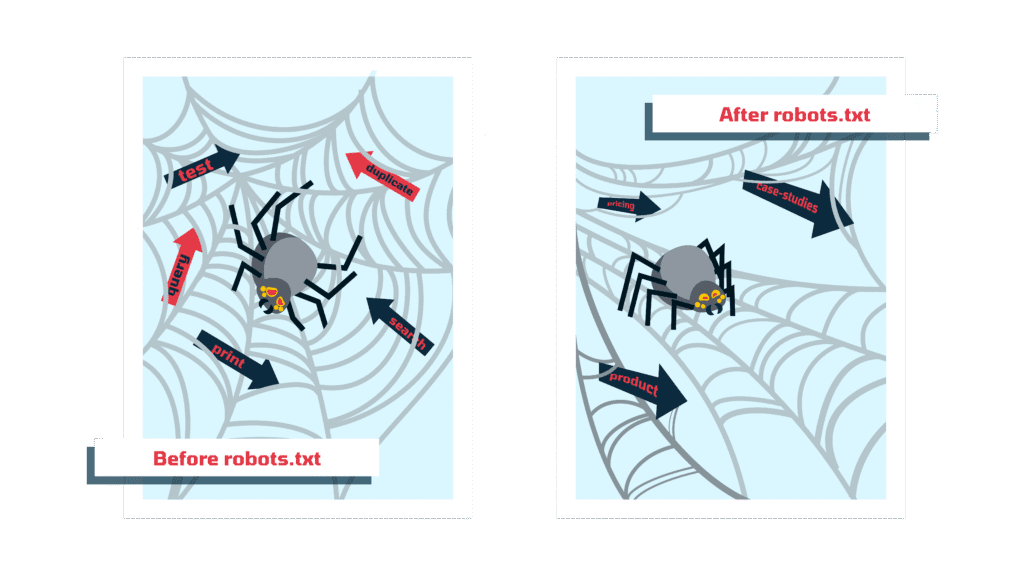
- Optimize Crawl Budget: If you have a large site (think over 100 pages.), telling crawlers what NOT to crawl can free up their resources to focus on your important pages. For any SaaS with hundreds of pages, this is important, you ensure search engines spend their time on your product pages and case studies, not on irrelevant or duplicate content. (Most smaller sites won’t hit crawl budget limits, but it’s good hygiene regardless.)
- Prevent Indexing of Sensitive or Irrelevant Pages: Every SaaS site has pages that are NOT meant for public eyes or search results, such as admin panels, login pages, user dashboards, staging sites, test pages, etc. By disallowing these in robots.txt, you tell Google “don’t go there.”
Important: Robots.txt alone doesn’t secure a page (it’s not a password); it just asks crawlers politely not to look. Malicious bots might ignore it, so never use robots.txt as the only protection for truly private data. - Avoid Duplicate Content & Index Bloat: SaaS sites often have odd pages that can cause duplicate content issues – landing pages for ppc, test pages, pages with session IDs in URLs, or print view pages. A classic move is to disallow things like /search results pages or parameter-laden URLs. This way you don’t confuse Google with many variants of the same content.
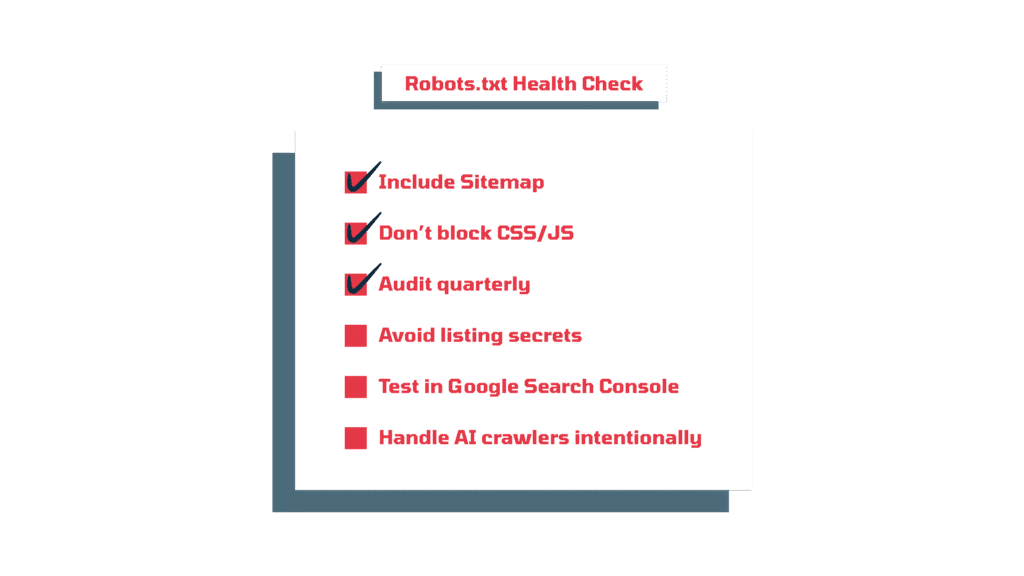
- Include Your Sitemap: A good robots.txt file typically lists your XML sitemap URL (or index of sitemaps) so search engines can easily find all your important URLs. For example:
Sitemap: https://yourSaaS.com/sitemap.xml
This isn’t a directive to disallow or allow; it’s just a helpful pointer. It’s like saying, “While you’re here, bot, grab my sitemap for a full directory of the site.” This helps ensure nothing important is missed during indexing.
Example – A basic SEO-focused robots.txt for a SaaS marketing site:
User-agent: * # Applies to all crawlers
Disallow: /login # Block login page (no value in indexing this)
Disallow: /admin/ # Block admin section
Allow: / # Otherwise allow everything public
Sitemap: https://www.yourSaaS.com/sitemap.xml
In the above example, we blocked two types of pages common to SaaS sites that shouldn’t be in Google’s index (login and admin), but allowed everything else. The User-agent: * means these rules apply to ALL bots. This simple setup ensures your marketing pages, docs, and blog are open for crawling, but the fluff or sensitive stuff is off-limits.
take control with Robots.txt
Crawlers don’t need to see everything. We’ll help you set rules that make sense and keep your site safe while your SEO works.
Why not just block everything and let only specific bots in? Because playing bouncer too hard can hurt you. Blocking too much content can tank your SEO – there’s a fine line between playing hard to get and being outright invisible. We’ve seen companies accidentally put Disallow: / for all agents on their production site (often copied from a staging site’s robots.txt), essentially kicking Google out completely. The result: zero indexation until it’s fixed. Oops. The lesson: be deliberate and precise with what you disallow.
Using Robots.txt to Wrangle LLM Crawlers (The New Kids on the Block)
SEO crawlers aren’t the only robots visiting your SaaS site anymore. We have LLM crawlers too now – these are bots used by AI systems (like OpenAI’s GPTBot for ChatGPT, or others used by Bard, Bing’s AI, etc.) to scrape content for training or to serve answers. In 2023 and beyond, B2B SaaS companies suddenly found not just Google or Bing crawling their docs and blogs, but also AI data hoovers. The good news is, robots.txt can help you manage these too.
Just like search bots, many AI crawlers are expected to respect robots.txt instructions – but whether they do or not is entirely up to them.
OpenAI’s GPTBot, for example, was introduced in mid-2023 and will check your robots.txt. If your file says “disallow” it’ll know that you don’t want them here .
Similarly, Google has a Google-Extended crawler token for its AI models (used to train Gemini), which site owners can also control via robots.txt. In other words, you can say “no thanks” to certain AI training scrapers while still allowing normal search indexing. Here’s how:
- Identify the AI User-Agents: Each crawler identifies itself by a user-agent string. For instance, OpenAI’s bots might show up as GPTBot (for its general web crawler) or ChatGPT-User/ChatGPT-Feedback (for specific purposes), Anthropic’s bot as ClaudeBot, Google’s AI scraper as Google-Extended, etc.. These names are what you’ll use in your robots.txt rules to target those bots specifically. A lot of major AI services publish their user-agent names for this reason.
- Allow or Disallow? Make a Strategic Choice: Not everyone will want to blanket-block AI crawlers. Consider your strategy:
- Concerns about AI training on your content: If you’re worried that AI models might learn from your documentation or blog and then regurgitate answers without users ever visiting your site, you can choose to disallow those bots. For example, if you don’t want ChatGPT’s model training on your proprietary guides, you’d block GPTBot. Many did just that – by September 2023, 242 of the top 1000 websites had decided to block GPTBot shortly after it launched.
- Opportunities in AI visibility: On the other hand, if you want your SaaS to be visible in AI-generated answers (say, your content gets cited by Bing Chat or a coding copilot tool), you can allow certain AI crawlers to access key content. It’s a trade-off: blocking means control and exclusivity; allowing could mean more AI-driven exposure. Either way, robots.txt lets you make that call.
- Syntax for AI bots: You’ll use the same User-agent / Disallow syntax as usual. For instance, to block OpenAI’s crawler from everything on your site, you’d add a rule like:
# Block OpenAI’s GPTBot from the entire site
User-agent: GPTBot
Disallow: /
This one-liner tells GPTBot it is not permitted to crawl any part of your site. Similarly, to opt out of Google’s AI data crawler, you’d add:
# Block Google’s AI training crawler (Google-Extended)
User-agent: Google-Extended
Disallow: /
Google has stated that using this directive will stop your site’s content from being used to improve Bard/Vertex AI, while still allowing regular Googlebot to index your site normally. That means your site can show up in Google Search, but Google promises not to feed those pages into its AI model’s training data if you block Google-Extended. (Note: This doesn’t affect the new AI-powered answer boxes on search directly; it’s about the training data.)
- Partial Allowances: Maybe you only want to block some content from AI bots. You can absolutely do that. For example, you might let GPTBot crawl your marketing pages (so your product info could show up in AI answers) but block it from crawling your knowledge base PDF library. In your robots.txt, you’d create a GPTBot section with specific Disallow paths (and use Allow directives if needed to carve out exceptions). The key is, you can be granular: treat each bot on a case-by-case basis based on your business comfort level with AI. Some companies even maintain a separate section for each major AI bot with tailored rules.
A quick reminder: robots.txt requests are voluntary – most well-behaved AI crawlers (OpenAI, Google, Anthropic, etc.) will comply, but a rogue scraper might not. Still, for reputable AI services, this is your first line of defense or invitation.
Consider it your way of saying “yes, welcome” or “no, do not enter” to the various AI data miners out there. And given the trajectory (tons of sites rushing to add AI bot rules starting in 2023), it’s clear webmasters see this file as critical for controlling AI access.
Pro Tip: If you do want to actively guide AI models to the most accurate, up-to-date content (rather than just blocking them), look beyond robots.txt. A new concept called llms.txt is emerging – essentially a cheat sheet of curated links for AI, living in your root directory. It doesn’t replace robots.txt (it doesn’t restrict crawling), but works alongside it to say “if you’re an AI looking to learn about our product, here’s the content that matters.” In other words, robots.txt tells bots what to avoid, while llms.txt can tell AI what to focus on.
Companies with extensive docs may benefit from using both: robots.txt to keep junk or sensitive areas off-limits, and llms.txt to spotlight the golden pages (like your API guide or onboarding tutorials) that you do want AI to cite.
Best Practices for a Great Robots.txt (Good vs. Bad Examples)
Not all robots.txt files are created equal. Some are lean, clean, and effective; others read like a hot mess of confusion or, worse, accidentally sabotage the site’s SEO. Here are the guidelines we follow for a good robots.txt, along with common mistakes that make a bad one:
- Keep It Simple and Relevant: A good robots.txt is usually short and to the point. List only what you need to block or allow. Don’t auto-generate a 200-line file blocking every random plugin directory under the sun. Simplicity reduces the chance of errors and makes it easy for you (and others) to understand later. Every line should have a purpose. If you inherit a robots.txt, audit it and remove outdated rules.
- “Disallow” with Care – Don’t Rob Yourself of Traffic: Only disallow content that truly needs to be hidden. A bad robots.txt often blocks important sections by mistake, crippling SEO. For example, blocking /products because you had some test page in there – oops, now none of your product pages can be crawled. When in doubt, err on the side of caution: it’s better to let a crawler in and use other means (like meta tags or password protection) to manage content, than to accidentally slam the door on your key pages.
- Don’t Rely on Robots.txt for Noindexing: This is a classic newbie mistake – putting Disallow in robots.txt and assuming that means the page won’t appear in Google. In fact, Google does not treat disallowed pages as a directive to not index; it just won’t crawl them. If some other site links to a page of yours, you disallowed, Google can still index the URL (with perhaps a placeholder title/description) even if it can’t crawl the content.
Once upon a time, Google unofficially tolerated a noindex directive in robots.txt, but that ended in 2019 – they flat-out ignore “noindex” in robots directives now.
The right way to prevent indexing is to allow the page to be crawled but include a <meta name=”robots” content=”noindex”> on it (or use HTTP header), or protect it behind login if it’s truly private. Use robots.txt to control crawling, not indexing directives. - Never List Secrets or Sensitive URLs in Plain Text: One quirky aspect of robots.txt – it’s public. If you put something in there, anyone can read it by going to yoursite.com/robots.txt. A bad practice is to enumerate all your “secret” admin or staging URLs in robots.txt, which is basically advertising them to the world (malicious bots included).
We get it, you want to block them from Google, but don’t name them all in one convenient list. A better approach for truly sensitive areas is to lock them down (password or IP restrict) and maybe disallow generic patterns. But don’t count on obscurity via robots – it’s not obscure at all when it’s literally public. - Include a Sitemap Directive: As mentioned, always drop in that Sitemap line pointing to your XML sitemap. It’s low effort, and ensures crawlers can find all your pages easily. This is a hallmark of a good robots.txt. It doesn’t hurt anything and can only help crawlers discover content.
- Use Wildcards and Allow carefully: Robots.txt supports pattern matching (e.g. Disallow: /folder/*/temp/) and an Allow directive to override disallows in certain cases. These are powerful tools but easy to screw up.
A good robots file might use a wildcard to, say, block all URLs containing a ?sessionid parameter or something – just be absolutely sure your pattern doesn’t inadvertently match more than intended. When using Allow, it typically is used to let specific files through in an otherwise disallowed section (for example, disallow everything in /downloads/ except /downloads/whitepaper.pdf by using an Allow for that PDF).
Always double-check wildcard rules! A misplaced * or a missing slash can throw the doors open or closed unintentionally. When in doubt, test your rules with a robots.txt tester (Google Search Console has one) to see if the URLs you want blocked or allowed are correctly interpreted. - Mind the Syntax (Case Sensitive & Format): Robots.txt cares about capitalization and exact spelling. Disallow: /Folder is not the same as /folder. A bad robots.txt might fail to block anything simply because someone wrote “Disallow: /Blog” when the actual URL is /blog (lowercase). Also, every group of directives should start with a User-agent line.
Forgetting a User-agent is like writing a law with no one assigned to follow it – it does nothing. Make sure each block of rules is properly formed, and that the file ends with a newline (some parsers require a newline at end of file – minor detail, but good practice). - Don’t Block CSS & JS (At Least for Google/Bing): In 2014, Google updated its technical webmaster guidelines and explicitly recommended allowing crawling of JS/CSS files. It says that failing to do so can impact optimal rendering of your content and hurt your rankings in SERPs. So unless you have a veryspecific reason not to, don’t do that,- if the algorithm can’t fetch your styling or scripts, it might assume that your site is broken or there’s text overlapping, etc.
- Regularly Audit and Update: Your site evolves – new sections launch, old sections retire, somebody might accidentally edit robots.txt (or a plugin might!). Set a calendar reminder to review your robots.txt periodically. We recommend auditing it at least quarterly or whenever you make a significant site change. It’s a one-minute check that can save you weeks of heartbreak if something went wrong. So, make sure yours is doing what it’s supposed to, and nothing more. Catch those mistakes before they catch you (and tank your SEO).
- Test, Test, Test: Use Google Search Console’s Robots Testing tool or third-party testers to simulate various URLs against your rules. This is especially crucial after making changes. A good robots.txt is like a well-behaved bouncer: it lets the right guests in and keeps the troublemakers out. Testing is how you check its ID-checking skills.
Robot.txt: Good vs Bad Example
To illustrate, here’s a bad robots.txt for a hypothetical SaaS, followed by a fixed good version:
❌ Bad Example: (What not to do)
User-agent: *
Disallow: /
Disallow: /blog/
Disallow: /docs/
In this bungled example, the first Disallow: / already blocks the entire site for all crawlers – basically a site-wide “go away”. The subsequent disallows are redundant (once you disallowed /, you didn’t need to also disallow blog and docs – they’re already blocked). This site would be completely invisible to search engines, negating all that content investment.
Unless this is a deliberate decision (rare for a public SaaS business), it’s a disaster. This often happens when someone left a Disallow: / from a staging environment or thought they were being clever hiding everything.
✅ Good Example: (Cleaned up for a typical SaaS)
# Allow all search and AI crawlers except specific ones
User-agent: *
Disallow: /admin/            # block backend admin
Disallow: /user/account/     # block user account pages
Allow: /                     # allow everything else

# Block specific bots that we don't want to crawl anything
User-agent: GPTBot           # block OpenAI GPTBot (AI training crawler)
Disallow: /

User-agent: Google-Extended  # block Google's Bard/Vertex AI training crawler
Disallow: /

Sitemap: https://www.yourSaaS.com/sitemap.xml
In the good example, we allow most content to be crawled, only blocking areas that are irrelevant or sensitive (admin, user account pages).
We’ve also shown how you can layer specific rules for specific bots after the general rules. The User-agent: * block applies to everyone except those we later give more specific rules to.
We explicitly blocked GPTBot and Google-Extended from the whole site (maybe this hypothetical SaaS decided it doesn’t want AI training on any of its content). Notice we still include the sitemap for completeness. This file is clear, targeted, and doesn’t inadvertently hamstring our SEO – that’s what you want.
Final Thoughts
Robots.txt might seem like a mundane technical detail, but it can be the difference between controlling your digital fate or leaving it up to the bots. It’s your first shot at telling both search engines and AI crawlers how you want your site to be treated. In an era where SEO and AI overlap, getting your robots.txt right is just smart business and good marketing hygiene.
At Singularity Digital, we’re opinionated about this because we’ve seen the stakes: one stray slash in a robots file can deindex a site; one oversight can let an AI scrape content you’d rather keep proprietary. On the flip side, a well-crafted robots.txt can boost your SEO efficiency and safeguard your content strategy. It’s a small file with a big role – part traffic cop, part bouncer, part tour guide for bots.
To recap our edgy-but-earnest advice: Keep your robot.txt clean, updated, and aligned with your business goals. Use it to shut out what you don’t want and guide what you do. And always remember, whether it’s Googlebot or GPTBot, you’re in charge of what they can touch – if you take the time to lay down the law in robots.txt.Now go forth and check that robots.txt file of yours – make sure it’s doing your bidding. The bots are listening. 😉
take control with Robots.txt
Crawlers don’t need to see everything. We’ll help you set rules that make sense and keep your site safe while your SEO works.