TL:DR:
- RAG is how AI models find and use specific, up-to-date information to answer user questions, instead of relying on their training data.
- It runs on a four-step loop: query comes in, system retrieves relevant content, packages it into a prompt, and the LLM generates a response from it.
- RAG matters to SaaS founders in two places. Inside your product, it powers accurate chatbot and assistant responses. Outside your product, it determines whether AI search tools like ChatGPT and Perplexity cite your content or a competitor’s.
- You can optimize for RAG without a developer. Write self-contained sections, lead with the answer, use clean HTML structure and schema markup, and be specific in every claim.
What is RAG?
RAG (Retrieval-Augmented Generation) is one way that AI models source knowledge that doesn’t exist in their training data, so they can generate the most relevant and useful responses possible.
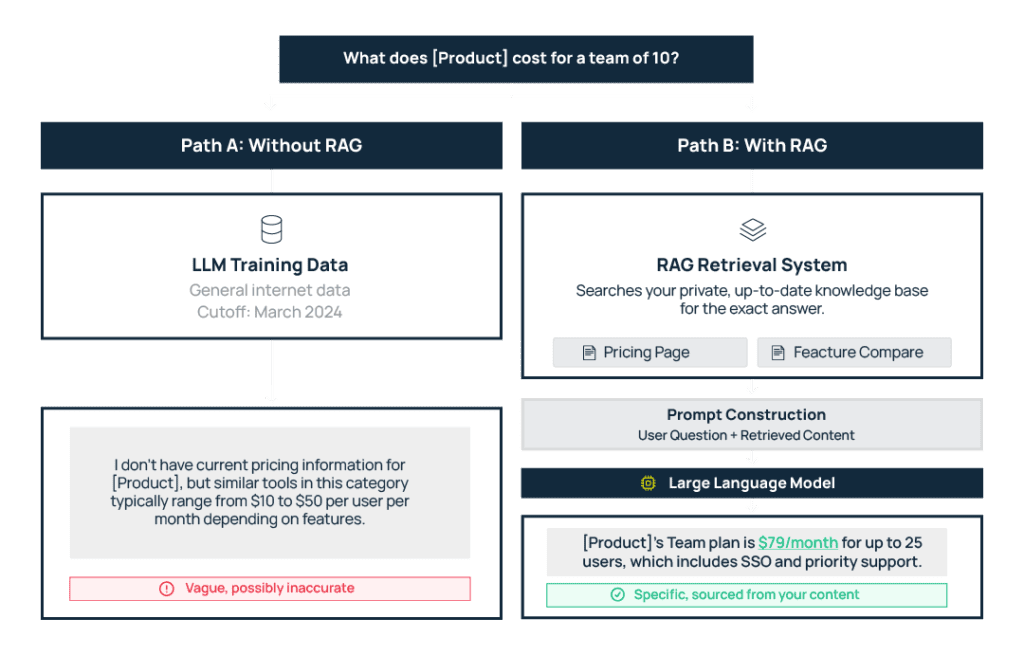
LLMs most often use general training data with a cutoff date sometime in the past to answer questions. And it works great when a user wants to know factual data, like what year the French Revolution started.
But when a user asks about details like the pricing of a product that launched last month, the AI system does not have a historical answer and needs to find that information. So it uses a combination of its existing data and new retrieval (aka a RAG system) to create an answer.In order for your brand to surface and have accurate information presented inside LLMs –– whether a chatbot or AI assistant in your own help documentation or a third-party tool like Perplexity or ChatGPT –– you need to optimize your content for RAG.
How Does RAG Work?: The Four-Step Loop
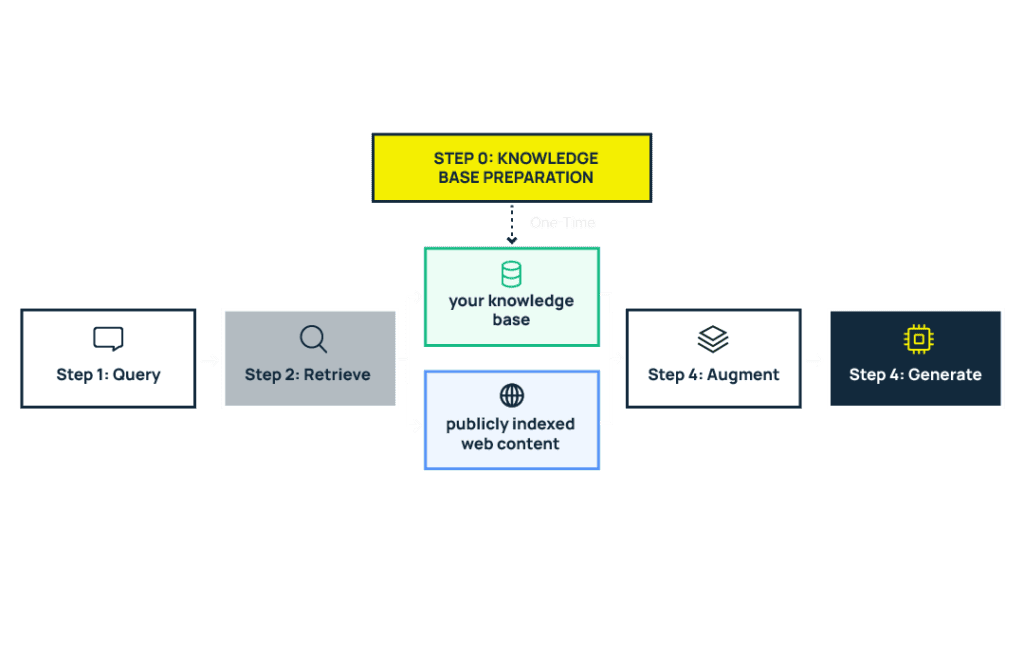
Step 0: The index gets prepared before any query comes in
Before the four-step loop can run, there needs to be something to search against. This is the setup phase — external content gets collected, processed, and indexed so it’s ready for retrieval when a query arrives.
What that looks like depends on where RAG is working:
- For your own product, you control this step. Your team decides what content goes into the knowledge base (help docs, product guides, FAQs), how it’s structured, and how often it gets updated. Those chunks are then converted into embeddings and stored in a vector database, ready to be searched.
- For external AI search platforms like ChatGPT or Perplexity, the platform handles this. They crawl the web, index publicly available content, and build their own retrieval databases. Here, you have no control over the process.
Step 1: A query comes in
A user asks a question. Maybe a customer types “how do I set up SSO?” into your in-app assistant. Or a buyer asks Perplexity, “What’s the best project management tool for remote teams?”
Step 2: The RAG system searches for relevant content
The query gets converted into a numerical representation called an embedding (a way of capturing the meaning of the question in a format machines can compare against other content). The system then runs a similarity search across the pre-indexed content (from step 0) to find the closest matches.
- For your own product, that index is your knowledge base or help center.
- For an AI search platform, that index could be any publicly available web content — including yours.
Step 3: The RAG system packages retrieved content into a prompt
Once the RAG system has its closest matches, it takes those retrieved pieces and combines them with the user’s original question into a single input — called a prompt — that gets sent to the LLM.
It’s like handing someone a question along with a few pages of reference material and saying, “answer this based on what’s in front of you.” The LLM doesn’t see your entire knowledge base or the whole internet. It sees a curated selection of the most relevant chunks that the RAG system found.
Step 4: The LLM generates a response using that context
The LLM processes the reference material it was given and writes a response from it. Whether you appear in that response, and how correct and useful the information about your brand is, depends on whether the RAG system has been able to retrieve and process your content.
That’s why optimization is so important.
How to Optimize Your Content for RAG
Optimizing for RAG means making your content retrievable so LLMs have accurate information about your product to work with. Here’s how to do it, and you don’t need a developer.
These practices apply wherever RAG is relevant to you. If you run a chatbot or assistant powered by your knowledge base, they help it give better answers. If you don’t, they help your content become retrievable when LLMs like ChatGPT and Perplexity search for the right information to answer a user’s query.
1. Write so every passage makes sense on its own
RAG systems pull small chunks of text, typically a few hundred words at most. Google Chrome’s AI features, for example, chunk pages into passages of roughly 200 words based on the page’s HTML structure.
This means every section of your content needs to be self-contained. If a paragraph only makes sense after reading three paragraphs above it, it becomes useless when retrieved on its own, because the retrieval step won’t grab those other paragraphs for context.
For example, a sentence like “Our SSO setup supports SAML 2.0 and OIDC with automatic role mapping” retrieves well because it carries its full meaning in isolation. A sentence like “As mentioned above, this also works with the protocols discussed earlier” retrieves poorly because it depends on surrounding content that the RAG system probably didn’t pick up.
So write every section as if it might be the only thing the LLM sees. Because in most cases, it will be.
2. Put the answer first (bottom line up front)
When a section gets chunked, the opening sentences are most likely to land in the first retrievable passage, so you need to state the most relevant information right away.
If your H2 is “How do I set up team permissions?” and your first sentence is about how your platform was built with collaboration in mind, the chunk that gets retrieved probably offers nothing useful to the LLM when it tries to synthesize an answer.
Not to mention, LLMs like Google’s Gemini tend to ignore passages that don’t match the query when they have better sources that answer the question more directly than you did.
So lead every section with the direct answer — How do I set up permissions? “Team permissions can be configured under Settings > Roles, where you can assign Admin, Editor, or Viewer access to each member.”
3. Use a clear HTML structure
Chunking follows your page’s DOM structure — that is, the HTML hierarchy of headings, paragraphs, and sections. This means how you structure your page directly determines how a RAG system breaks it apart for retrieval. Here are two simple ways to optimize it:
Go from H1 to H2 to H3 in logical order. Don’t jump from H1 to H4, or nest unrelated topics under the same H2. Each heading should signal a clear shift in topic so the chunking system knows where one idea ends and another begins.
Use schema markup. a standardized code you add to your HTML that labels your content for machines — telling them “this is an FAQ,” “this is a product,” “this is a price” so they’re confident about what type of content they’re looking at without having to infer it from the text alone.
Schema also helps RAG systems identify specific entities on your page – your product name, pricing tiers, feature names – as structured data they can extract directly, rather than trying to guess it out of natural language.
This helps RAG systems find your content faster when it’s relevant to a user’s query and represent your product accurately in the response.
4. Be specific in every claim you make
Writing can cover a topic without saying anything concrete about it. RAG systems deprioritize this content because it doesn’t add useful information to the answer the LLM is trying to construct.
For example, compare these two sentences about the same feature:
“We offer affordable plans for teams of all sizes.”
This is technically accurate, but tells the LLM nothing it can use in a response. What are the plans? What do they cost? What’s included?
“Our Team plan starts at $49/month for up to 10 users and includes SSO, audit logs, and priority support.”
If a user asks, “How much does [product] cost for a small team?” this chunk answers the question directly.
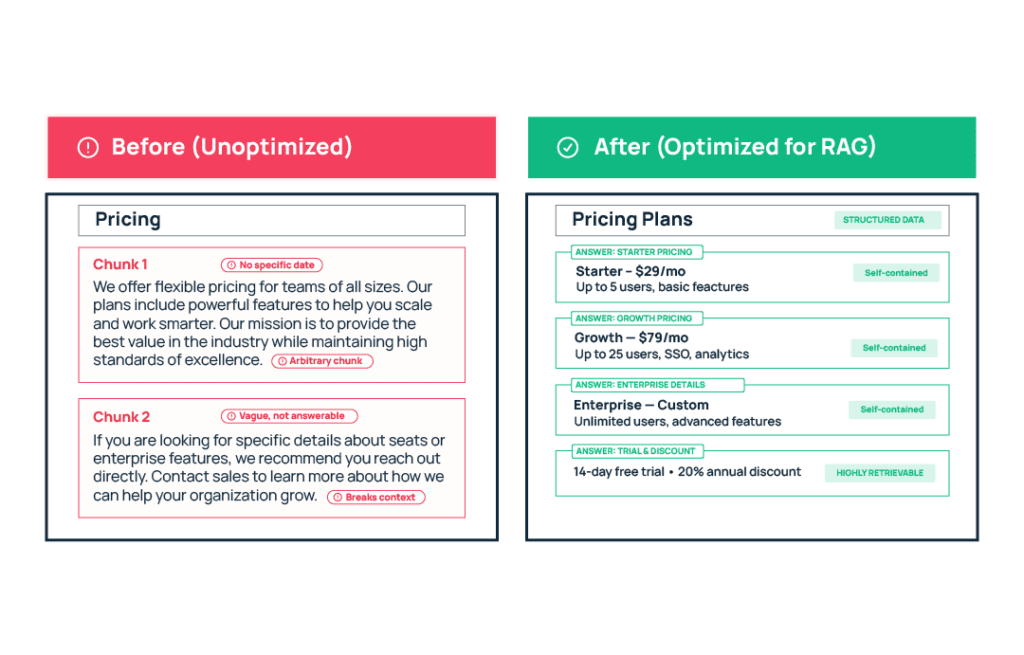
RAG Optimization in Practice: Before and After
Here’s what RAG optimization looks like applied to a real piece of SaaS content. We’ve taken a typical pricing and feature comparison page and rewritten it using the four principles covered above.
Final Thoughts: Why Should Founders Care About RAG?
AI search is growing fast. And the traffic that LLMs like ChatGPT and Perplexity send to websites converts at 14.2% compared to Google’s 2.8%. Your SaaS product needs to be part of these conversations to capture that demand, and RAG is central to whether you even get found in the first place.
On the other hand, within your product, users expect accurate, product-specific answers. Fine-tuning an LLM to deliver that is expensive, slow, and requires retraining the model every time your product changes. RAG lets you keep the model as-is and update the knowledge base instead.
RAG also gives you source attribution. Answers point back to the specific doc they drew from, allowing users to verify easily. Your team can also trace a bad answer to the source and fix it.
You don’t need an ML team to optimize for it; in fact, the most important inputs are the content you already have – your pricing pages, feature documentation, FAQs, use case pages, and help center articles. Start by making sure they’re clean, current, and structured for retrieval.
For help putting these optimization strategies into practice across your site and docs, book a call with us to start working on an optimization plan tailored to your product and content!