
TL;DR
- Schema markup helps search engines understand what your pages actually represent, not just what they say
- It’s not a direct ranking factor, but it can improve click-through rates through richer search results
- SaaS companies should focus on a few key schema types: Organization, SoftwareApplication, Product, Article, and FAQ
- You don’t need to be a developer, schema can be implemented via CMS tools or added manually with JSON-LD
- Start with high-impact pages, validate your setup, and track performance over time to see results
You Google your own product to check how it appears in search. Your page is ranking well, and your title and meta description look good.
Then you notice something: your competitors’ listings stand out more than yours.
Their results show star ratings, FAQs, breadcrumbs (a clickable path showing where the page sits within a site, like Home > Product > Feature), or even pricing information directly in the search results. They are begging to be clicked on.
In many cases, this difference comes down to schema markup.
What is schema markup?
Think of schema markup as a sophisticated labeling system. It is structured data added to a page’s code that helps search engines understand the content’s meaning. While invisible to users, this code acts as a set of machine-readable signals that categorize and display your page more accurately in search results.
These ‘labels’ are standardized based on Schema.org’s vocabulary. They identify whether content represents a software product, company, review, Q&A, article, and so on..
These labels provide concrete information for a search engine to use when creating your search results, rather than merely inferring meaning from headings and text.
The illustration below demonstrates this concept: a normal search result (left), the structured data in the page’s code (middle), and the actual page (right). You can see that star ratings, number of ingredients and more are being pulled from the page into the search result from the schema markup .
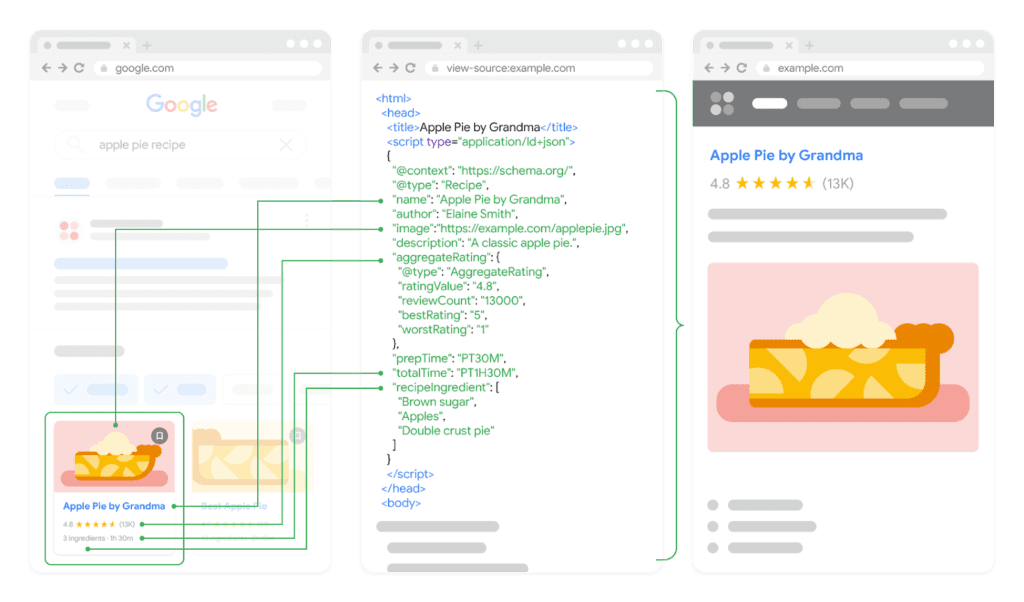
For SaaS websites, schema markup identifies software applications, pricing information, reviews, company details, and FAQ content, helping search engines understand the relationships between your product pages, documentation, and other content across your site.
Structured data vs. schema markup vs. rich results
These three terms are often used interchangeably, but they refer to different parts of the same concept.
Structured data is the general idea of organizing information in a way that machines can easily read and interpret, rather than only using plain text and leaving search engines to guess based on page content.
Schema markup is one of the main ways you can implement structured data by labeling elements on a page using standardized vocabulary from Schema.org.
Rich results are the enhanced search listings featuring elements like star ratings or other contextual details that may appear when structured data is implemented correctly.
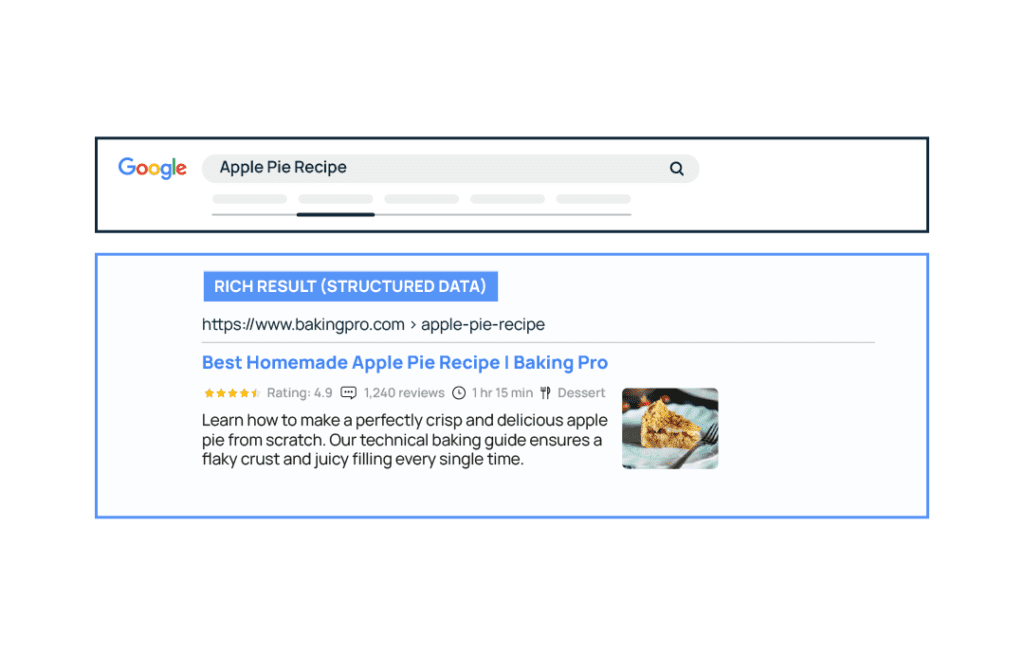
In other words, structured data is the concept, schema markup is the implementation, and rich results are one possible outcome in search.
Does schema markup improve search rankings?
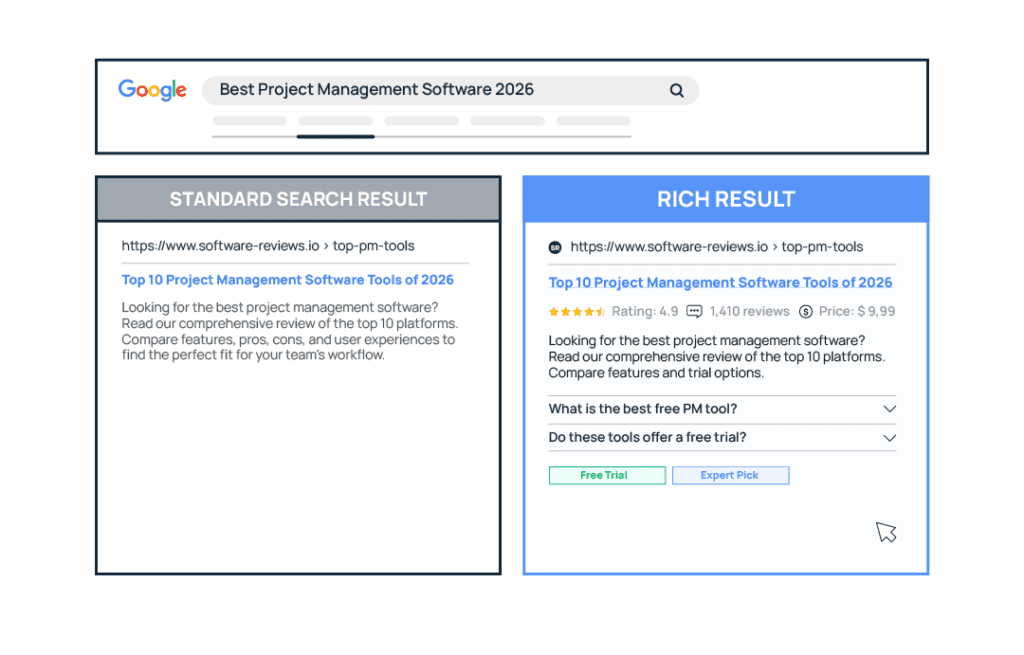
Google has been clear that schema markup is not a direct ranking factor, and simply implementing structured data won’t cause a page to rank higher on its own.
However, schema can still influence performance indirectly.
By enabling rich results your search listings can become more visible and informative. This can lead to higher click-through rates, meaning schema helps you get more value out of the rankings you already have.
The bigger impact, however, comes from how schema helps search engines understand your content more concretely. Instead of guessing what your page represents, search engines can clearly identify whether it’s a software product, a pricing page, a help article, or something else.
That clarity helps search engines:
- categorize your pages more accurately
- match your content to the right search intent
- connect your product, brand, and content as part of a larger entity
Over time, this can mean your pages align more closely with the search queries they’re meant to answer, driving more qualified traffic.
Does schema help with AI and voice search visibility?
The short answer: possibly, but we don’t have enough definitive evidence yet. At this stage, Google has not explicitly stated that schema markup improves visibility in AI Overviews or voice search results.
Structured data makes content easier for machines to interpret. By clearly labeling what your page represents, schema reduces ambiguity and gives search engines more structured signals to work with. Because of that, it’s reasonable to assume schema may help AI systems extract and organize information more reliably, but ultimately we will all have to wait and see how this develops.
Why schema markup matters for SaaS websites
SaaS company websites typically span multiple page types that serve different purposes:
- product and feature pages that explain what your software does
- pricing pages that drive conversions
- documentation and help content that supports users
- blog content that attracts and educates potential customers
Without structured data, search engines have to guess what your company and offerings are based on text, headings and internal links. That’s a problem when, from a purely textual perspective, a pricing page, a product overview, and a help article can all look similar.
Schema helps a search engine create a more coherent picture of your product, brand and web pages. That added clarity can:
- help search engines match your pages to the right queries
- improve how your product is understood as an entity (a clearly defined product with its own features and context)
- make your listings eligible for rich results
How to implement schema markup on a SaaS website
Implementing schema markup doesn’t have to be a developer-only task.
For many SaaS teams , especially smaller teams or those without dedicated engineering support, there are tools that allow you to add structured data without directly editing your site’s code.
That said, if you have the technical bandwidth, you can absolutely do this manually if you prefer.
As you put schema markup in place, start by focusing on pages that directly influence acquisition or conversions, such as product and feature pages, pricing pages, and high-traffic blog posts. These are the areas where improved search visibility and higher click-through rates can have the biggest impact.
For ease: CMS or plugins
Many CMS platforms allow you to add schema markup without editing code.
Tools like Yoast SEO or Rank Math can automatically generate structured data based on your page type, for example: blog posts, articles, or basic organization details.
For most teams, this is the fastest way to get started, and is especially useful for:
- small teams without dedicated developers
- marketing-led teams managing content directly
- companies that want to implement schema quickly without slowing down workflows
Starting with CMS-based schema can make it easier to build a structured content system that scales because it makes it easier for non-technical people to standardize schema across your website.
For control: Manual JSON-LD
JSON-LD allows you to add structured data as a script within your page, without affecting the visible content. This makes it easier to manage and update compared to other formats.
With this approach, developers add JSON-LD directly into the page’s HTML — typically in the <head> or body of the page.
Manual implementation gives you full control over:
- which schema types are used
- how properties are structured
- how different pieces of data connect (e.g. product, organization, content)
This is especially useful for SaaS companies that want to: customize schema for product or pricing pages; implement more advanced or specific schema types; ensure accuracy across complex page structures.
Which schema types matter most for SaaS websites
Small to mid-sized SaaS teams that are just beginning to improve their website don’t need to implement every schema type under the sun. A pragmatic approach is to focus on the schema types that support customer acquisition and product understanding first.
In practical terms, that means prioritizing pages that:
- explain your product
- drive conversions (like pricing pages)
- attract traffic (like blog content)
The goal is to add the right schema in the right places so search engines can clearly understand what your business offers, without overcomplicating your setup.
Below are some of the schema types that matter most for SaaS, along with where they should be used and when they’re actually worth implementing.
Organization schema
Organization schema identifies the company behind your website. It tells search engines who you are as a business and helps search engines connect your brand across search results, knowledge panels, and different pages on your site. Without this, search engines have to piece together your brand from scattered signals across your site and the web.
This typically includes:
- your company name
- website URL
- logo
- social profiles
Where should you use it?
Organization schema is usually implemented once and applied sitewide to consistently reinforce your company identity.
That means it’s often added in your global site code (like the header or via your CMS), rather than being tied to a single page.
Example
Here’s how this information looks to a search engine without structure:
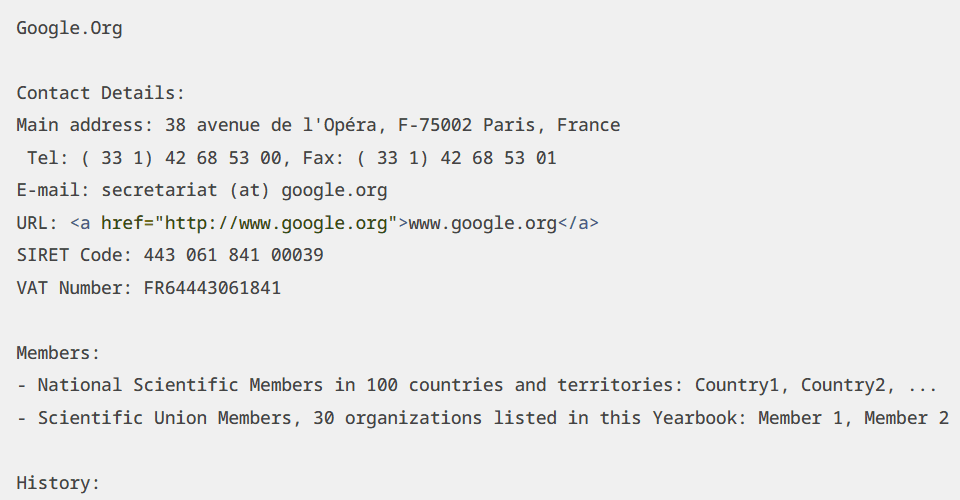
And here’s how schema organizes that same information:
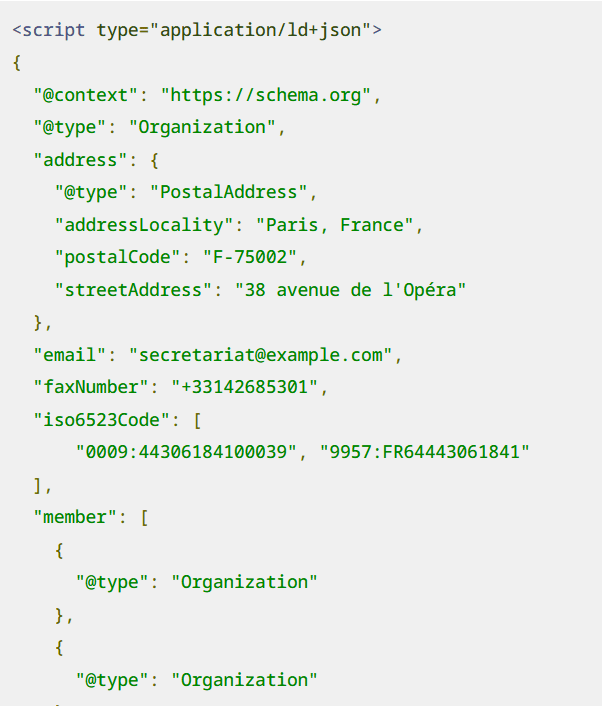
Note: This example is adapted from Schema.org and simplified for illustration, your implementation should be customized and validated.
SoftwareApplication schema
SoftwareApplication schema tells search engines that a page is about a software product.
For SaaS companies, this is one of the most important schema types because it directly describes what you sell. Without this schema, search engines have to guess what your product is based on page content.
It can include details like:
- application category (e.g. CRM, analytics, marketing)
- operating system (typically “Web” for SaaS)
- pricing or subscription details
- ratings or reviews (if available)
Where should you use it?
SoftwareApplication schema should be used on product-related pages, such as:
- your main product page
- feature or solution pages
- sometimes pricing pages (if they focus on the product itself)
It should not be added to every page on your site. Blog posts, help articles, and general content pages should use other schema types instead.
Example
Here’s how information about a product might appear without structured data:
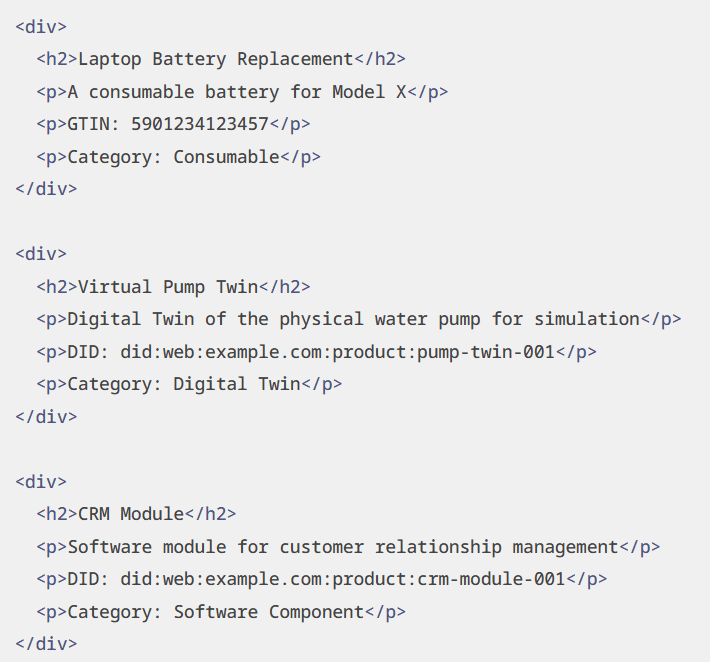
And here’s how schema organizes that same information:
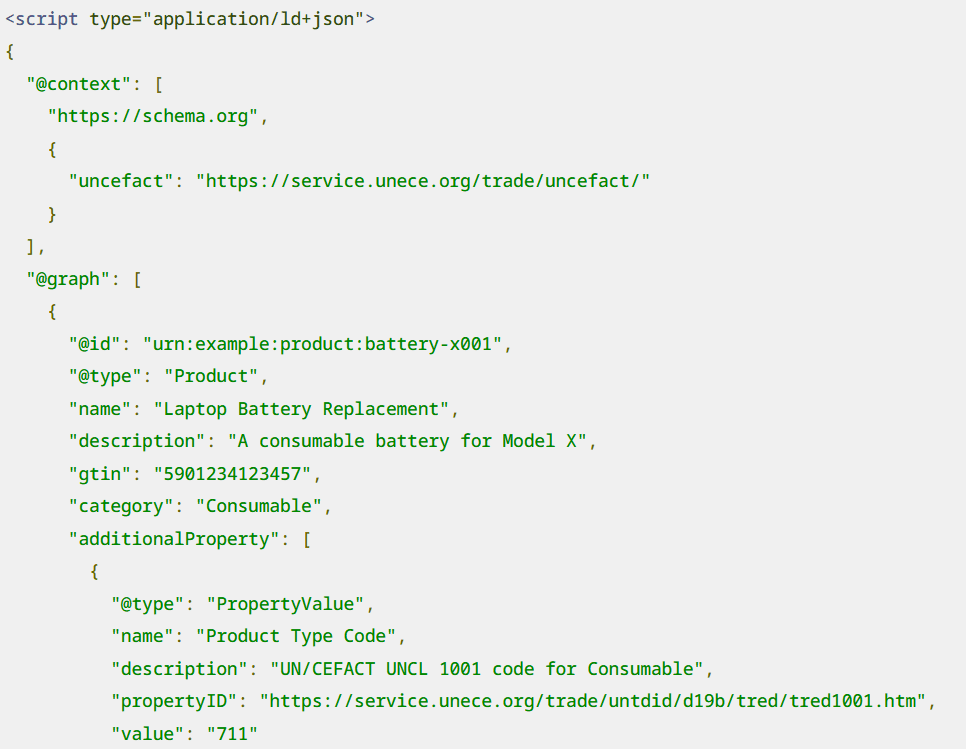
Note: This example is simplified for illustration. Your implementation should reflect your actual product details and be validated before going live.
Product schema
Product schema is used to describe a specific product and its commercial details, such as pricing, offers, and availability.
For SaaS companies, this can be useful when a page is focused on plans, tiers, or purchase options, rather than the product itself.
Where should you use it?
Product schema is best used on:
- pricing pages
- plan comparison pages
- landing pages focused on subscriptions or offers
In most cases, your core product pages should use SoftwareApplication schema, since that more accurately represents a SaaS product.
When does it make sense for SaaS?
Product schema becomes relevant when your page is structured around buying decisions, not just product understanding.
For example:
- comparing pricing tiers
- highlighting discounts or offers
- showing plan-specific details
In these cases, Product schema can help search engines better interpret the commercial aspects of your offering.
Important distinction
SaaS companies often make the mistake of using Product schema everywhere.
But:
- SoftwareApplication = what the product is
- Product = how it’s sold
Using the wrong type can confuse search engines rather than help them.
Article schema
Article schema helps search engines understand that a page is editorial content, like a blog post or guide.
For SaaS companies investing in content marketing, this is the schema that supports your blog and educational resources. Without Article schema, search engines rely on page structure to interpret your content. With it, you clearly define authorship, content type, and publication details, helping search engines better understand, categorize, and assess the relevance of your content.
It can include details like:
- headline
- author
- publication date
- last updated date
Where should you use it?
Article schema should be used on:
- blog posts
- guides and long-form content
- resource or learning center articles
It should be applied consistently across your content, but not on product, pricing, or landing pages.
Example
Here’s how a blog post might be structured using Article schema:
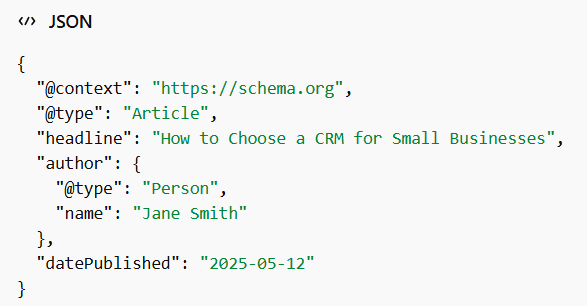
Note: This example is simplified for illustration. Your implementation should reflect your actual content structure and be validated before going live.
How to confirm your schema markup
Adding schema markup is only part of the process, you also need to make sure it’s implemented correctly. Here’s two easy tools you can use to check:
How to measure your schema efforts
Once schema is live, you can track its performance using tools like Google Search Console. Pay attention to how metrics such as impressions, click-through rate (CTR) change vs historical data, and any improvements in how your pages appear in search results. It’s also useful to monitor whether your pages become eligible for rich results over time.
While schema doesn’t usually produce instant or dramatic gains, over time, it can improve how your pages are understood, displayed, and interacted with in search.
Conclusion: Schema markup for SaaS is about clarity, not shortcuts
Schema markup isn’t a shortcut to higher rankings, and it’s not meant to be.
Its real value comes from making your website easier for search engines to understand, and therefore improving how your pages appear and perform in search over time. Most SaaS companies already have the right pieces in place: product pages, pricing, documentation, and content, they just need to add the structure that connects those pieces into a clear, machine-readable picture.
If you want to make your site easier to understand, rank, and convert, get in touch with Singularity Digital. We work with SaaS companies to build SEO and content systems that connect your product, pages, and strategy in a way that actually drives growth, without relying on guesswork or one-off tactics.