
Your product solves the same underlying problem for a lot of different people, but each of them runs into it differently, depending on their role and jobs to be done. They look for a solution in their own words, shaped by their own version of the problem, and when they land on your website, they want to see you speak to that exact version and show how the solution fits into their day-to-day.
When your page doesn’t do that but a competitor’s does, that’s who gets the buyer. That’s an entirely avoidable loss, because you control what they see the moment they land, through your messaging and how you address them.
This exercise lets you catch the problem early. You see what your buyers expect from you, and what makes them stay or leave, before it plays out on your real traffic.
TL;DR:
- Run each of your buyer personas through two AI tools (Claude + ChatGPT) using a tested prompt, so you get two independent reads on how that persona would react to your homepage.
- Mark each reaction Confirmed (both tools agree) or Unresolved (they contradict), then compare Confirmed lists across all your personas to see if a gap is universal, shared by some, or specific to one persona.
- Fix universal and shared gaps directly in your homepage’s hero copy. Persona-specific gaps get a quick homepage addition if there’s no conflict, or a userbase-based priority call (and eventually a dedicated page) if addressing one persona’s need works against another’s.
- Unresolved contradictions can’t be settled by more AI, turn those into specific questions and take them to real buyer interviews instead.
- Useful to catch gaps pre-launch, diagnose conversion drop-off post-launch, and for AI search visibility (helps AI tools recommend you accurately).
- Limitation: it’s only as good as the persona data behind it, and it’s still a simulation, a head start before real buyer conversations, not a replacement for them.
Why You Should Run AI Persona Simulations
Say your SaaS product is called “Up2Speed”, a project management software for remote teams. You have built three personas for it, with their specific roles, day-to-day responsibilities, and jobs to be done.
- Dana, Head of Operations
Her job → keeping a remote team aligned across time zones - Owen, Engineering Manager
His job → keeping his engineers focused on shipping - Priya, Product Lead
Her job → catching cross-team dependencies before that delays a launch
Your product is built to help all 3 of them, but for any of them to really feel like it, your messaging needs to speak in the language native to their role and address the concerns that are actually theirs. This persona simulation exercise helps you get a close read on whether it does, and that helps with three things:
Catching Messaging Gaps Before You Go Live
Before your key landing pages (aka money pages) go live, running buyer persona simulations on them gets you a close read on how real buyers that persona represents would respond. For each persona, you’d get a section-wise breakdown of where your messaging misses their requirements and concerns completely, or only partly addresses them and leaves room for doubts.
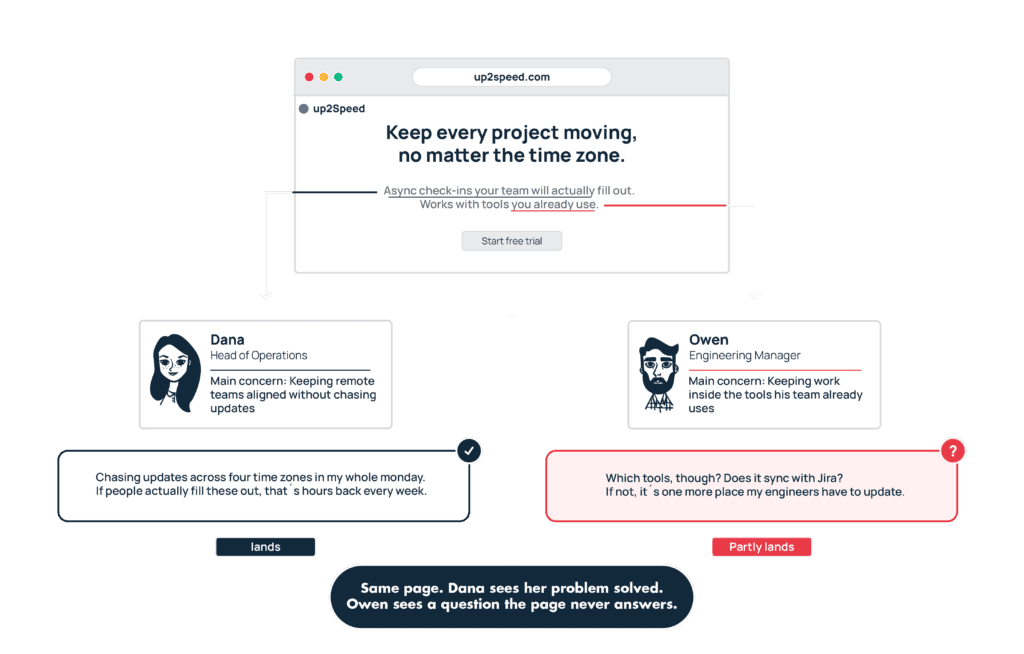
The output from this will save you from investing ad money, time, and effort driving traffic to a page that never actually spoke to your buyer’s problem or convinced them your product’s worth giving a shot.
Diagnosing Why Traffic Is Not Converting
When you’ve already launched, and traffic is coming in, organic or paid, but people are landing on the page and dropping off without converting, AI buyer persona simulation is one of the simplest checks you can run to see if that’s due to a messaging gap.
For each persona, it tells you what’s confusing them (comprehension problem), what’s making them hesitate (trust problem), and what isn’t convincing them enough (motivation problem) to take the next step.
Because that read comes from real customers’ insight your persona was built on, the fix you make actually helps you align yourself better with the buyers that persona represents. So you’re not guessing, making one fix at a time and waiting for it to move something, but making meaningful changes that could turn more of that traffic into leads.
Getting Recommended by AI Systems
Buyers are talking to AI search tools, asking for exactly what they need in one prompt and letting the AI shortlist their options, instead of digging through ten company sites themselves.
That creates a new challenge for you. You’re no longer fighting for the highest spot on search results anymore — you’re fighting for mentions and recommendations inside these AI conversations. And making it happen takes precise differentiation, a clearly delivered USP and value prop, and very sharp tailoring for the people you serve, because these AI systems can only be as clear about who you are, what you solve, and who you serve as you make it in your messaging.
This persona simulation exercise helps the most here.
When you feed your persona data into an AI and have it read your key landing pages from those buyers’ point of view, it highlights where you’re not clearly addressing their pain points. That’s the same alignment AI systems rely on to recognize you as the right match for the right customer.
So fixing those gaps, helps you speak more clearly to your actual buyers and lines you up with the evaluation logic AI systems use to decide who to recommend.
The Process of Running Buyer Persona Simulations with AI
You now know why this is worth doing – so, here’s how to actually run it. The process we share below contains prompts we’ve tested ourselves and with clients, and they consistently surface a precise read on where your messaging is falling short.
Step 1: Run Your Persona Simulation
This step is where you generate two independent AI reads on your messaging (for the selected page) per persona, one from each AI tool. This is the data you will use throughout this process.
How useful those reads are comes down to your inputs, so the more your personas reflect real customer data, real reviews, and real language, the more precise what comes back will be.
Want to add more real-life context to your personas? Learn how to do better persona interviews with our guide.
What to do:
1. Start by pulling a persona you’ve already built from your persona library. If you haven’t built yours yet, [our complete guide on building buyer personas] walks you through how to do that.
2. Open two new different elements and start new threads each. Use one thread per persona because running two personas (say, Dana, a dev lead, and Owen, a marketing ops lead) in the same thread risks one persona’s tone or objections bleeding into how the model evaluates the next one.
3. Paste the persona’s profile in exactly
4. Use the prompt below, once per persona, in each tool.
Prompt Template to use:
You are [PERSONA NAME]. [Paste PERSONA NAME's full profile from your persona library]

You just landed on this homepage: [paste homepage copy].

Walk through it the way you actually would, section by section, not a summary at the end. Tell me where you pause and what question forms in your head at each part.

Then answer directly:
1. In your own words, explain what this product does and who it's for, the way you'd explain it to a colleague. What did you actually take away, and what's unclear or missing?
2. Does this speak to what you're actually struggling with, or does it feel generic? Is there anything about your specific situation this page doesn't address at all?
3. What on this page makes you doubt any of the claims? What's missing that would make you trust this more?
4. Give me 2-3 specific objections that would stop you from taking the next step, not generic ones. For each: what on the page triggered it, and what would you need to see to get past it?
5. Look at every CTA on this page. Does each one feel like the natural next step given what you just read? At the main CTA, would you actually click it, or would you stop and look for something specific first? If you'd stop, say exactly what you'd need to see.
6. You've evaluated tools like [COMPETITOR A] and [COMPETITOR B] before. Compared to what you know of them, does this page explain why it's actually different, or does it sound like the same pitch you've already heard? Be specific about what's missing that would set it apart.

Be specific throughout. No generic statements like "this seems interesting" without saying exactly what's driving that reaction.
Step 2: Compare Outputs from Both LLMs Against Each Other
From the last step, you should have your persona’s Claude output and her ChatGPT output. Now you’re looking for where the reads from these two LLMs agree, and where they don’t.
1. Take both outputs, and put them side by side, question by question. You can easily do it in a doc, notes app, or a spreadsheet.
2. Mark each of the six answers Confirmed, when both tools independently landed on it, or Unresolved, when they contradict, or one raises something the other doesn’t mention at all.
We recommend doing this manually on purpose, because if you ask an AI to compare its own output against another model’s, it risks favoring whichever response reads closer to its own reasoning style.
Plus, doing it yourself also lets you double-check the AI’s read against your persona. Because only you know the context behind every detail on that sheet, you’ll catch specifics an AI can gloss over.
Worked example for Dana side-by-side:
- Confirmed [highlighted in green]
- Unresolved [highlighted in yellow]
| Question | Claude | ChatGPT |
| 1. What does it do / who’s it for | “A tool for tracking sprint velocity across teams” | “Sprint tracking software, seems built for eng managers” |
| 2. Speaks to your struggle? | “Doesn’t mention distributed teams or timezone gaps at all” | “Feels generic, no mention of distributed team issues” |
| 3. Doubt triggers | “The ’10x faster’ claim has no proof behind it” | “No case studies, hard to trust the speed claim” |
| 4. Objections | “No mention of integration with our existing sprint tool” | “Worried this replaces my whole workflow instead of fitting into it” |
| 5. CTA reaction | “Would stop and look for a demo option before ‘Start Free Trial'” | “Would click Start Free Trial, low risk to try” |
| 6. vs. competitors | “Doesn’t say how it’s different from Linear” | “Doesn’t explain what makes it different from what I’ve used” |
Repeat this process for all your personas until you have a confirmed list for each one of them to use in the next step.
Step 3: Compare Confirmed Reactions Across All Your Personas to find gaps
Now that you’ve got a Confirmed list for each persona, this step is where you compare them side by side. It tells you whether a messaging problem is universal, shared by a handful of personas, or isolated to just one.
Feed all of those Confirmed lists into Claude together using the prompt template below.
Prompt template:
Here are the confirmed reactions from [X] personas to the same homepage: [paste each persona's Confirmed list, labeled by persona]

Compare them and give me three separate bulleted lists for each:
1. Which confirmed concerns show up in every single persona's list, no exceptions?
2. Which confirmed concerns show up in some but not all personas?
3. Which confirmed reactions are specific to only one persona?
Claude will come back with your Confirmed concerns sorted into three lists, one for each question.
Step 4: Fix Each Gap Based on Its Classification
Each list is its own category of concern:
- Concerns shared by all personas
- Concerns shared by more than one, but not all personas
- Specific concerns shared by one persona each
Each category calls for a different way of addressing it on your website.
Here’s how to take the concerns in each one and turn them into messaging changes for the personas they affect, starting with the homepage since that page carries the bulk of your traffic:
1: When confirmed by all personas
A concern every persona raised deserves space above the fold, since that’s the part of the page every visitor sees first.
If your current Hero section is too generic to say what your product does and who it’s for, then it needs rewriting. Let’s take Up2Speed, for example: if its homepage Hero read something like “The smarter way to get work done”, it definitely should be rewritten to at least say, “Keep your remote team aligned and shipping on time.”
And if the Hero already says that clearly and the concern still came up, you’ll have to think about how to address it in the next content block where there’s more room for words than a headline allows.
2: When confirmed by more than one persona, but not all
A concern shared by, say, two out of your three personas still earns a place on the homepage, since it represents a significant share of your buyers. It could get a short section lower on the page, built around the day-to-day problem it solves, or be added to an existing section that already covers how your product helps.
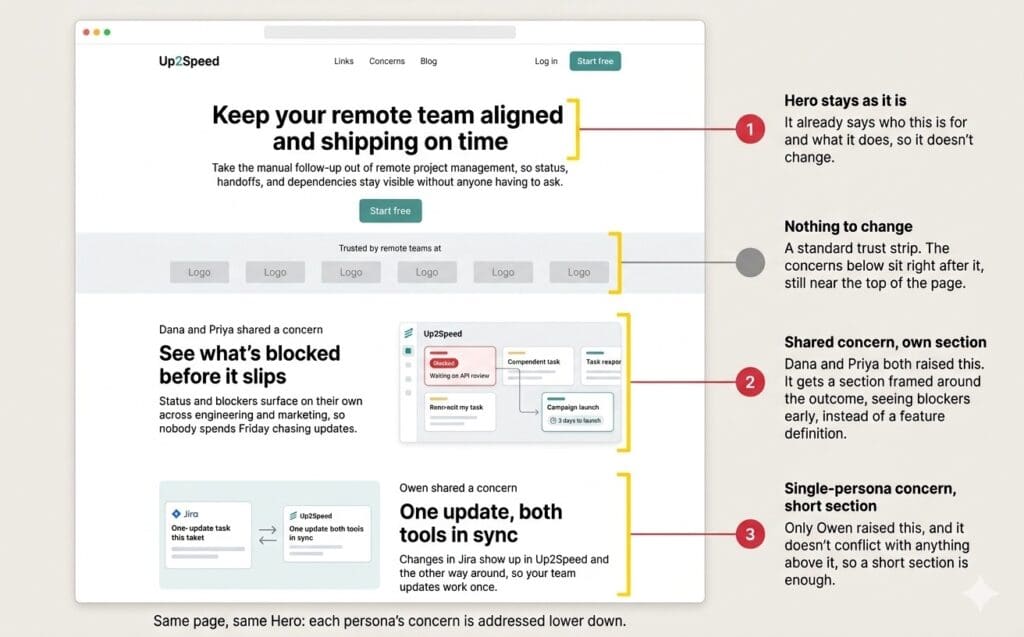
For example, in this mockup, the concern shared by Dana and Priya gets its own section below the Hero, framed around the outcome of seeing blockers early. Owen’s concern, raised by one persona only, gets a shorter section of its own, and the Hero stays unchanged.
3. When confirmed by only one persona each
For every isolated concern a persona has, there’ll be two different outcomes depending on whether that concern has a conflict with another persona’s concern or not.
- When there’s no conflict: This is when a concern is a missing fact or proof point, and nothing about fixing it for this persona takes anything away from another persona’s experience of the same page.
For example, if Dana’s Confirmed list shows she wants proof behind your claims, and your current copy reads:
“See exactly who’s blocked, without digging through screens or drowning in features you don’t need.”
You keep that line and add the proof she’s asking for:
“See exactly who’s blocked, without digging through screens or drowning in features you don’t need. Engineering teams using Up2Speed catch blockers 4x faster than with standups alone – Read the full case study →”.
Owen and Priya can have their own specific concerns handled the same way: a detail here, a proof point there, each landing exactly where it’s relevant to that persona. Do it carefully, and you’ll never clutter the page but only speak with more precision to whoever’s reading it.
- When there’s a conflict: This is when a persona’s isolated concern is central enough to their buying decision that the page needs to lead with it, and that emphasis works against what another persona needs the page to lead with instead. In this situation, your user base decides who gets that primary emphasis, since the hero can only make one argument first.
For example, say Dana’s concern calls for leading with integration into her existing engineering workflow, while Owen’s calls for leading with cross-channel reporting. Now, if Owen represents 60% of your user base, it could make sense to build his concern into the top of the page, above the fold, where visitors look first.
That doesn’t mean Dana will be ignored entirely; her concerns would still be addressed on the homepage, just not get the same real estate as Owen. And down the line, she would get her own dedicated landing page where her specific concern gets the elaborate treatment it deserves.
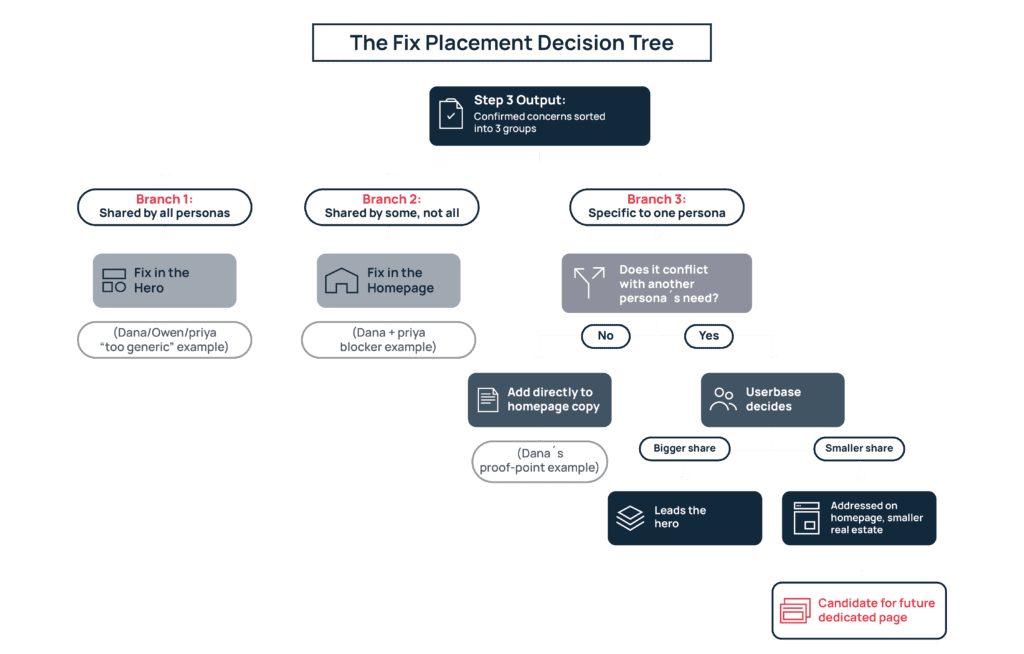
In a nutshell, because your homepage is often the first place buyers like Dana, Owen, and Priya land, it makes sense to touch on each of their concerns there, even if they don’t all get the same amount of attention. And what the homepage can’t give each of them, a dedicated page can. There you can show in detail how your product helps them, and bring them in through keyword targeting and paid ads.
Step 5: Turn What’s Unresolved Into Buyer Interview Questions
In Step 2, we flagged the concerns where the two LLMs playing the same persona disagreed (the yellow ones). One model read the reaction one way, and the other read it differently, and neither reading cancels the other out. Now we need to find out whether each one is a real objection your messaging hasn’t addressed, or one model’s own bias standing in for the persona, so these can be resolved.
And settling that takes research beyond running buyer persona simulations with AI. That’s why we recommend treating these concerns as starting points for your next round of buyer interviews.
Take each unresolved concern, turn it into a question, and bring it into a conversation with a real buyer who matches that persona. Our guide on conducting a buyer persona interview explains how to structure those conversations so they produce the most useful, real human input for your messaging.
Final Thoughts on Simulating Buyer Personas With AI
Using LLMs to simulate buyer personas can make testing your messaging easier, but only if the persona behind it is solid. And vague traits like “skeptical” or “busy” give the AI nothing real to react to, no matter what prompt you use. A persona needs to be grounded in actual quotes, objections, and JTBD pulled from reviews, calls, and support tickets.
The results are also shaped by which AI tool you run it through, since each one carries its own default habits from its training data. We’ve tried to control for it by running two tools side by side – trust their input where they agree, and treat disagreement as your signal to go verify with a real buyer. Even then, this is still a simulation and only gets you moving before those conversations happen; not replace them.
This is the process we use with SaaS teams to test and refine their messaging. To discuss how your product could benefit from it, book a free strategy call with us, and we’ll be happy to talk it through.